

Limitations
- Our Job Queues are designed to distribute tasks to an HTTP server, and queue operations are managed with http response symantics, e.g. return 200 for a successful job, 500 for a failed job.
- Jobs will be retried up to 3 times (meaning 4 total attempts) before being marked as failed. This limitation in combination with interruptible instances means our job queues are not well suited for extremely long running tasks.
- A failed attempt is retried immediately, with no backoff, and the retry can land on the same instance. With one instance running, all four attempts of a failing job can be used up within seconds, so a transient fault that lasts a few seconds fails the job.
- Instance interruptions count as job failures, and those jobs will be retried according to the above policy. The
interruption is noticed only when the job’s lease runs out, which takes several minutes. Until then the job reads
running. - Jobs are dispatched in the order they were created. With more than one instance, jobs run at the same time and can finish out of order.
- Jobs are not guaranteed to be processed by the same node, but they will be processed by a healthy node.
- The response body from your http server cannot exceed 10MB. A larger reply counts as a failed attempt, so the job runs four times in full and then fails. The job does not record why, and the retries cannot succeed.
- A container group’s queue connection can be set only when the group is created. It cannot be added, changed or removed afterwards, so to change it you need a new container group.
- Deleting a queue deletes its pending jobs and permanently removes the connection from every container group attached to it. The group keeps running with no queue, and creating a new queue with the same name does not reconnect it. The API neither refuses the delete nor reports this.
- Stopping or deleting a container group does not stop its worker immediately. The old container can keep taking new
jobs for a short time afterwards. A job it takes then stays
runninguntil the queue notices the worker is gone and retries the job. That takes several minutes, and longer if no other worker is connected to the queue. Stop submitting jobs, or let the queue drain, before you stop or delete a group. - Cancelling a running job does not stop it. See Using Queues.
- Job Queues can only be managed and accessed via the Job Queue API
Terminology
- Job: An individual request to be processed. An example of a job might be a token string sent to an image generation service.
- Job Queue Worker: A small go binary program (x86_64 Linux only) you install in your container which receives jobs from the Queue, forwards them to your application running in the container, receives results and returns them to the Queue.
- Job Queue: Salad-managed queue service that receives requests from your systems, queues them, and distributes them FIFO to nodes. Job queues distribute received jobs to one or more container groups. A container group is connected to a Job Queue when the container group is first created, and that connection cannot be added, changed or removed afterwards.
Architecture
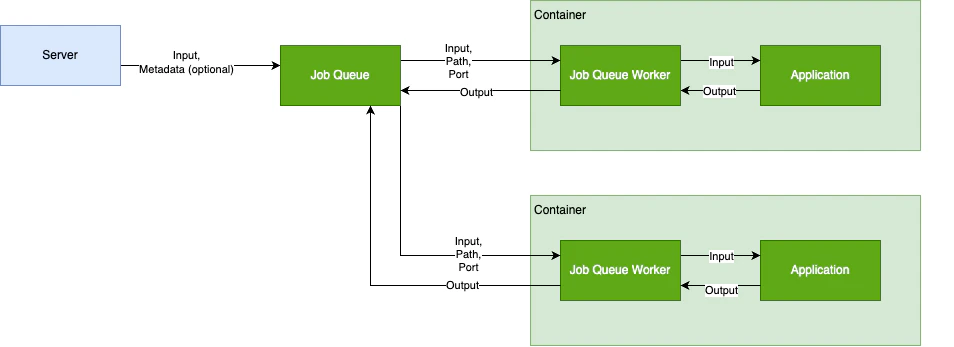
Getting Started with Job Queues
- Create a Job Queue - How-to Guide | API Reference
- Configure the Job Queue Worker - How-to Guide
- Push your container to a registry - Container Registry Guides
- Configure a Container Group with a Job Queue - How-to Guide | API Reference
- Add Jobs to the Queue - API Reference
- Retrieve Results - API Reference | List Jobs