Last Updated: May 20, 2025

Introduction

LLM fine-tuning tasks often require long runtimes—ranging from several hours to multiple days—depending on factors such as GPU type, dataset size, and model complexity, etc. SaladCloud operates on a distributed network of interruptible nodes, meaning any node running your tasks may shut down unexpectedly. Despite this, most Salad nodes remain stable for over 10 hours at a time. To fine-tune LLMs effectively on SaladCloud, it’s important to build resilience into your training workflow. We recommend implementing the following strategies:
  • Start training from a base model.
  • Periodically save training progress by uploading checkpoints to cloud storage.
  • If interrupted, automatically resume training from the latest checkpoint by downloading it when your instance restarts on a new node.
Hugging Face’s Trainer offers robust support for training on interruptible infrastructure such as SaladCloud. It enables regular checkpointing and supports custom callbacks, allowing you to trigger background uploads of checkpoints to cloud storage without blocking the training process. When resuming training, the Trainer can seamlessly restore the full training state—including the model, optimizer, scheduler, gradient history, and even the position within the shuffled dataset at the current epoch—ensuring continuity and minimizing progress loss after interruptions. By using the Trainer along with a few simple functions we provide to handle data synchronization between Salad nodes and cloud storage, you can make your existing training script fully compatible with SaladCloud by adding fewer than 10 lines of code.

Single-Replica Container Group vs. Job Queue System

If you’re running long-duration LLM fine-tuning tasks—spanning tens of hours or even multiple days—you can simplify implementation by creating a dedicated single-replica container group (SRCG) for each task on SaladCloud. Pass task-specific configurations to the SRCG via environment variables, including the number of epochs, batch size, checkpoint and logging intervals, and the paths to datasets, checkpoints, and final model stored in cloud storage. Although the task is temporarily paused during node reallocation after interruptions, our testing shows that total downtime accounts for less than 4% of the overall runtime in multi-day runs. On the other hand, if you’re running many training tasks—such as hyperparameter sweeps—a job queue becomes essential. Systems like GCP Pub/Sub, AWS SQS, Salad Kelpie, or custom solutions using Redis or Kafka can distribute jobs (task-specific configurations) across a pool of Salad nodes. If a node fails during job execution, the job queue ensures the job is retried immediately on another available node . You can further implement autoscaling by monitoring the number of available jobs in the queue and dynamically adjusting the number of Salad nodes. This approach ensures that your target number of tasks is completed within a defined timeframe, while also allowing cost control during periods of lower demand. This guide focuses on the SRCG-based approach. A separate guide will cover job queue integration.

Handling Interruptions During Training

Let’s take a look at ft-normal.py to see how the Trainer handles interruptions during training. You can use the provided Dockerfile to set up a local virtual environment and run the code. This example code performs supervised fine-tuning of a 4-bit quantized LLaMA 3.1 8B model on a price prediction task using LoRA adapters. Instead of updating all 8 billion base model parameters (approximately 16 GB), it fine-tunes only a small set of adapter weights—about 27.3 million parameters (109.1 MB)—significantly reducing memory and compute requirements. Despite training far fewer parameters, LoRA often matches the performance of full fine-tuning on many tasks. It works by injecting learnable low-rank updates into specific attention layers, effectively capturing task-specific patterns while preserving the base model’s general knowledge. This makes LoRA especially well-suited for efficiently adapting large models to domain-specific tasks. Here are some samples from the training dataset: The training samples consists of a prompt containing product and pricing context, separated by the phrase “Price is $”. The goal is to fine-tune the model (LoRA adapters) to accurately generate the correct price based on the preceding contextual information. Here are the key training parameters:
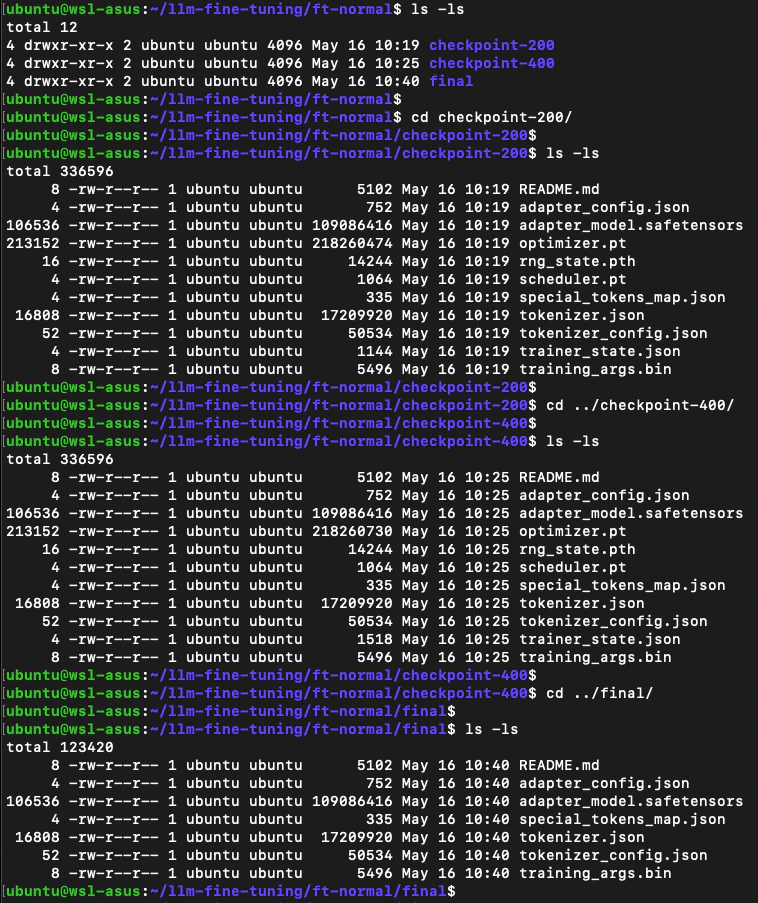
A custom callback is provided after a checkpoint is saved to print the training state. The code takes approximately 690 seconds to run on an RTX 3090. Please review the output to verify the results. Scaling this to the full dataset of 400,000 samples (144M tokens, 200× larger) would take an estimated 38 hours (690 × 200 ÷ 3600). After training, 3 directories are created: two checkpoints (at steps 200 and 400) and one final output. Each checkpoint includes the LoRA adapter weights, optimizer and scheduler states, and training metadata—totaling approximately 344.6 MB. The final directory contains only the trained LoRA weights and configuration, reducing its size to around 126.4 MB. These sizes may vary depending on the LoRA configuration, such as the adapter rank (r), the number of target modules, and the precision used to store the weights. The global seed (unique for each task) is set to ensure that the dataset shuffle order remains deterministic across runs and epochs. For example, if training is interrupted after checkpoint-200 is saved, it can be resumed seamlessly from that point. The Trainer will restore the model state, optimizer, gradients, and the exact position within the shuffled dataset, allowing training to continue precisely where it left off.

Enabling LLM Fine-tuning on SaladCloud

Required Code Changes

With the provided helper.py—a lightweight 400-line module that handles background data synchronization-you only need 4 small code changes, adding just 6 lines to make ft-normal.py fully compatible with SaladCloud. See ft-interruptible.py for a complete reference.
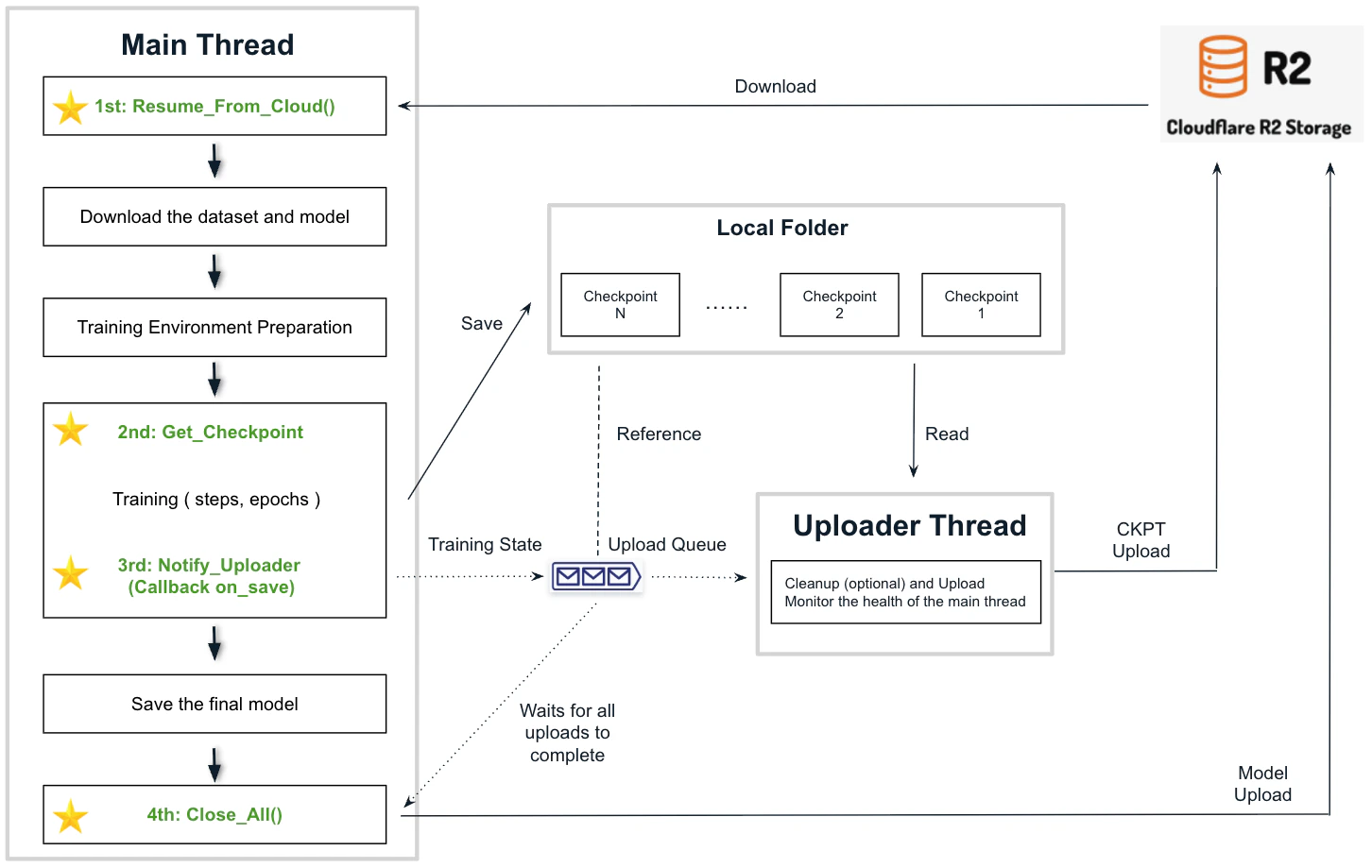
  • 1st Change: Import helper and call Resume_From_Cloud()
Initializes the environment by reading task-specific configurations, performing system checks, and downloading the latest checkpoint if resuming training. It then sets up the local upload queue and starts the uploader thread.
  • 2nd Change: Call the Notify_Uploader() and Get_Checkpoint()
Signals the start of training (optionally measuring the time to download the dataset and model) and retrieves the latest checkpoint directory name, if available. Notifies the uploader thread to save the latest checkpoint after it is created, allowing training to continue without interruption. Waits for all uploads to complete, uploads the final model and shuts down the SRCG.

Dockerfile Configuration

The provided Dockerfile creates a containerized environment by using the PyTorch official image, then installing essential utilities (VS Code Server CLI, Rclone) and required dependencies for training. It copies the required Python code into the image and sets the default command.
Dockerfile.ft
Installing the VS Code Server CLI is optional, allowing you to easily access the running instances using VS Code Desktop or a browser for testing and troubleshooting purposes. Rclone is the tool used for data synchronization between Salad nodes and cloud storage. Some cloud storage providers charge for egress traffic, while ingress traffic is typically free. We recommend a vendor (such as Cloudflare R2) that does not charge egress fees. Let’s build the image and push it to Docker Hub:

Environment Variables

Ensure all required environment variables are set before running a LLM fine-tuning task. You can organize them in a .env file located in the project folder for easy configuration and reuse.
.env

Local Run

If you have an RTX 3090 (24GB VRAM) or a higher GPU, you can perform a local test of the fine-tuning task. To avoid downloading the model and dataset every time the container runs, mount the host cache directory to the container. You can use docker compose to start the container defined in docker-compose.yaml. The command automatically loads environment variables from the .env file in the same directory.
Alternatively, you can run the container manually using docker run with the required environment variables and volume mounts.

Test and Deployment on SaladCloud

See srcg_deploy.py for a deployment example of an SRCG with the SaladCloud Python SDK to run the fine-tuning task. Use progress_check.py to monitor the task state (steps, node usage, performance and network throughput) by reading the state file from cloud storage and progress_reset.py to reset the task by removing all the state file, checkpoints and the final model stored in the cloud.

Best Practices

Before launching a batch of LLM fine-tuning tasks on SaladCloud, it’s important to run preliminary tests on the targeted nodes to determine key configuration parameters. You can deploy an SRCG using a placeholder command via the SaladCloud Python SDK or add the command via the SaladCloud Portal after the SRCG is created. Once deployed, connect to the instance using either VS Code Desktop (or a browser), or the integrated terminal in the Portal. Run ft-normal.py interactively for specific steps to observe actual VRAM usage at different batch sizes, estimate task runtime, and review the checkpoint sizes under various hyperparameter settings. As a general guideline, we recommend saving at least one checkpoint per hour. To achieve this, you’ll need to set an appropriate saving_steps value. Most Salad nodes provide upload throughput of at least 20 Mbps, which is sufficient to upload approximately 6–7 GB of data to the cloud within an hour. If your checkpoint size is relatively small, consider lowering the saving_steps value to generate more frequent checkpoints. This helps reduce progress loss in the event of node reallocation. For fine-tuning LLMs with larger checkpoint sizes, select nodes with higher upload speeds. Many Salad nodes offer strong upload performance, often exceeding 100 Mbps. Use the provided code to perform the network speed test and other initial system checks to filter out nodes that don’t meet requirements. Finally, ensure adequate buffer between key parameters—such as batch size, saving_steps (checkpoint frequency), and upload speed—to avoid upload bottlenecks during task execution.

Functional Test Results

Please refer to the full-coverage functional test results for a task executed via an SRCG on SaladCloud using RTX 4090 nodes. Over a period exceeding 24 hours, the SRCG was deliberately stopped, restarted, recreated, and reallocated a total of 8 times to simulate various scenarios and test the robustness of the code. A total of three nodes were utilized to complete the task, while one additional node was immediately rejected after failing the initial system check. During the test—which involved 160,000 training steps (weight updates) over 400,000 samples across 2 epochs, with a batch size of 5, gradient_accumulation_steps set to 1, and saving_steps set to 4,000 (yielding approximately around 8000 steps and 2 checkpoints per hour)—a total of 40 checkpoints (344.6 MB each) were uploaded along with 1 model upload (126.4 MB). Additionally, 6 checkpoints were downloaded to successfully resume training. A separate performance and stability test report will be provided later for standard LLM fine-tuning tasks running on SaladCloud.