

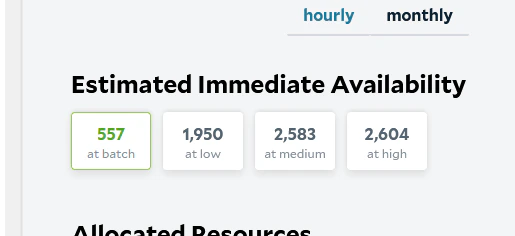
- Availability only includes currently online nodes. Many more nodes are available on our network and can be activated as needed. If you need more capacity than is currently available, reach out to SaladCloud support and we can work to grow the network based on anticipated needs.
- Node allocation depends on multiple factors, not just priority level. Even if few nodes are shown as available at your selected priority level, your workload may be able to be allocated nodes from other workloads. For example, if your workload has higher RAM requirements, nodes from same-priority workloads may be reallocated to meet those needs.
- Nodes where your workload exited will still appear in availability counts. Availability data can include nodes that previously ran your workload and exited with a non-zero exit code and will not be reassigned to it. Check your workload’s system events to confirm whether it has failed on nodes.
- Available nodes may not be immediately reassigned. Some nodes stay with their current workloads for a period before being reallocated. This prevents excessive workload churn and repeated image pulls. How long a node stays depends on the priority level of the workload it is running, and nodes running high-priority workloads are not reallocated to other workloads.
Choosing GPU Classes
Availability depends heavily on which GPU classes you select. When you choose them:- Start with VRAM. Your model and its working memory must fit in the GPU’s memory, with some room to spare, because a small part of each GPU’s VRAM is reserved for the Windows host. The List GPU Classes endpoint and salad.com/pricing show the VRAM of each class.
- Select every class that fits. Each instance can run on any of the classes you select, so more classes means more
nodes to choose from and faster allocation. Classes differ in speed and price, so check which GPU an instance received
(for example, with
nvidia-smi) when comparing performance. - Stay with one vendor. An image built for CUDA runs on NVIDIA GPUs and an image built for ROCm runs on AMD GPUs, so select classes from the vendor your image supports. See AMD GPUs and ROCm.
- Choose a priority. Higher priority levels get nodes first and aren’t interrupted by lower-priority work, but cost more per hour.
- Check availability when you plan. Availability changes throughout the day, so check it before you deploy or change GPU classes, rather than polling it continuously.