> ## Documentation Index
> Fetch the complete documentation index at: https://docs.salad.com/llms.txt
> Use this file to discover all available pages before exploring further.
# Transcription API Quickstart
> Get started with Salad Transcription API here. This step by step guide will walk you through setting up your SaladCloud account and running your first Transcription API job.
*Last Updated: November 26, 2024*
## Accounts & Credentials
### Create SaladCloud Account
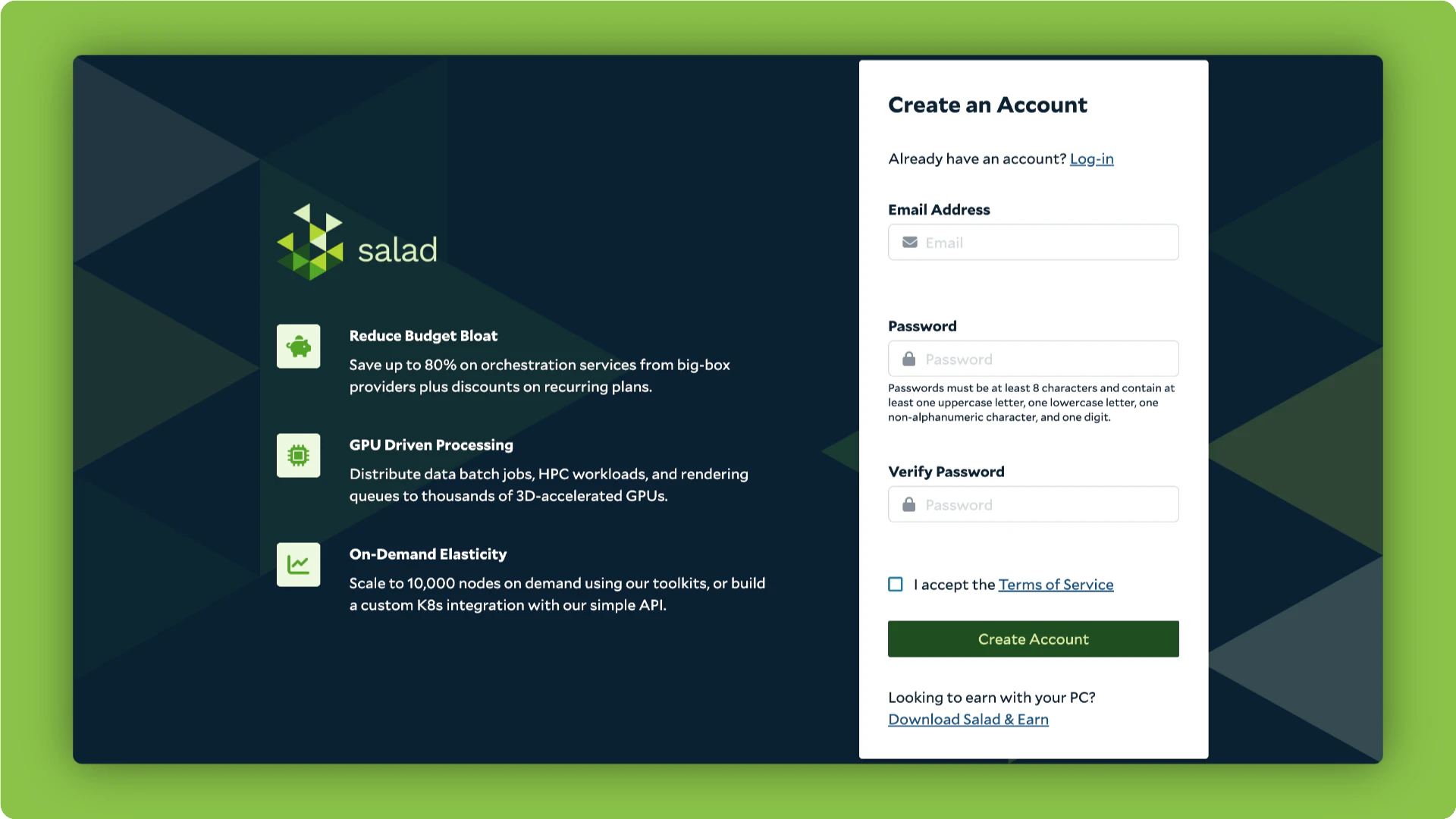
*To start,* visit [https://portal.salad.com/](https://portal.salad.com/) to log in or create a free account. **New users
receive 5 free audio hours to transcribe at no cost!**
[Watch our quick tutorial](https://www.loom.com/share/6d68372eb4de4600927bc20ad31253f3) on how to use your free credits
effectively.
 ### Create SaladCloud Organization
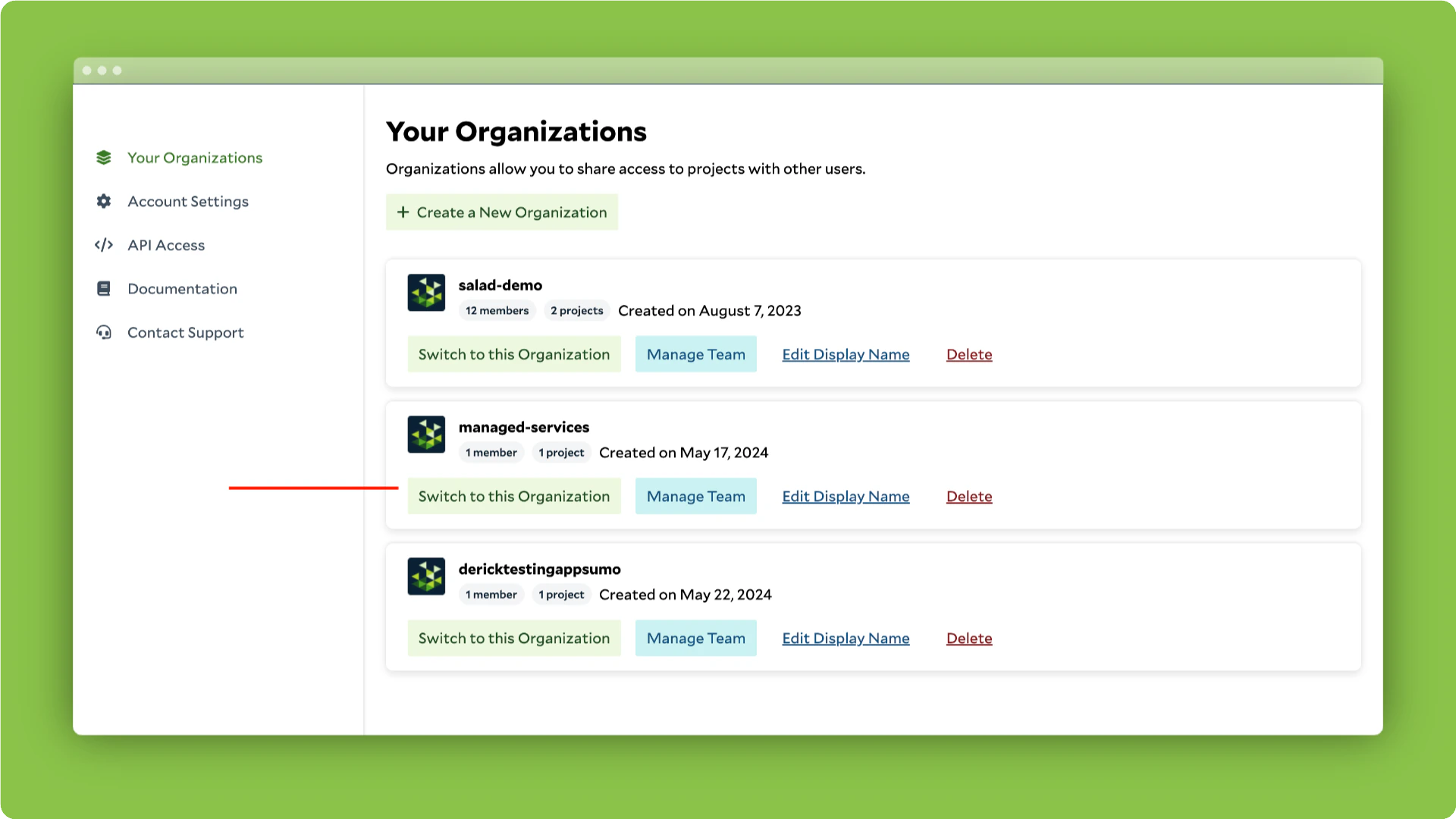
*Next,* create a new organization or select an existing one you'd like to use for transcription. Click on *Switch to
this Organization* for the org you want to use.
### Create SaladCloud Organization
*Next,* create a new organization or select an existing one you'd like to use for transcription. Click on *Switch to
this Organization* for the org you want to use.
 ### Get Transcription API URL
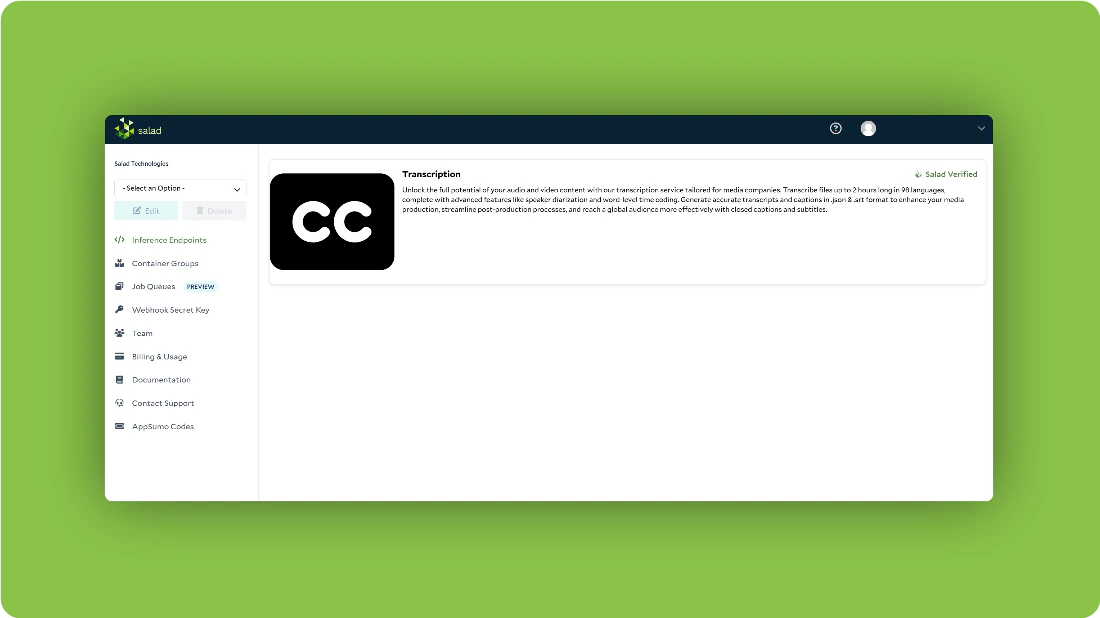
*Then,* click on *Inference Endpoints* in the left-hand nav and open up the Transcription API or Transcription Lite.
### Get Transcription API URL
*Then,* click on *Inference Endpoints* in the left-hand nav and open up the Transcription API or Transcription Lite.
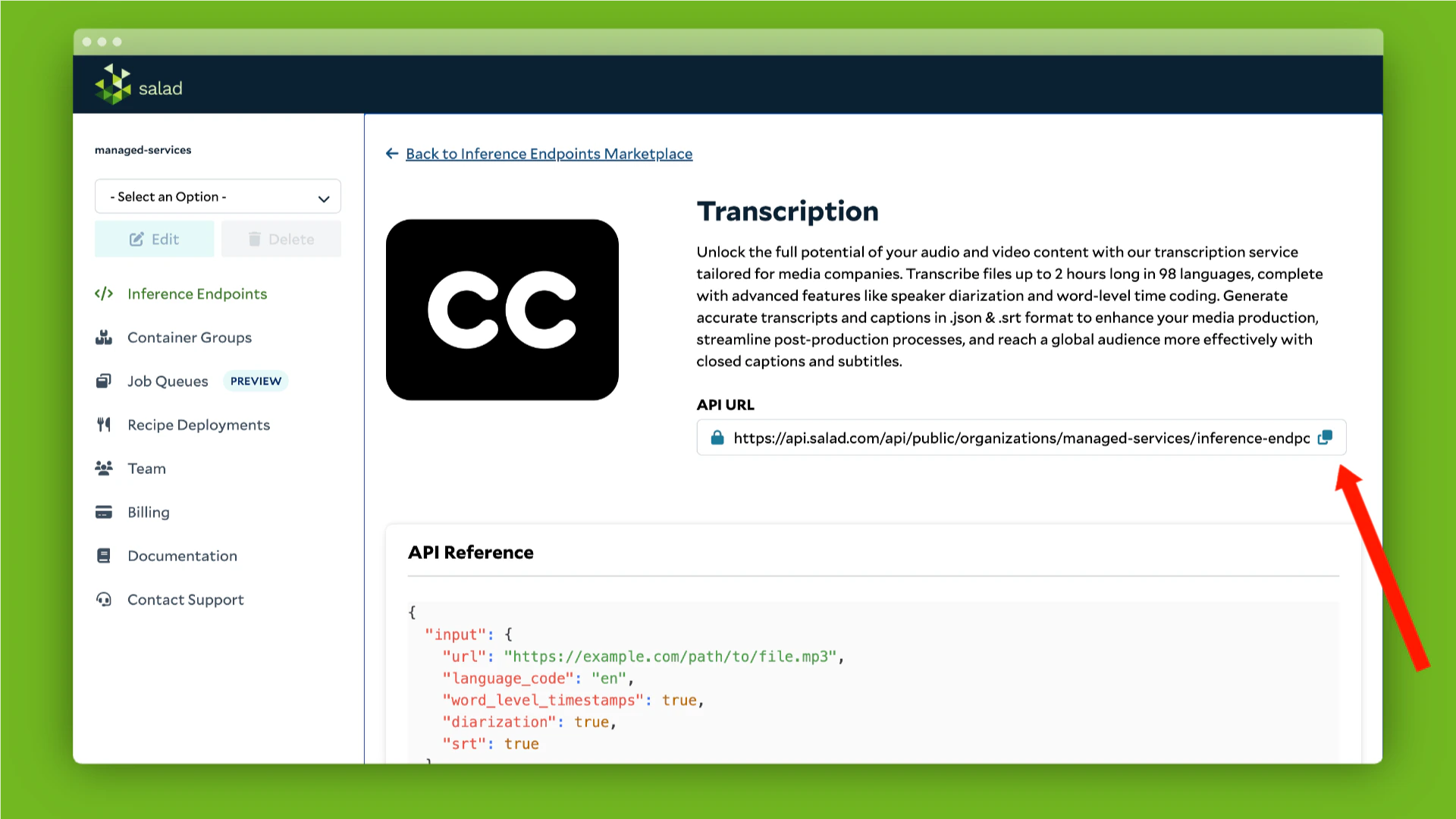
 Copy your Transcription API URL
 ### Authentication
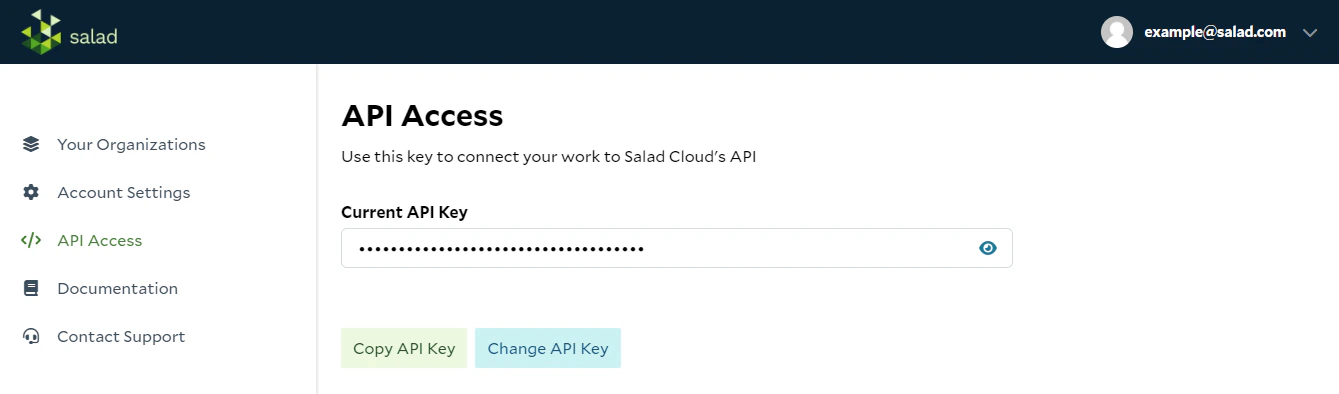
Copy your SaladCloud API key from your account [here.](https://portal.salad.com/api-key)
### Authentication
Copy your SaladCloud API key from your account [here.](https://portal.salad.com/api-key)
 ## How to Use Transcription APIs
We provide several examples and resources to help you use the API effectively:
* For a **cURL example** and parameter descriptions, refer to
[Example cURL Post](#example-curl-post-with-salad-transcription-api) on this page.
* For **easy testing** with our API reference, visit the [API Reference](#api-reference).
* For **process automation**, see [Transcription Automation](#transcription-automation).
* For **native Python integration**, check out our
[official Python SDK](/transcription/how-to-guides/sdk/python-sdk-quick-start). The SDK simplifies file uploads to S4,
authentication, job polling, and webhook handling, letting you transcribe and manage jobs with just a few lines of
code.
### Example cURL Post with Salad Transcription API
```bash theme={null}
curl -X POST https://api.salad.com/api/public/organizations/{my-organization}/inference-endpoints/transcribe/jobs \
-H "Salad-Api-Key: {your-api-key}" \
-H "Content-Type: application/json" \
-d '{
"input": {
"url": "https://example.com/path/to/file.mp3",
"language_code": "en",
"return_as_file": false,
"sentence_level_timestamps": "true"
"word_level_timestamps": false,
"diarization": false,
"sentence_diarization": true,
"multichannel": false,
"srt": false,
"translate": "",
"summarize": 50,
"llm_translation": "french, german, portuguese",
"srt_translation": "spanish, Hindi",
"custom_prompt": "",
"custom_vocabulary": ""
},
"webhook": {your webhook url},
"metadata": {
"my-job-id": 1234
}
}'
```
### Example cURL Post with Transcription Lite
```bash theme={null}
curl -X POST https://api.salad.com/api/public/organizations/{my-organization}/inference-endpoints/transcription-lite/jobs \
-H "Salad-Api-Key: {your-api-key}" \
-H "Content-Type: application/json" \
-d '{
"input": {
"url": "https://example.com/path/to/file.mp3",
"language_code": "en",
"return_as_file": false,
"sentence_level_timestamps": "true"
"word_level_timestamps": false,
"diarization": false,
"sentence_diarization": true,
"srt": false,
"translate": "to_eng"
},
"webhook": {your webhook url},
"metadata": {
"my-job-id": 1234
}
}'
```
* Fill in the file link instead of "[https://example.com/path/to/file.mp3](https://example.com/path/to/file.mp3)"
* Optional : replace `{your webhook url}` with webhook url if needed. If not, remove the line.
Webhook is a method that enables application to transmit data to another application immediately upon the occurrence of
an event. Instead of having your application periodically poll for updates, a webhook delivers data to a specified URL
as soon as the event occurs, facilitating instant communication and minimizing latency. In our case transcription result
gets sent to the webhook.
### Example cURL Get Transcript from Salad Transcription API
```bash theme={null}
curl https://api.salad.com/api/public/organizations/{my-organization}/inference-endpoints/transcribe/jobs/54e84442-3576-45ca-904c-a1d90bc77baf \
-H "Salad-Api-Key: {your-api-key}"
```
### Example cURL Get Transcript from Transcription Lite
```bash theme={null}
curl https://api.salad.com/api/public/organizations/{my-organization}/inference-endpoints/transcription-lite/jobs/54e84442-3576-45ca-904c-a1d90bc77baf \
-H "Salad-Api-Key: {your-api-key}"
```
### Step 1 | Configure Header
Configure you header to include your unique SaladCloud API URL which can be found above as the variable “API URL”. Also
include your unique SaladCloud API key [which can be found here](https://portal.salad.com/api-key) as the variable
“Salad-Api-Key”.
### Step 2 | Set Input Parameters
To find more information about each parameter, please, visit **"Features"** option in the menu on the left.
Update the JSON input parameters to customize your transcription output.
#### url
The url parameter should be a downloadable link to your audio or video file. We recommend using a file service like AWS
S3, Azure Blob Storage, Dropbox, or Google Drive that offers secure, downloadable links. For instructions on how to
generate downloadable links for these services, please refer to
[How to Create Downloadable File Links](/transcription/how-to-guides/cloud-storage/aws-downloadable-file)
Send media in any of these formats.
*Audio:* AIFF, FLAC, M4A, MP3, WAV
*Video:* MKV, MOV, WEBM, WMA, MP4 (most codecs), AVI
#### return\_as\_file
Set to true to receive the transcription output as a downloadable file URL. This is useful for large outputs. Default is
false.
#### language\_code
Transcription is available in 97 languages. We automatically identify the source language. You only need to specify the
"language\_code" if diarization is required. Please note that accuracy varies across languages — some may perform better
than others. For detailed accuracy information, refer to our
[language benchmark results](/transcription/reference/accuracy-benchmarks).
#### sentence\_level\_timestamps
Sentence level timestamps are returned on default. Set to false if not needed.
#### word\_level\_timestamps
Set to "true" for word level timestamps. Set to "false” on default.
#### diarization
Set to *"true"* for speaker separation and identification. If you don't require it, set it to *"false”*.
Diarization requires the `language_code` to be defined. By default, it is set to `"en"` (English).
You can also diarize in *"fr"* (French), *"de"* (German), *"es"* (Spanish), *"it"* (Italian), *"ja"* (Japanese), *"zh"*
(Chinese), *"nl"* (Dutch), *"uk"* (Ukrainian), *"pt"* (Portuguese), *"ar"* (Arabic), *"cs”* (Czech), *"ru"* (Russian),
*"pl"* (Polish), *"hu"* (Hungarian), *"fi"* (Finnish), *"fa"* (Persian), *"el"* (Greek), *"tr"* (Turkish), *"da"*
(Danish), *"he"* (Hebrew), *"vi"* (Vietnamese), *"ko"* (Korean), *"ur"* (Urdu), *"te"* (Telugu), *"hi"* (Hindi), *"ca"*
(Catalan), *"ml"* (Malayalam).
#### sentence\_diarization
Set to `true` to include speaker information at the sentence level. Requires language\_code to be specified. Default is
`false`.
#### multichannel
Set to `true` to enable multichannel transcription. Each channel will be transcribed separately and labeled with
`channel` and `speaker`. Falls back to regular speaker diarization if only one channel is present. Requires
`diarization` for word-level speaker and channel labeling, or `sentence_diarization` for sentence-level speaker and
channel labeling.
#### translate
Set `"translate": "to_eng"` to translate the transcription into English. This replaces the original transcription with
the English translation. All additional parameters may also be used alongside translation.
#### llm\_translation
*(Salad Transcription API only)*
Provide a comma-separated list of target languages to translate the transcription into multiple languages using our LLM
integration. The original transcription will be returned as normal, along with the translations. **Supported
languages:** English, French, German, Italian, Portuguese, Hindi, Spanish, Thai
#### srt
Set to *"true"* to generate a .srt output for caption and subtitles. If you don't require it, set it to *"false"*.
#### srt\_translation
*(Salad Transcription API only)*
Provide a comma-separated list of target languages to translate the generated SRT captions into multiple languages. The
original transcription and SRT content will be returned as normal. **Supported languages:** English, French, German,
Italian, Portuguese, Hindi, Spanish, Thai
#### summarize
*(Salad Transcription API only)*
Set to an integer value representing the maximum number of words for the summary of the transcription.
#### custom\_vocabulary (preview)
*(Salad Transcription API only)*
Provide a comma-separated list of custom words or phrases to improve transcription accuracy for domain-specific terms.
#### custom\_prompt (preview)
*(Salad Transcription API only)*
Provide a custom instruction to perform specific analyses on the transcription using our LLM integration.
#### classification\_labels
#### overall\_classification
*(Salad Transcription API only)*
Use the classification\_labels parameter in conjunction with overall\_classification to classify the entire transcription
into specified categories using an LLM.
#### overall\_sentiment\_analysis
*(Salad Transcription API only)*
Set "overall\_sentiment\_analysis": true to perform sentiment analysis.
### webhook
\*Optional. Webhook is a method that enables application to transmit data to another application immediately when
process is finished. Specify your webhook url to use.
#### my-job-id
\*Optional. If you need an identifier from your system you can the job id as desired.
### Step 3 | Make Post Request
Make your **POST** transcript request. If successful, you will receive a confirmation response that will include the job
*"id"* \*(ex: fb724cc9-d0f7-44a1-86c4-180c7fab975e).
### Step 4 | Make Get Request
Make your GET transcript request. If successful, you will receive a JSON transcript output that will include the inputs
you requested.
##### Example Transcript Output
```json theme={null}
{
"id": "fb724cc9-d0f7-44a1-86c4-180c7fab975e",
"input": {
"url": "https://example.com/path/to/file.mp3",
"language_code": "en",
"word_level_timestamps": true,
"return_as_file": false,
"diarization": true,
"sentence_diarization": true,
"srt": true,
"sentence_level_timestamps": true,
"summarize": 50,
"llm_translation": "french, german, portuguese",
"srt_translation": "spanish, Hindi"
},
"status": "succeeded",
"events": [
{
"action": "created",
"time": "2024-10-05T19:22:20.1115308+00:00"
},
{
"action": "started",
"time": "2024-10-05T21:38:40.1424816+00:00"
},
{
"action": "succeeded",
"time": "2024-10-05T21:39:49.1000268+00:00"
}
],
"output": {
"sentence_level_timestamps": [
{
"text": "You know that little voice in your head?",
"timestamp": [
0.0,
5.9
],
"start": 0.0,
"end": 5.9,
"speaker": "SPEAKER_02"
},
...
{
"text": "Because when we change the dialogue, we can change our world.",
"timestamp": [
115.14,
121.42
],
"start": 115.14,
"end": 121.42,
"speaker": "SPEAKER_02"
}
],
"word_segments": [
{
"word": "You",
"start": 4.274,
"end": 4.395,
"score": 0.89,
"speaker": "SPEAKER_02"
},
{
"word": "know",
"start": 4.435,
"end": 4.555,
"score": 0.87,
"speaker": "SPEAKER_02"
},
{
"word": "that",
"start": 4.576,
"end": 4.696,
"score": 0.773,
"speaker": "SPEAKER_02"
},
{
"word": "little",
"start": 4.756,
"end": 4.977,
"score": 0.833,
"speaker": "SPEAKER_02"
},
{
"word": "voice",
"start": 5.037,
"end": 5.378,
"score": 0.869,
"speaker": "SPEAKER_02"
}
...
{
"word": "world.",
"start": 120.938,
"end": 121.199,
"score": 0.219,
"speaker": "SPEAKER_02"
}
],
"srt_content": "1\n00:00:04,274 --> 00:00:05,880\nYou know that little voice in your head?\n\n2\n00:00:10,506 --> 00:00:13,240\nThe one that tells you to ignore a tasteless joke?\n\n3\n00:00:21,650 --> 00:00:25,920\nThe one that tells you to keep quiet when a client makes a racist comment?\n\n4\n00:00:31,604 --> 00:00:36,197\nThe little voice that tells you you're not smart enough because English isn't your\n\n5\n00:00:36,278 --> 00:00:37,100\nfirst language.\n\n6\n00:00:46,284 --> 00:00:50,138\nOr that it's okay to judge someone for leaving early because they have family\n\n7\n00:00:50,158 --> 00:00:50,660\ncommitments.\n\n8\n00:01:07,800 --> 00:01:11,880\nOr that it's not a big deal when everyone's opinion isn't considered.\n\n9\n00:01:21,129 --> 00:01:23,880\nYou may think you're the only one that hears that voice.\n\n10\n00:01:24,901 --> 00:01:27,659\nBut that voice also speaks to other people.\n\n11\n00:01:28,601 --> 00:01:30,819\nIt says, You're different.\n\n12\n00:01:32,202 --> 00:01:33,177\nYou're an outsider.\n\n13\n00:01:34,843 --> 00:01:35,899\nYou lack commitment.\n\n14\n00:01:37,020 --> 00:01:38,719\nYour opinion doesn't matter.\n\n15\n00:01:39,881 --> 00:01:45,619\nInstead of listening to that little voice, you need to find yours and make it heard.\n\n16\n00:01:51,651 --> 00:01:53,438\nIt's time for all of us to speak up.\n\n17\n00:01:56,143 --> 00:02:01,199\nBecause when we change the dialogue, we can change our world.\n\n",
"summary": "Silence oppressive voices; amplify your own.",
"llm_translations": {
"French": "Connaissez-vous cette petite voix dans votre tête ? \n\nLa voix qui vous dit de ignorer une blague de mauvais goût ?\n\nLa voix qui vous dit de garder le silence quand un client fait un commentaire raciste ?\n\nLa voix qui vous dit que vous ne êtes pas intelligent(e) car l'anglais n'est pas votre langue maternelle ?\n\nOu que c'est normal de juger quelqu'un pour être parti tôt parce qu'il a des engagements familiaux ?\n\nLa voix qui vous dit de ne rien dire quand les autres sont réduits à des stéréotypes ?\n\nOu que ce n'est pas important de prendre en compte toutes les opinions ?\n\nVous pensez peut-être que vous êtes le seul à entendre cette voix. Mais cette voix parle également aux autres.\n\nElle dit : Vous êtes différent(e). Vous êtes un(e) extérieur(e). Vous manquez de détermination. Votre opinion n'a pas d'importance.\n\nAu lieu d'écouter cette petite voice, vous devez trouver la vôtre et faire entendre votre voix. \n\nC'est l'heure pour nous tous de parler. \n\nCar lorsque nous changeons le dialogue, nous pouvons changer notre monde.",
"German": "Du weißt, diese kleine Stimme in deinem Kopf? Die eine, die dir sagt, ein unfassbarer Witz zu ignorieren? Die eine, die dich auffordert, leise zu sein, wenn jemand einen rassistischen Kommentar abgibt? Die kleine Stimme, die dir sagt, du seist nicht intelligent genug, weil Englisch nicht deine Muttersprache ist. Oder dass es in Ordnung ist, jemanden für früh zu gehen zu verurteilen, weil er Familienverpflichtungen hat. Die eine, die sagt, nichts sagen zu sollen, wenn andere zu Stereotypen reduziert werden. Oder dass das nicht großes Problem ist, wenn nicht alle Meinungen berücksichtigt werden. Du denkst vielleicht, du wärst der Einzige, der diese Stimme hört. Aber diese Stimme spricht auch andere Menschen an. Sie sagt: \"Du bist anders.\" \"Du bist ein Außenseiter.\" \"Du hast keine Verpflichtung.\" \"Deine Meinung zählt nicht.\" Anstatt dieser kleinen Stimme zu lauschen, musst du deine eigene finden und laut werden lassen. Es ist Zeit für uns alle aufzuschreien. Denn wenn wir die Konversation ändern, können wir unsere Welt verändern. Danke.",
"Portuguese": "Você sabe aquele pequeno voz na sua cabeça? A que diz para ignorar uma piada sem graça? A que diz para ficar calado quando um cliente faz um comentário racista? A pequena voz que diz você não é inteligente o suficiente porque inglês não é a sua língua materna. Ou que está bem julgar alguém por sair cedo porque têm compromissos familiares. A que diz para não dizer nada quando os outros são reduzidos a estereótipos. Ou que não é um grande problema quando nenhuma opinião é considerada. Você pode pensar que você é o único que ouve aquela voz. Mas essa voz também fala com outras pessoas. Diz: Você é diferente. Você é estranho. Você falta de compromisso. Sua opinião não importa. Em vez de ouvir aquele pequeno voz, você precisa encontrar a sua e fazê-la ser ouvida. É hora para todos nós falarmos alto. Porque quando mudamos o diálogo, podemos mudar nosso mundo. Obrigado."
},
"srt_translation": {
"Spanish": "1\n00:00:04,274 --> 00:00:05,880\n¿Sabes esa pequeña voz en tu cabeza?\n\n2\n00:00:10,506 --> 00:00:13,240\nLa que te dice ignorar un chiste de mal gusto?\n\n3\n00:00:21,650 --> 00:00:25,920\nLa que te dice callar cuando alguien hace un comentario racista?\n\n4\n00:00:31,604 --> 00:00:36,197\nEsa voz pequeña que te dice que no eres lo suficientemente inteligente porque el inglés no es tu\n\n5\n00:00:36,278 --> 00:00:37,100\nprimer idioma.\n\n6\n00:00:46,284 --> 00:00:50,138\nO que está bien juzgar a alguien por irse temprano porque tienen compromisos familiares.\n\n7\n00:00:50,158 --> 00:00:50,660\nO que no es un gran problema cuando no se considera la opinión de todos.\n\n8\n00:01:07,800 --> 00:01:11,880\nO que está bien con que nadie tenga la última palabra.\n\n9\n00:01:21,129 --> 00:01:23,880\nPuede parecer que solo tú escuchas esa voz.\n\n10\n00:01:24,901 --> 00:01:27,659\nPero esa voz también habla a otras personas.\n\n11\n00:01:28,601 --> 00:01:30,819\nDice: Eres diferente.\n\n12\n00:01:32,202 --> 00:01:33,177\nEres un forastero.\n\n13\n00:01:34,843 --> 00:01:35,899\nFaltas de compromiso.\n\n14\n00:01:37,020 --> 00:01:38,719\nTu opinión no importa.\n\n15\n00:01:39,881 --> 00:01:45,619\nEn lugar de escuchar esa voz pequeña, necesitas encontrar la tuya y hacer que se escuche.\n\n16\n00:01:51,651 --> 00:01:53,438\nEs hora de que todos hablamos.\n\n17\n00:01:56,143 --> 00:02:01,199\nPorque cuando cambiamos el diálogo, podemos cambiar nuestro mundo.",
},
"text": " You know that little voice in your head? The one that tells you to ignore a tasteless joke? The one that tells you to keep quiet when a client makes a racist comment? The little voice that tells you you're not smart enough because English isn't your first language. Or that it's okay to judge someone for leaving early because they have family commitments. The one that tells you not to say anything when others are being reduced to stereotypes. Or that it's not a big deal when everyone's opinion isn't considered. You may think you're the only one that hears that voice. But that voice also speaks to other people. It says, You're different. You're an outsider. You lack commitment. Your opinion doesn't matter. Instead of listening to that little voice, you need to find yours and make it heard. It's time for all of us to speak up. Because when we change the dialogue, we can change our world. Thank you.",
"duration": 0.04,
"processing_time": 68.46978211402893
},
"create_time": "2024-10-05T19:22:20.1115308+00:00",
"update_time": "2024-10-05T21:39:49.1000268+00:00"
}
```
**"status"**
If your transcription request is *“pending”*, it has not yet been picked up for processing.
*“created”* the transcription job is now in our queue to be processed.
*“running”* the transcription is processing.
*“failed”* the transcript was not created. We will automatically re-try the transcription process until it fails three
times. If we are unable to transcribe your media, you will get a 200 error with one of the following messages. Send us a
support request at [support@salad.com](https://mailto:support@salad.com/) if this happens.
\*"succeeded" the transcript is ready. If we were not able to pull your url, or there was another issue with the audio
file you will see an "error" in the response and one of the reasons:
\*File size is more than 3GB \*File can not be downloaded or duration is missing. Please check your file and try again.
\*File duration is more than 2.5 hours
## API Reference
Access detailed API specifications and test requests directly by visiting the
[Transcription API Reference page](/reference/transcribe/inference_endpoints/create-an-inference-endpoint-job).
### Step 1: Set Up Authorization
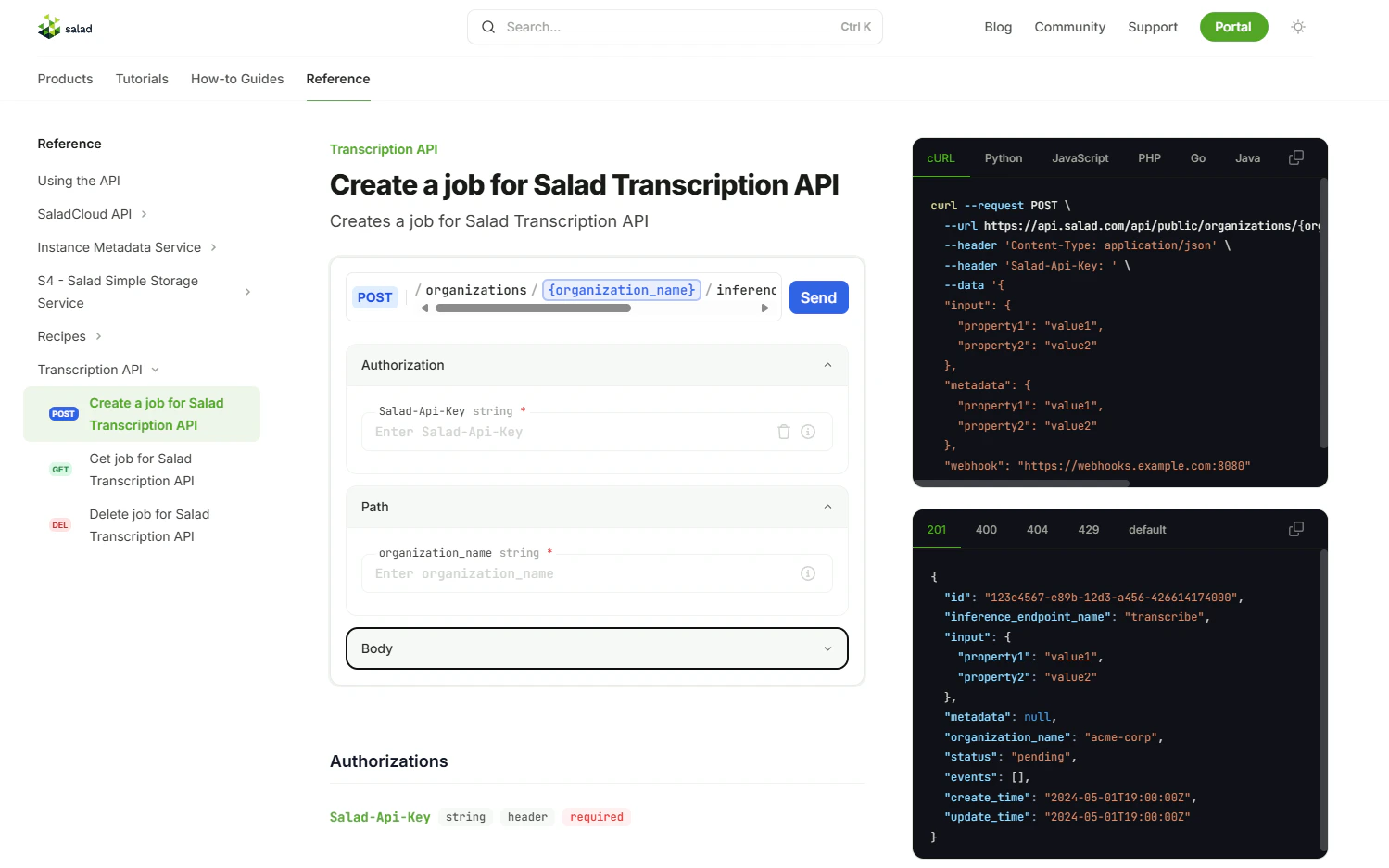
* In the dropdown menu on the left, make sure **"Create a job for Salad Transcription API"** is selected.
* Enter your **Salad API key** and **Organization Name**. Follow instructions above if you do not know where to find
them.
* Under the **Authorization** section, provide your **Salad API key**.
* Under the **Path** section, specify your organization name.
## How to Use Transcription APIs
We provide several examples and resources to help you use the API effectively:
* For a **cURL example** and parameter descriptions, refer to
[Example cURL Post](#example-curl-post-with-salad-transcription-api) on this page.
* For **easy testing** with our API reference, visit the [API Reference](#api-reference).
* For **process automation**, see [Transcription Automation](#transcription-automation).
* For **native Python integration**, check out our
[official Python SDK](/transcription/how-to-guides/sdk/python-sdk-quick-start). The SDK simplifies file uploads to S4,
authentication, job polling, and webhook handling, letting you transcribe and manage jobs with just a few lines of
code.
### Example cURL Post with Salad Transcription API
```bash theme={null}
curl -X POST https://api.salad.com/api/public/organizations/{my-organization}/inference-endpoints/transcribe/jobs \
-H "Salad-Api-Key: {your-api-key}" \
-H "Content-Type: application/json" \
-d '{
"input": {
"url": "https://example.com/path/to/file.mp3",
"language_code": "en",
"return_as_file": false,
"sentence_level_timestamps": "true"
"word_level_timestamps": false,
"diarization": false,
"sentence_diarization": true,
"multichannel": false,
"srt": false,
"translate": "",
"summarize": 50,
"llm_translation": "french, german, portuguese",
"srt_translation": "spanish, Hindi",
"custom_prompt": "",
"custom_vocabulary": ""
},
"webhook": {your webhook url},
"metadata": {
"my-job-id": 1234
}
}'
```
### Example cURL Post with Transcription Lite
```bash theme={null}
curl -X POST https://api.salad.com/api/public/organizations/{my-organization}/inference-endpoints/transcription-lite/jobs \
-H "Salad-Api-Key: {your-api-key}" \
-H "Content-Type: application/json" \
-d '{
"input": {
"url": "https://example.com/path/to/file.mp3",
"language_code": "en",
"return_as_file": false,
"sentence_level_timestamps": "true"
"word_level_timestamps": false,
"diarization": false,
"sentence_diarization": true,
"srt": false,
"translate": "to_eng"
},
"webhook": {your webhook url},
"metadata": {
"my-job-id": 1234
}
}'
```
* Fill in the file link instead of "[https://example.com/path/to/file.mp3](https://example.com/path/to/file.mp3)"
* Optional : replace `{your webhook url}` with webhook url if needed. If not, remove the line.
Webhook is a method that enables application to transmit data to another application immediately upon the occurrence of
an event. Instead of having your application periodically poll for updates, a webhook delivers data to a specified URL
as soon as the event occurs, facilitating instant communication and minimizing latency. In our case transcription result
gets sent to the webhook.
### Example cURL Get Transcript from Salad Transcription API
```bash theme={null}
curl https://api.salad.com/api/public/organizations/{my-organization}/inference-endpoints/transcribe/jobs/54e84442-3576-45ca-904c-a1d90bc77baf \
-H "Salad-Api-Key: {your-api-key}"
```
### Example cURL Get Transcript from Transcription Lite
```bash theme={null}
curl https://api.salad.com/api/public/organizations/{my-organization}/inference-endpoints/transcription-lite/jobs/54e84442-3576-45ca-904c-a1d90bc77baf \
-H "Salad-Api-Key: {your-api-key}"
```
### Step 1 | Configure Header
Configure you header to include your unique SaladCloud API URL which can be found above as the variable “API URL”. Also
include your unique SaladCloud API key [which can be found here](https://portal.salad.com/api-key) as the variable
“Salad-Api-Key”.
### Step 2 | Set Input Parameters
To find more information about each parameter, please, visit **"Features"** option in the menu on the left.
Update the JSON input parameters to customize your transcription output.
#### url
The url parameter should be a downloadable link to your audio or video file. We recommend using a file service like AWS
S3, Azure Blob Storage, Dropbox, or Google Drive that offers secure, downloadable links. For instructions on how to
generate downloadable links for these services, please refer to
[How to Create Downloadable File Links](/transcription/how-to-guides/cloud-storage/aws-downloadable-file)
Send media in any of these formats.
*Audio:* AIFF, FLAC, M4A, MP3, WAV
*Video:* MKV, MOV, WEBM, WMA, MP4 (most codecs), AVI
#### return\_as\_file
Set to true to receive the transcription output as a downloadable file URL. This is useful for large outputs. Default is
false.
#### language\_code
Transcription is available in 97 languages. We automatically identify the source language. You only need to specify the
"language\_code" if diarization is required. Please note that accuracy varies across languages — some may perform better
than others. For detailed accuracy information, refer to our
[language benchmark results](/transcription/reference/accuracy-benchmarks).
#### sentence\_level\_timestamps
Sentence level timestamps are returned on default. Set to false if not needed.
#### word\_level\_timestamps
Set to "true" for word level timestamps. Set to "false” on default.
#### diarization
Set to *"true"* for speaker separation and identification. If you don't require it, set it to *"false”*.
Diarization requires the `language_code` to be defined. By default, it is set to `"en"` (English).
You can also diarize in *"fr"* (French), *"de"* (German), *"es"* (Spanish), *"it"* (Italian), *"ja"* (Japanese), *"zh"*
(Chinese), *"nl"* (Dutch), *"uk"* (Ukrainian), *"pt"* (Portuguese), *"ar"* (Arabic), *"cs”* (Czech), *"ru"* (Russian),
*"pl"* (Polish), *"hu"* (Hungarian), *"fi"* (Finnish), *"fa"* (Persian), *"el"* (Greek), *"tr"* (Turkish), *"da"*
(Danish), *"he"* (Hebrew), *"vi"* (Vietnamese), *"ko"* (Korean), *"ur"* (Urdu), *"te"* (Telugu), *"hi"* (Hindi), *"ca"*
(Catalan), *"ml"* (Malayalam).
#### sentence\_diarization
Set to `true` to include speaker information at the sentence level. Requires language\_code to be specified. Default is
`false`.
#### multichannel
Set to `true` to enable multichannel transcription. Each channel will be transcribed separately and labeled with
`channel` and `speaker`. Falls back to regular speaker diarization if only one channel is present. Requires
`diarization` for word-level speaker and channel labeling, or `sentence_diarization` for sentence-level speaker and
channel labeling.
#### translate
Set `"translate": "to_eng"` to translate the transcription into English. This replaces the original transcription with
the English translation. All additional parameters may also be used alongside translation.
#### llm\_translation
*(Salad Transcription API only)*
Provide a comma-separated list of target languages to translate the transcription into multiple languages using our LLM
integration. The original transcription will be returned as normal, along with the translations. **Supported
languages:** English, French, German, Italian, Portuguese, Hindi, Spanish, Thai
#### srt
Set to *"true"* to generate a .srt output for caption and subtitles. If you don't require it, set it to *"false"*.
#### srt\_translation
*(Salad Transcription API only)*
Provide a comma-separated list of target languages to translate the generated SRT captions into multiple languages. The
original transcription and SRT content will be returned as normal. **Supported languages:** English, French, German,
Italian, Portuguese, Hindi, Spanish, Thai
#### summarize
*(Salad Transcription API only)*
Set to an integer value representing the maximum number of words for the summary of the transcription.
#### custom\_vocabulary (preview)
*(Salad Transcription API only)*
Provide a comma-separated list of custom words or phrases to improve transcription accuracy for domain-specific terms.
#### custom\_prompt (preview)
*(Salad Transcription API only)*
Provide a custom instruction to perform specific analyses on the transcription using our LLM integration.
#### classification\_labels
#### overall\_classification
*(Salad Transcription API only)*
Use the classification\_labels parameter in conjunction with overall\_classification to classify the entire transcription
into specified categories using an LLM.
#### overall\_sentiment\_analysis
*(Salad Transcription API only)*
Set "overall\_sentiment\_analysis": true to perform sentiment analysis.
### webhook
\*Optional. Webhook is a method that enables application to transmit data to another application immediately when
process is finished. Specify your webhook url to use.
#### my-job-id
\*Optional. If you need an identifier from your system you can the job id as desired.
### Step 3 | Make Post Request
Make your **POST** transcript request. If successful, you will receive a confirmation response that will include the job
*"id"* \*(ex: fb724cc9-d0f7-44a1-86c4-180c7fab975e).
### Step 4 | Make Get Request
Make your GET transcript request. If successful, you will receive a JSON transcript output that will include the inputs
you requested.
##### Example Transcript Output
```json theme={null}
{
"id": "fb724cc9-d0f7-44a1-86c4-180c7fab975e",
"input": {
"url": "https://example.com/path/to/file.mp3",
"language_code": "en",
"word_level_timestamps": true,
"return_as_file": false,
"diarization": true,
"sentence_diarization": true,
"srt": true,
"sentence_level_timestamps": true,
"summarize": 50,
"llm_translation": "french, german, portuguese",
"srt_translation": "spanish, Hindi"
},
"status": "succeeded",
"events": [
{
"action": "created",
"time": "2024-10-05T19:22:20.1115308+00:00"
},
{
"action": "started",
"time": "2024-10-05T21:38:40.1424816+00:00"
},
{
"action": "succeeded",
"time": "2024-10-05T21:39:49.1000268+00:00"
}
],
"output": {
"sentence_level_timestamps": [
{
"text": "You know that little voice in your head?",
"timestamp": [
0.0,
5.9
],
"start": 0.0,
"end": 5.9,
"speaker": "SPEAKER_02"
},
...
{
"text": "Because when we change the dialogue, we can change our world.",
"timestamp": [
115.14,
121.42
],
"start": 115.14,
"end": 121.42,
"speaker": "SPEAKER_02"
}
],
"word_segments": [
{
"word": "You",
"start": 4.274,
"end": 4.395,
"score": 0.89,
"speaker": "SPEAKER_02"
},
{
"word": "know",
"start": 4.435,
"end": 4.555,
"score": 0.87,
"speaker": "SPEAKER_02"
},
{
"word": "that",
"start": 4.576,
"end": 4.696,
"score": 0.773,
"speaker": "SPEAKER_02"
},
{
"word": "little",
"start": 4.756,
"end": 4.977,
"score": 0.833,
"speaker": "SPEAKER_02"
},
{
"word": "voice",
"start": 5.037,
"end": 5.378,
"score": 0.869,
"speaker": "SPEAKER_02"
}
...
{
"word": "world.",
"start": 120.938,
"end": 121.199,
"score": 0.219,
"speaker": "SPEAKER_02"
}
],
"srt_content": "1\n00:00:04,274 --> 00:00:05,880\nYou know that little voice in your head?\n\n2\n00:00:10,506 --> 00:00:13,240\nThe one that tells you to ignore a tasteless joke?\n\n3\n00:00:21,650 --> 00:00:25,920\nThe one that tells you to keep quiet when a client makes a racist comment?\n\n4\n00:00:31,604 --> 00:00:36,197\nThe little voice that tells you you're not smart enough because English isn't your\n\n5\n00:00:36,278 --> 00:00:37,100\nfirst language.\n\n6\n00:00:46,284 --> 00:00:50,138\nOr that it's okay to judge someone for leaving early because they have family\n\n7\n00:00:50,158 --> 00:00:50,660\ncommitments.\n\n8\n00:01:07,800 --> 00:01:11,880\nOr that it's not a big deal when everyone's opinion isn't considered.\n\n9\n00:01:21,129 --> 00:01:23,880\nYou may think you're the only one that hears that voice.\n\n10\n00:01:24,901 --> 00:01:27,659\nBut that voice also speaks to other people.\n\n11\n00:01:28,601 --> 00:01:30,819\nIt says, You're different.\n\n12\n00:01:32,202 --> 00:01:33,177\nYou're an outsider.\n\n13\n00:01:34,843 --> 00:01:35,899\nYou lack commitment.\n\n14\n00:01:37,020 --> 00:01:38,719\nYour opinion doesn't matter.\n\n15\n00:01:39,881 --> 00:01:45,619\nInstead of listening to that little voice, you need to find yours and make it heard.\n\n16\n00:01:51,651 --> 00:01:53,438\nIt's time for all of us to speak up.\n\n17\n00:01:56,143 --> 00:02:01,199\nBecause when we change the dialogue, we can change our world.\n\n",
"summary": "Silence oppressive voices; amplify your own.",
"llm_translations": {
"French": "Connaissez-vous cette petite voix dans votre tête ? \n\nLa voix qui vous dit de ignorer une blague de mauvais goût ?\n\nLa voix qui vous dit de garder le silence quand un client fait un commentaire raciste ?\n\nLa voix qui vous dit que vous ne êtes pas intelligent(e) car l'anglais n'est pas votre langue maternelle ?\n\nOu que c'est normal de juger quelqu'un pour être parti tôt parce qu'il a des engagements familiaux ?\n\nLa voix qui vous dit de ne rien dire quand les autres sont réduits à des stéréotypes ?\n\nOu que ce n'est pas important de prendre en compte toutes les opinions ?\n\nVous pensez peut-être que vous êtes le seul à entendre cette voix. Mais cette voix parle également aux autres.\n\nElle dit : Vous êtes différent(e). Vous êtes un(e) extérieur(e). Vous manquez de détermination. Votre opinion n'a pas d'importance.\n\nAu lieu d'écouter cette petite voice, vous devez trouver la vôtre et faire entendre votre voix. \n\nC'est l'heure pour nous tous de parler. \n\nCar lorsque nous changeons le dialogue, nous pouvons changer notre monde.",
"German": "Du weißt, diese kleine Stimme in deinem Kopf? Die eine, die dir sagt, ein unfassbarer Witz zu ignorieren? Die eine, die dich auffordert, leise zu sein, wenn jemand einen rassistischen Kommentar abgibt? Die kleine Stimme, die dir sagt, du seist nicht intelligent genug, weil Englisch nicht deine Muttersprache ist. Oder dass es in Ordnung ist, jemanden für früh zu gehen zu verurteilen, weil er Familienverpflichtungen hat. Die eine, die sagt, nichts sagen zu sollen, wenn andere zu Stereotypen reduziert werden. Oder dass das nicht großes Problem ist, wenn nicht alle Meinungen berücksichtigt werden. Du denkst vielleicht, du wärst der Einzige, der diese Stimme hört. Aber diese Stimme spricht auch andere Menschen an. Sie sagt: \"Du bist anders.\" \"Du bist ein Außenseiter.\" \"Du hast keine Verpflichtung.\" \"Deine Meinung zählt nicht.\" Anstatt dieser kleinen Stimme zu lauschen, musst du deine eigene finden und laut werden lassen. Es ist Zeit für uns alle aufzuschreien. Denn wenn wir die Konversation ändern, können wir unsere Welt verändern. Danke.",
"Portuguese": "Você sabe aquele pequeno voz na sua cabeça? A que diz para ignorar uma piada sem graça? A que diz para ficar calado quando um cliente faz um comentário racista? A pequena voz que diz você não é inteligente o suficiente porque inglês não é a sua língua materna. Ou que está bem julgar alguém por sair cedo porque têm compromissos familiares. A que diz para não dizer nada quando os outros são reduzidos a estereótipos. Ou que não é um grande problema quando nenhuma opinião é considerada. Você pode pensar que você é o único que ouve aquela voz. Mas essa voz também fala com outras pessoas. Diz: Você é diferente. Você é estranho. Você falta de compromisso. Sua opinião não importa. Em vez de ouvir aquele pequeno voz, você precisa encontrar a sua e fazê-la ser ouvida. É hora para todos nós falarmos alto. Porque quando mudamos o diálogo, podemos mudar nosso mundo. Obrigado."
},
"srt_translation": {
"Spanish": "1\n00:00:04,274 --> 00:00:05,880\n¿Sabes esa pequeña voz en tu cabeza?\n\n2\n00:00:10,506 --> 00:00:13,240\nLa que te dice ignorar un chiste de mal gusto?\n\n3\n00:00:21,650 --> 00:00:25,920\nLa que te dice callar cuando alguien hace un comentario racista?\n\n4\n00:00:31,604 --> 00:00:36,197\nEsa voz pequeña que te dice que no eres lo suficientemente inteligente porque el inglés no es tu\n\n5\n00:00:36,278 --> 00:00:37,100\nprimer idioma.\n\n6\n00:00:46,284 --> 00:00:50,138\nO que está bien juzgar a alguien por irse temprano porque tienen compromisos familiares.\n\n7\n00:00:50,158 --> 00:00:50,660\nO que no es un gran problema cuando no se considera la opinión de todos.\n\n8\n00:01:07,800 --> 00:01:11,880\nO que está bien con que nadie tenga la última palabra.\n\n9\n00:01:21,129 --> 00:01:23,880\nPuede parecer que solo tú escuchas esa voz.\n\n10\n00:01:24,901 --> 00:01:27,659\nPero esa voz también habla a otras personas.\n\n11\n00:01:28,601 --> 00:01:30,819\nDice: Eres diferente.\n\n12\n00:01:32,202 --> 00:01:33,177\nEres un forastero.\n\n13\n00:01:34,843 --> 00:01:35,899\nFaltas de compromiso.\n\n14\n00:01:37,020 --> 00:01:38,719\nTu opinión no importa.\n\n15\n00:01:39,881 --> 00:01:45,619\nEn lugar de escuchar esa voz pequeña, necesitas encontrar la tuya y hacer que se escuche.\n\n16\n00:01:51,651 --> 00:01:53,438\nEs hora de que todos hablamos.\n\n17\n00:01:56,143 --> 00:02:01,199\nPorque cuando cambiamos el diálogo, podemos cambiar nuestro mundo.",
},
"text": " You know that little voice in your head? The one that tells you to ignore a tasteless joke? The one that tells you to keep quiet when a client makes a racist comment? The little voice that tells you you're not smart enough because English isn't your first language. Or that it's okay to judge someone for leaving early because they have family commitments. The one that tells you not to say anything when others are being reduced to stereotypes. Or that it's not a big deal when everyone's opinion isn't considered. You may think you're the only one that hears that voice. But that voice also speaks to other people. It says, You're different. You're an outsider. You lack commitment. Your opinion doesn't matter. Instead of listening to that little voice, you need to find yours and make it heard. It's time for all of us to speak up. Because when we change the dialogue, we can change our world. Thank you.",
"duration": 0.04,
"processing_time": 68.46978211402893
},
"create_time": "2024-10-05T19:22:20.1115308+00:00",
"update_time": "2024-10-05T21:39:49.1000268+00:00"
}
```
**"status"**
If your transcription request is *“pending”*, it has not yet been picked up for processing.
*“created”* the transcription job is now in our queue to be processed.
*“running”* the transcription is processing.
*“failed”* the transcript was not created. We will automatically re-try the transcription process until it fails three
times. If we are unable to transcribe your media, you will get a 200 error with one of the following messages. Send us a
support request at [support@salad.com](https://mailto:support@salad.com/) if this happens.
\*"succeeded" the transcript is ready. If we were not able to pull your url, or there was another issue with the audio
file you will see an "error" in the response and one of the reasons:
\*File size is more than 3GB \*File can not be downloaded or duration is missing. Please check your file and try again.
\*File duration is more than 2.5 hours
## API Reference
Access detailed API specifications and test requests directly by visiting the
[Transcription API Reference page](/reference/transcribe/inference_endpoints/create-an-inference-endpoint-job).
### Step 1: Set Up Authorization
* In the dropdown menu on the left, make sure **"Create a job for Salad Transcription API"** is selected.
* Enter your **Salad API key** and **Organization Name**. Follow instructions above if you do not know where to find
them.
* Under the **Authorization** section, provide your **Salad API key**.
* Under the **Path** section, specify your organization name.
 ### Step 2: Configure Input Parameters
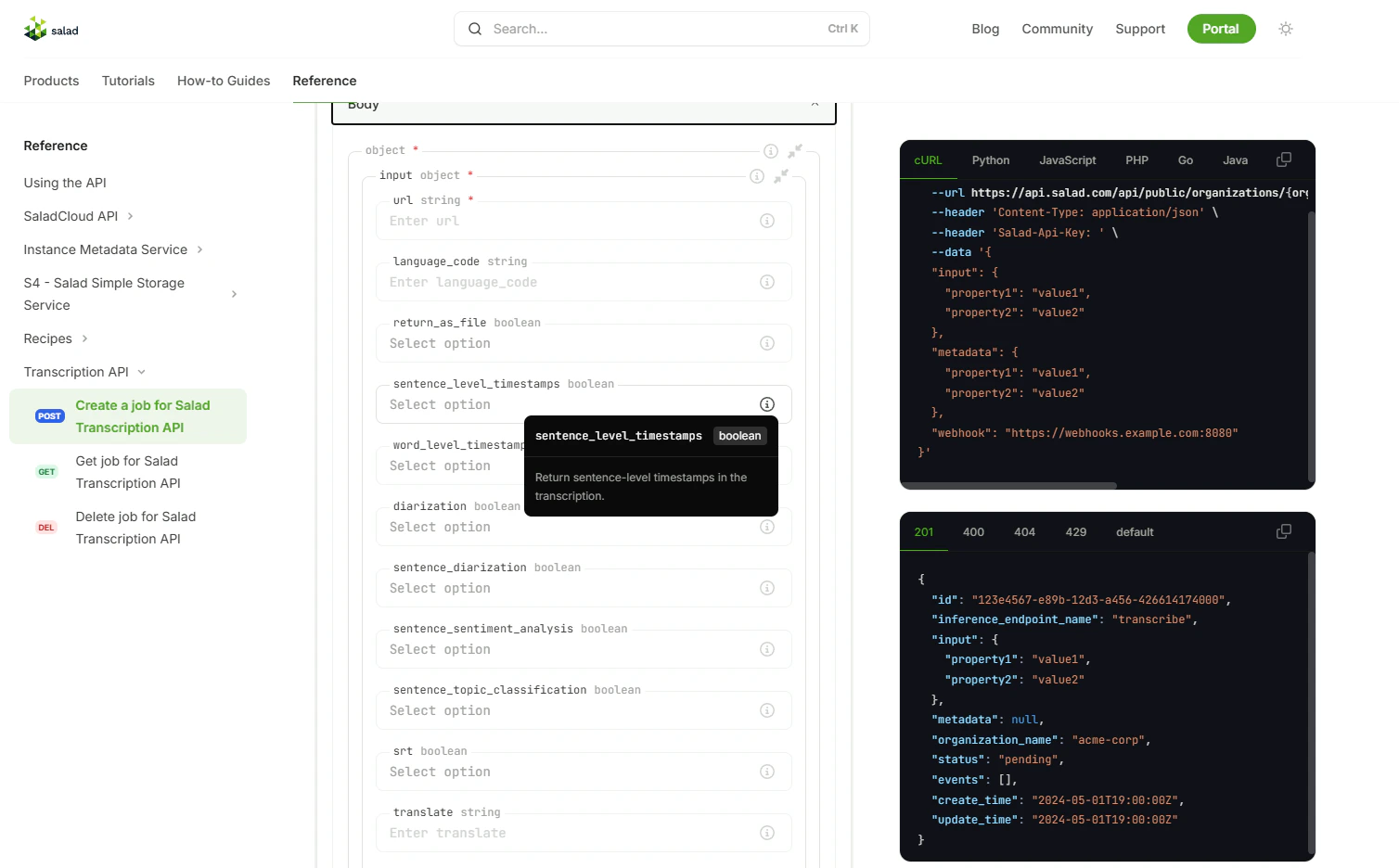
* In the **Body** section, specify the input parameters as described in the documentation above.
* Each parameter is explained directly on the reference page to help you customize your request.
### Step 2: Configure Input Parameters
* In the **Body** section, specify the input parameters as described in the documentation above.
* Each parameter is explained directly on the reference page to help you customize your request.
 ### Step 3: Submit the Request
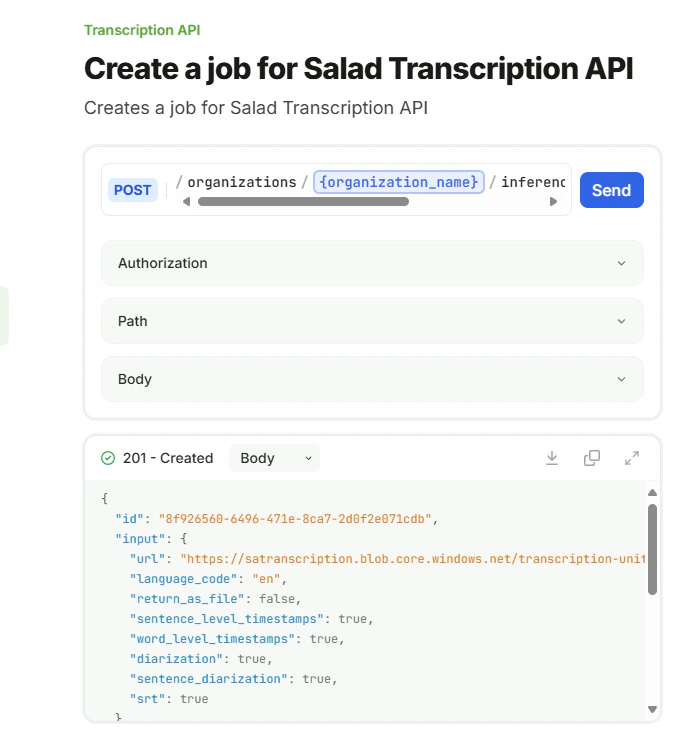
* Click the **Send** button to submit the request.
* Upon success, you'll receive a response containing a unique `"id"` field. This **Job ID** will be used to retrieve the
transcription results.
### Step 3: Submit the Request
* Click the **Send** button to submit the request.
* Upon success, you'll receive a response containing a unique `"id"` field. This **Job ID** will be used to retrieve the
transcription results.
 ### Step 4: Retrieve Transcription Results
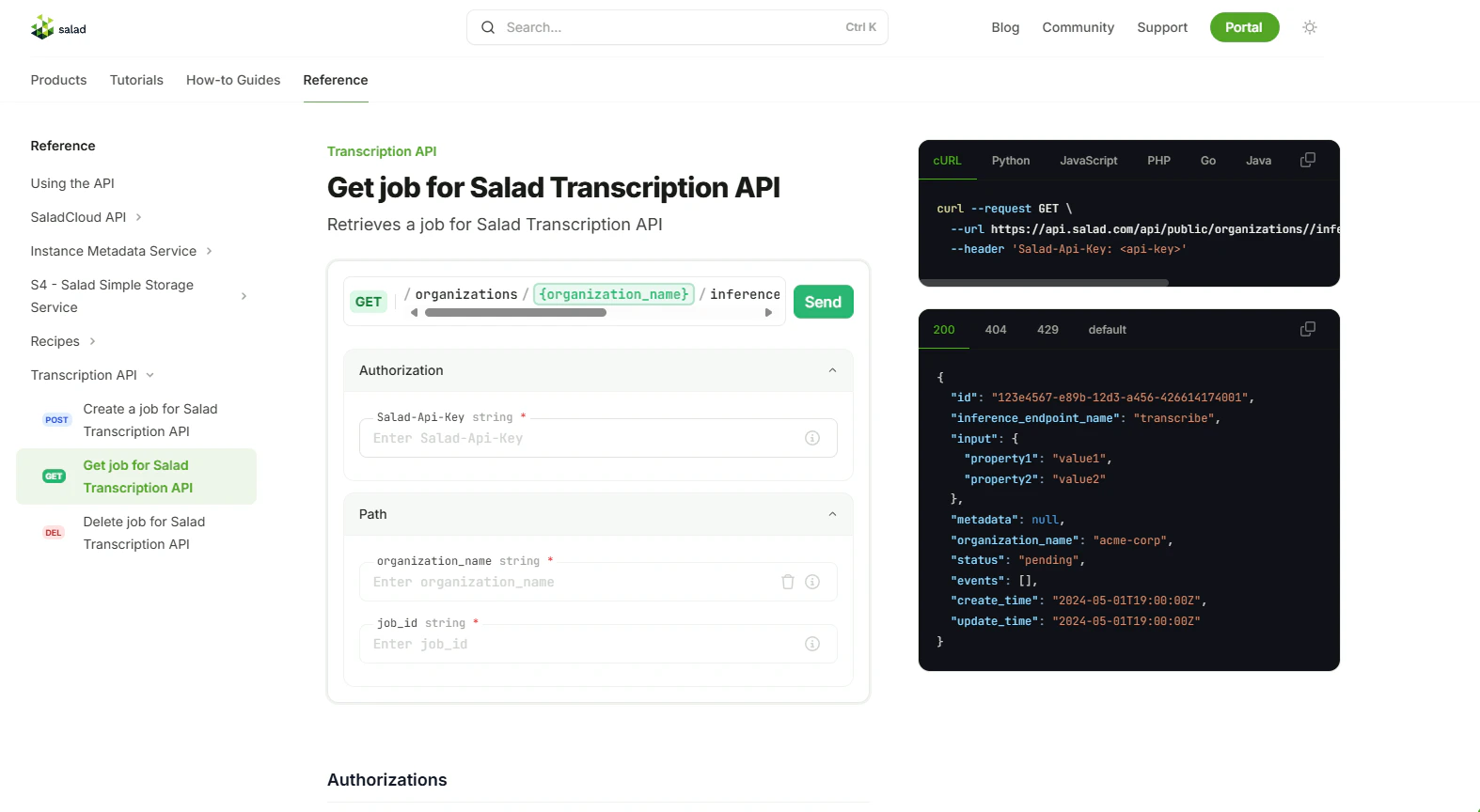
* In the dropdown menu on the left, select **"Get job for Salad Transcription API"**.
* Under the **Authorization** section, provide your **Salad API key**.
* Under the **Path** section, specify your **organization name** and the **Job ID** you received in Step 3.
* Click **Send** to fetch the transcription results.
### Step 4: Retrieve Transcription Results
* In the dropdown menu on the left, select **"Get job for Salad Transcription API"**.
* Under the **Authorization** section, provide your **Salad API key**.
* Under the **Path** section, specify your **organization name** and the **Job ID** you received in Step 3.
* Click **Send** to fetch the transcription results.
 ### Example Response
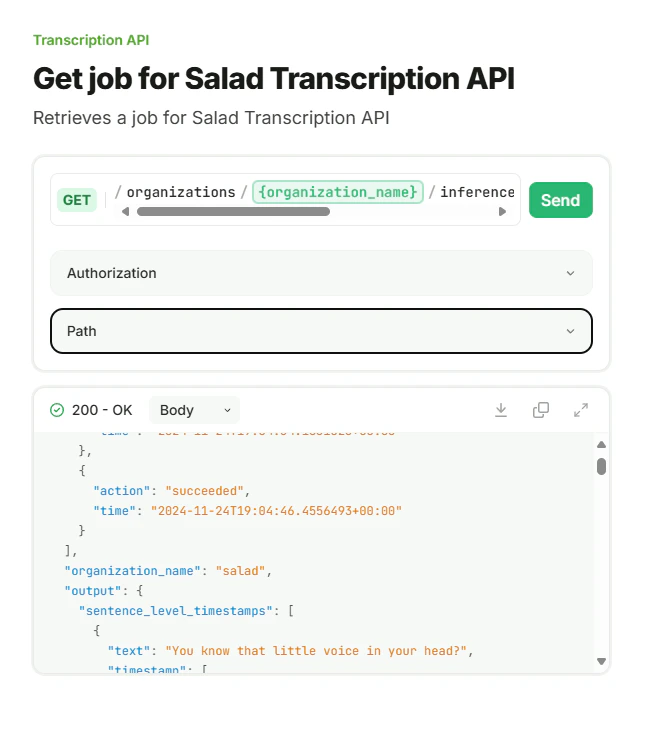
* The response will include the transcription output, timestamps, and other requested data, depending on the parameters
you specified.
### Example Response
* The response will include the transcription output, timestamps, and other requested data, depending on the parameters
you specified.
 ## Transcription Automation
Webhooks are already available, and you can check the documentation above (under Example cURL Post Transcript). Using
webhooks is a better way to get results as soon as possible. However, if your use case better fits with polling, use the
following code. Make sure you update it as needed:
### Pass 1: Submitting Audio Files for Transcription
This part of the script submits audio files for transcription and collects job IDs. The job IDs are used in the second
pass to check the status and retrieve the results.
```bash theme={null}
import requests
import json
# Set the organization name, url, and API key
organization_name = "your_organization_name"
url = f"https://api.salad.com/api/public/organizations/{organization_name}/inference-endpoints/transcribe/jobs"
salad_key = "your_salad_key"
language_code = "en"
# Add your audio links here
list_of_audio_files = [
"audio_url",
"audio_url",
"audio_url",
]
# If you want to pull links from a file, you can use the following code
# with open('audio_links.txt', 'r') as f:
# list_of_audio_files = f.readlines()
# Placeholder for job_ids
list_of_job_ids = []
headers = {
"Salad-Api-Key": salad_key,
"Content-Type": "application/json",
"accept": "application/json",
}
# Pass 1: Submit audio files for transcription
# Loop through the list of audio files and construct body of each request
for audio_file in list_of_audio_files:
data = {
"input": {
"url": audio_file,
"language_code": language_code,
"word_level_timestamps": True,
"diarization": True,
"srt": True,
}
}
# Send the request
response = requests.post(url, headers=headers, json=data)
# Pull job id from response. And save it to a list or a file
job_id = response.json()["id"]
list_of_job_ids.append(job_id)
#save job_ids to a file if needed (uncomment the code below)
# job_id_str = f'"{job_id}",'
# # Open a file and write the job_id to it
# with open('queue_test.txt', 'a') as f:
# f.write(job_id_str + '\n')
```
### Pass 2: Checking Job Status and Retrieving Results
This part of the script checks the status of each transcription job periodically and retrieves the results once the
transcription is completed.
```bash theme={null}
# Pass 2. Loop though the job_ids and get the results
# If you use both passes in the same script, just continue.
# If you use scripts separately you need to set up connection again
# and initialize the list of job ids :
# Uncomment the code below if you need to
# import requests
# import json
# Set the organization name, url, and API key
# organization_name = "your_organization_name"
# url = f"https://api.salad.com/api/public/organizations/{organization_name}/inference-endpoints/transcribe/jobs"
# salad_key = "your_salad_key"
# language_code = "en"
# headers = {
# "Salad-Api-Key": salad_key,
# "Content-Type": "application/json",
# "accept": "application/json",
# }
# Pull list from a file:
# with open('queue_test.txt', 'r') as f:
# list_of_job_ids = f.readlines()
# or initialize the list manually
# list_of_job_ids = ["job_id1", "job_id2", "job_id3", "job_id4"]
import time
# Loop though the job_ids and get the results
while len(list_of_job_ids) > 0:
for job in list_of_job_ids:
response_url = f"https://api.salad.com/api/public/organizations/salad/inference-endpoints/transcribe/jobs/{job}"
response = requests.get(response_url, headers=headers)
if response.json()['status'] == 'running' or response.json()['status'] == 'pending':
print(f"Job {job} is still {response.json()['status']}, waiting for retry...")
continue
elif response.json()['status'] == 'succeeded':
#save the response to a file
with open(f'result_{job}.json', 'w', encoding='utf-8') as f:
json.dump(response.json(), f, ensure_ascii=False)
#remove the job_id from the list
list_of_job_ids.remove(job)
else:
print(f"Job {job} failed, waiting for retry...")
# wait for 30 seconds and retry
time.sleep(30)
continue
```
## Transcription Automation
Webhooks are already available, and you can check the documentation above (under Example cURL Post Transcript). Using
webhooks is a better way to get results as soon as possible. However, if your use case better fits with polling, use the
following code. Make sure you update it as needed:
### Pass 1: Submitting Audio Files for Transcription
This part of the script submits audio files for transcription and collects job IDs. The job IDs are used in the second
pass to check the status and retrieve the results.
```bash theme={null}
import requests
import json
# Set the organization name, url, and API key
organization_name = "your_organization_name"
url = f"https://api.salad.com/api/public/organizations/{organization_name}/inference-endpoints/transcribe/jobs"
salad_key = "your_salad_key"
language_code = "en"
# Add your audio links here
list_of_audio_files = [
"audio_url",
"audio_url",
"audio_url",
]
# If you want to pull links from a file, you can use the following code
# with open('audio_links.txt', 'r') as f:
# list_of_audio_files = f.readlines()
# Placeholder for job_ids
list_of_job_ids = []
headers = {
"Salad-Api-Key": salad_key,
"Content-Type": "application/json",
"accept": "application/json",
}
# Pass 1: Submit audio files for transcription
# Loop through the list of audio files and construct body of each request
for audio_file in list_of_audio_files:
data = {
"input": {
"url": audio_file,
"language_code": language_code,
"word_level_timestamps": True,
"diarization": True,
"srt": True,
}
}
# Send the request
response = requests.post(url, headers=headers, json=data)
# Pull job id from response. And save it to a list or a file
job_id = response.json()["id"]
list_of_job_ids.append(job_id)
#save job_ids to a file if needed (uncomment the code below)
# job_id_str = f'"{job_id}",'
# # Open a file and write the job_id to it
# with open('queue_test.txt', 'a') as f:
# f.write(job_id_str + '\n')
```
### Pass 2: Checking Job Status and Retrieving Results
This part of the script checks the status of each transcription job periodically and retrieves the results once the
transcription is completed.
```bash theme={null}
# Pass 2. Loop though the job_ids and get the results
# If you use both passes in the same script, just continue.
# If you use scripts separately you need to set up connection again
# and initialize the list of job ids :
# Uncomment the code below if you need to
# import requests
# import json
# Set the organization name, url, and API key
# organization_name = "your_organization_name"
# url = f"https://api.salad.com/api/public/organizations/{organization_name}/inference-endpoints/transcribe/jobs"
# salad_key = "your_salad_key"
# language_code = "en"
# headers = {
# "Salad-Api-Key": salad_key,
# "Content-Type": "application/json",
# "accept": "application/json",
# }
# Pull list from a file:
# with open('queue_test.txt', 'r') as f:
# list_of_job_ids = f.readlines()
# or initialize the list manually
# list_of_job_ids = ["job_id1", "job_id2", "job_id3", "job_id4"]
import time
# Loop though the job_ids and get the results
while len(list_of_job_ids) > 0:
for job in list_of_job_ids:
response_url = f"https://api.salad.com/api/public/organizations/salad/inference-endpoints/transcribe/jobs/{job}"
response = requests.get(response_url, headers=headers)
if response.json()['status'] == 'running' or response.json()['status'] == 'pending':
print(f"Job {job} is still {response.json()['status']}, waiting for retry...")
continue
elif response.json()['status'] == 'succeeded':
#save the response to a file
with open(f'result_{job}.json', 'w', encoding='utf-8') as f:
json.dump(response.json(), f, ensure_ascii=False)
#remove the job_id from the list
list_of_job_ids.remove(job)
else:
print(f"Job {job} failed, waiting for retry...")
# wait for 30 seconds and retry
time.sleep(30)
continue
```