> ## Documentation Index
> Fetch the complete documentation index at: https://docs.salad.com/llms.txt
> Use this file to discover all available pages before exploring further.
# Using the API
> Start integrating directly with SaladCloud's robust API
*Last Updated: October 10, 2024*
The SaladCloud API is organized around REST. Our API has predictable resource-oriented URLs, accepts JSON-encoded
request bodies, returns JSON-encoded responses, and uses standard HTTP response codes, authentication, and verbs.
You can find OpenAPI specifications for all of our public APIs
[here](https://github.com/SaladTechnologies/salad-cloud-docs/tree/main/api-specs).
## Authentication
Each API request is authenticated with an API access token that can be accessed via the Web Portal. Each user has a
unique API token that grants API access to any Organization, Project, or Container group that the user has access to. If
you need to get a new API Token, you are able to refresh API tokens directly from the Web Portal.
This API token should be included in the `Salad-Api-Key` header of each request.
```http theme={null}
Salad-Api-Key: YOUR_API_KEY
```
This authentication scheme is also used to access container groups (when authentication is enabled) and inference
endpoints.
## Get your SaladCloud API Key
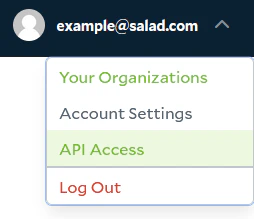
Navigate to the `API Access` section under the account drop down
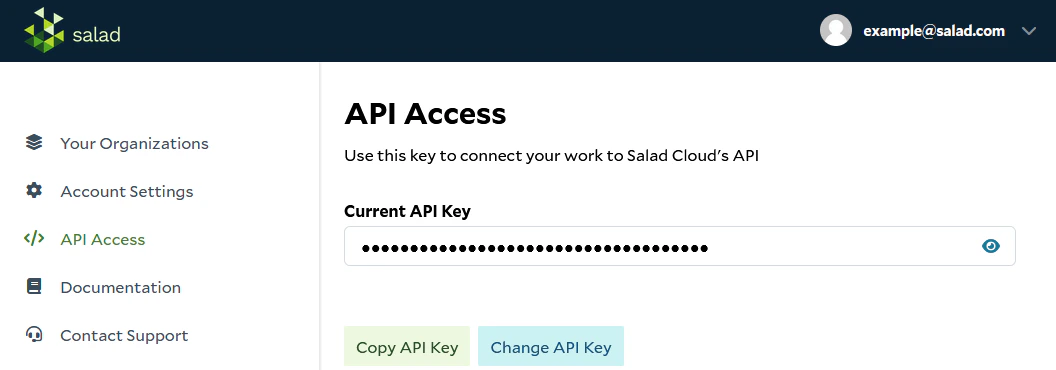
 Copy your API key from the `API Access` page. Be sure to store this key securely, as it is the only way to access the
SaladCloud APIs.
Copy your API key from the `API Access` page. Be sure to store this key securely, as it is the only way to access the
SaladCloud APIs.
 ## Refreshing API Keys
If you need to update your API key for any reason, you can refresh the API key from the `API Access` page.
When you refresh an API token, the previous token is immediately invalidated and will not longer grant API access.
## Rate Limits
SaladCloud's servers enforce rate limits to ensure our APIs are responsive as we grow. The rate limit is tied to an
individual API key and set to 240 requests per minute. If your team would like a higher rate limit, please
[reach out to our team](/support/contact).
## Errors
Errors from the SaladCloud API may come as HTML documents. Be sure to handle this case in your application.
SaladCloud uses conventional HTTP response codes to indicate the success or failure of an API request. In general:
* Codes in the 2xx range indicate success.
* Codes in the 4xx range indicate an error that failed given the information provided (e.g., a required parameter was
omitted, a change failed, etc.).
* Codes in the 5xx range indicate an error with SaladCloud's servers (these are rare).
## Refreshing API Keys
If you need to update your API key for any reason, you can refresh the API key from the `API Access` page.
When you refresh an API token, the previous token is immediately invalidated and will not longer grant API access.
## Rate Limits
SaladCloud's servers enforce rate limits to ensure our APIs are responsive as we grow. The rate limit is tied to an
individual API key and set to 240 requests per minute. If your team would like a higher rate limit, please
[reach out to our team](/support/contact).
## Errors
Errors from the SaladCloud API may come as HTML documents. Be sure to handle this case in your application.
SaladCloud uses conventional HTTP response codes to indicate the success or failure of an API request. In general:
* Codes in the 2xx range indicate success.
* Codes in the 4xx range indicate an error that failed given the information provided (e.g., a required parameter was
omitted, a change failed, etc.).
* Codes in the 5xx range indicate an error with SaladCloud's servers (these are rare).