> ## Documentation Index
> Fetch the complete documentation index at: https://docs.salad.com/llms.txt
> Use this file to discover all available pages before exploring further.
# Enable JWT Authentication
> The world’s largest distributed GPU cloud at the most competitive prices
## Introduction
[JSON Web Token](https://datatracker.ietf.org/doc/html/rfc7519) (JWT) is a compact, secure mechanism for authentication
and authorization in modern web applications and APIs. It supports stateless authentication, removing the requirement
for servers to store session data—ideal for scalable, distributed systems. JWTs can be signed with a private key, and
servers verify them using the corresponding public key, ensuring integrity and authenticity.
A [JSON Web Key](https://datatracker.ietf.org/doc/html/rfc7517) (JWK) is a standardized format for representing
cryptographic keys in JSON, typically for conveying public keys. A **JSON Web Key Set** (JWKS) is a collection of JWKs,
often used to manage and share public keys for JWT validation.
**SaladCloud primarily runs GPU-intensive workloads for most use cases, while also requiring interaction with external
services or systems to retrieve jobs and return results. Applications can now retrieve JWTs for each Salad node and use
the provided JWKS endpoint for JWT-based authentication.** This eliminates the need to pass credentials (via environment
variables, private images, or other methods) for workloads on SaladCloud to access external services, including cloud
providers (AWS, Azure, GCP), as well as custom services (such as Kubernetes and Redis clusters). The solution simplifies
identity management, enhances security, and improves scalability.
Here are some common scenarios for JWT authentication on SaladCloud:
### Accessing HTTP Services
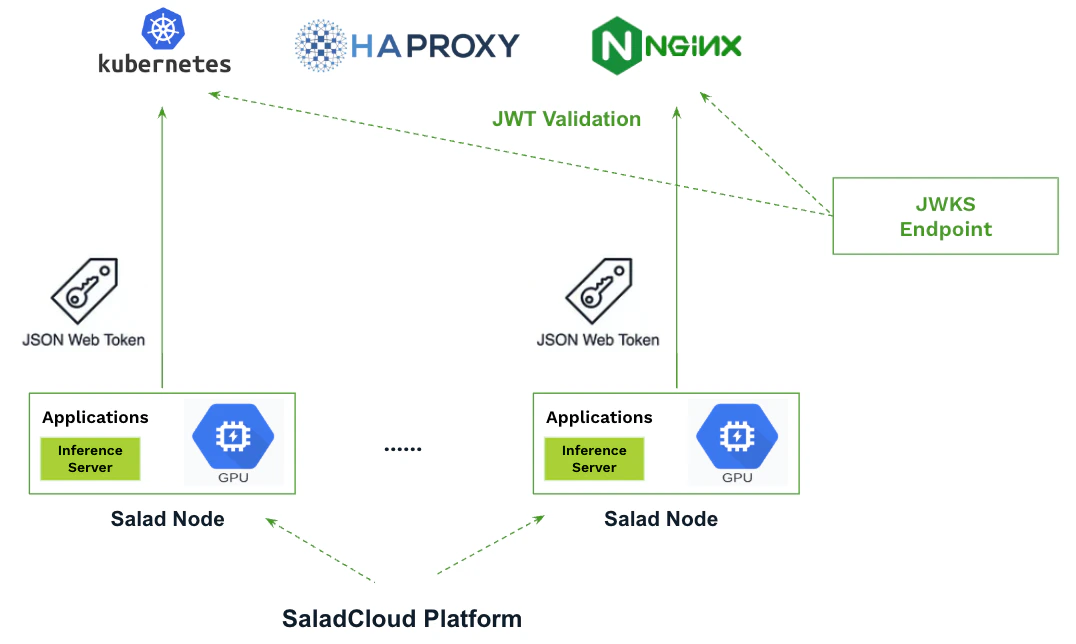
* Applications can obtain the JWT locally on each Salad node and include it in requests to external services, either in
the HTTP Authorization header or the request body.
* The services (or proxies) validate the JWT using the JWKS endpoint, granting access and permissions based on the
token’s claims, such as salad\_container\_group\_id and salad\_machine\_id.
 ### Implementing an Identity Broker for Centralized Authentication and Authorization
* The identity broker is responsible for creating and managing credentials for external services, **including HTTP, TCP,
and other protocols.**
* Applications on SaladCloud communicate with the broker by including the JWT in their HTTP requests.
* The broker validates the JWT and grants access and permissions (**such as API keys, access tokens, or
username/passwords**) to applications based on the claims within the JWT.
* All sensitive information is encrypted during transit and securely stored in memory on Salad nodes.
### Implementing an Identity Broker for Centralized Authentication and Authorization
* The identity broker is responsible for creating and managing credentials for external services, **including HTTP, TCP,
and other protocols.**
* Applications on SaladCloud communicate with the broker by including the JWT in their HTTP requests.
* The broker validates the JWT and grants access and permissions (**such as API keys, access tokens, or
username/passwords**) to applications based on the claims within the JWT.
* All sensitive information is encrypted during transit and securely stored in memory on Salad nodes.
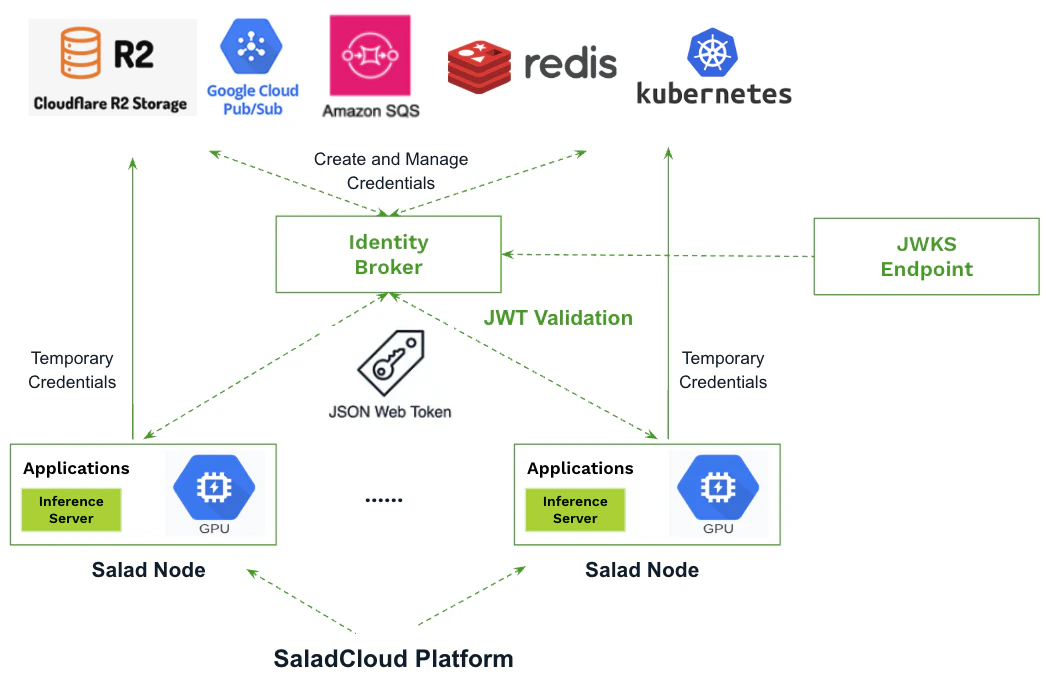 **This centralized approach boosts security, simplifies access control, and enables scalable, fine-grained permissions,
ensuring seamless integration with external services.**
## JWKS Endpoint on SaladCloud
The JWKS on SaladCloud can be accessed through
[the JWKS Endpoint](https://matrix-rest-api.salad.com/.well-known/workload-jwks.json). You can retrieve and inspect it
using the following command:
```
curl -s https://matrix-rest-api.salad.com/.well-known/workload-jwks.json | jq
```
**This centralized approach boosts security, simplifies access control, and enables scalable, fine-grained permissions,
ensuring seamless integration with external services.**
## JWKS Endpoint on SaladCloud
The JWKS on SaladCloud can be accessed through
[the JWKS Endpoint](https://matrix-rest-api.salad.com/.well-known/workload-jwks.json). You can retrieve and inspect it
using the following command:
```
curl -s https://matrix-rest-api.salad.com/.well-known/workload-jwks.json | jq
```
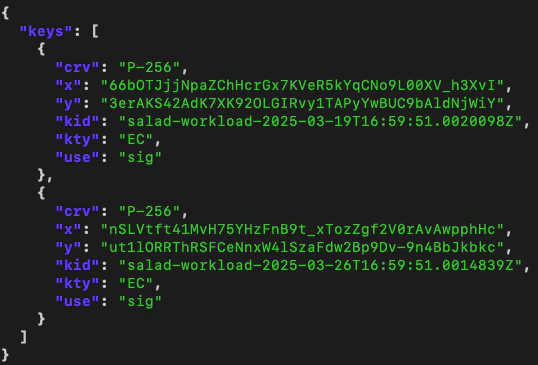 SaladCloud maintains two key pairs (each with a private and public key), rotated every two weeks, with one key pair
always one week older than the other. The older private key remains active for signing JWTs.
In the above JWKS, the “kid” values (**"salad-workload-2025-03-19T16:59:51.0020098Z"** and
**"salad-workload-2025-03-26T16:59:51.0014839Z"**) serves as unique, timestamped identifiers for each public key. When
validating a JWT that references a specific ‘kid’ in its header, the appropriate public key must be selected.
For external services that don’t natively support dynamic retrieval or selection of public keys from the JWKS endpoint,
you can implement a script to periodically fetch the JWKS (e.g., daily) and update their configurations accordingly.
## JWT for Salad Nodes
Each Salad node can be issued a JWT that contains essential metadata, including details like salad\_machine\_id,
salad\_organization\_name, and other relevant information. **The JWT expires after 5 minutes, with a new one automatically
issued before expiration.**
The [SaladCloud Instance Metadata Service](/container-engine/explanation/infrastructure-platform/imds) (IMDS) enables
applications running on Salad nodes to securely query essential information and manage configurations. The IMDS is
available at the non-routable IPv4 address 169.254.169.254 on port 80 of each Salad node, and applications running
locally can call the service to check health status, trigger node reallocation, and retrieve the JWT.
**Note: Applications must bypass any proxies (such as SOCK5 and HTTP) when making requests to the IMDS.**
Below is an example code of how to retrieve the JWT using the SaladCloud IMDS Python SDK. For more details on obtaining
the JWT in different programming languages, please refer to
[the guide](/container-engine/how-to-guides/imds/obtaining-an-imds-jwt).
```python imds_jwt.py theme={null}
from salad_cloud_imds_sdk import SaladCloudImdsSdk, Environment
sdk = SaladCloudImdsSdk( base_url=Environment.DEFAULT.value, timeout=10000 )
result = sdk.metadata.get_container_token()
print(result.jwt)
```
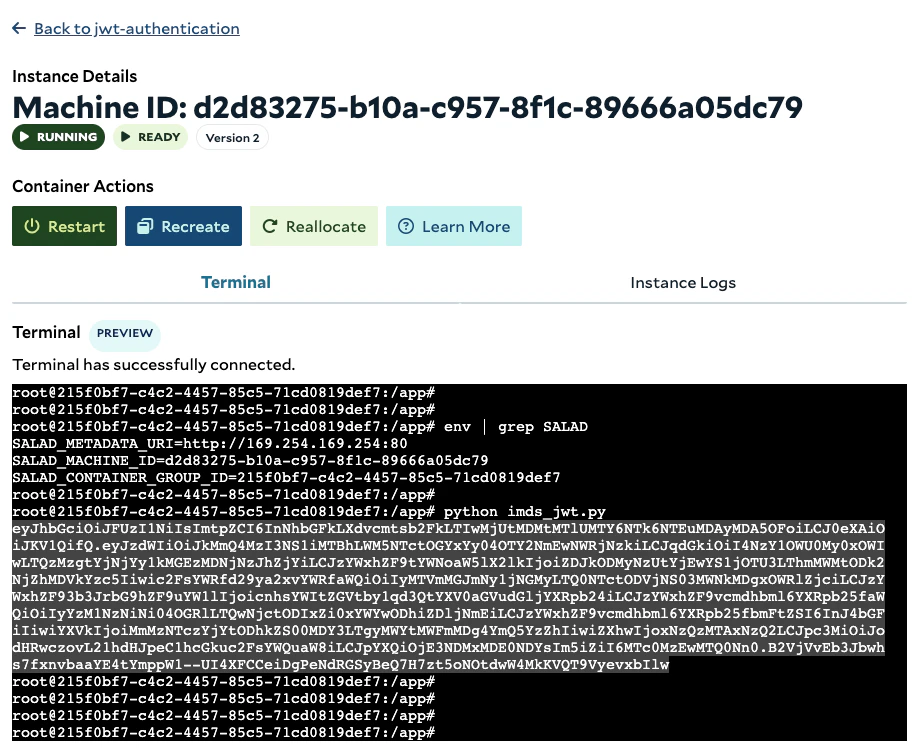
Let's build a container image with
[IMDS Python SDK support](https://github.com/SaladTechnologies/salad-cloud-imds-sdk-python) and deploy it on SaladCloud.
Once the instance is running, execute the code:
SaladCloud maintains two key pairs (each with a private and public key), rotated every two weeks, with one key pair
always one week older than the other. The older private key remains active for signing JWTs.
In the above JWKS, the “kid” values (**"salad-workload-2025-03-19T16:59:51.0020098Z"** and
**"salad-workload-2025-03-26T16:59:51.0014839Z"**) serves as unique, timestamped identifiers for each public key. When
validating a JWT that references a specific ‘kid’ in its header, the appropriate public key must be selected.
For external services that don’t natively support dynamic retrieval or selection of public keys from the JWKS endpoint,
you can implement a script to periodically fetch the JWKS (e.g., daily) and update their configurations accordingly.
## JWT for Salad Nodes
Each Salad node can be issued a JWT that contains essential metadata, including details like salad\_machine\_id,
salad\_organization\_name, and other relevant information. **The JWT expires after 5 minutes, with a new one automatically
issued before expiration.**
The [SaladCloud Instance Metadata Service](/container-engine/explanation/infrastructure-platform/imds) (IMDS) enables
applications running on Salad nodes to securely query essential information and manage configurations. The IMDS is
available at the non-routable IPv4 address 169.254.169.254 on port 80 of each Salad node, and applications running
locally can call the service to check health status, trigger node reallocation, and retrieve the JWT.
**Note: Applications must bypass any proxies (such as SOCK5 and HTTP) when making requests to the IMDS.**
Below is an example code of how to retrieve the JWT using the SaladCloud IMDS Python SDK. For more details on obtaining
the JWT in different programming languages, please refer to
[the guide](/container-engine/how-to-guides/imds/obtaining-an-imds-jwt).
```python imds_jwt.py theme={null}
from salad_cloud_imds_sdk import SaladCloudImdsSdk, Environment
sdk = SaladCloudImdsSdk( base_url=Environment.DEFAULT.value, timeout=10000 )
result = sdk.metadata.get_container_token()
print(result.jwt)
```
Let's build a container image with
[IMDS Python SDK support](https://github.com/SaladTechnologies/salad-cloud-imds-sdk-python) and deploy it on SaladCloud.
Once the instance is running, execute the code:
 Next, let’s decode and verify the JWT using [the online tool](https://jwt.io/). Copy the JWT into the Encoded section on
the left and paste the corresponding JWK string into the first box of the VERIFY SIGNATURE section on the bottom right.
Next, let’s decode and verify the JWT using [the online tool](https://jwt.io/). Copy the JWT into the Encoded section on
the left and paste the corresponding JWK string into the first box of the VERIFY SIGNATURE section on the bottom right.
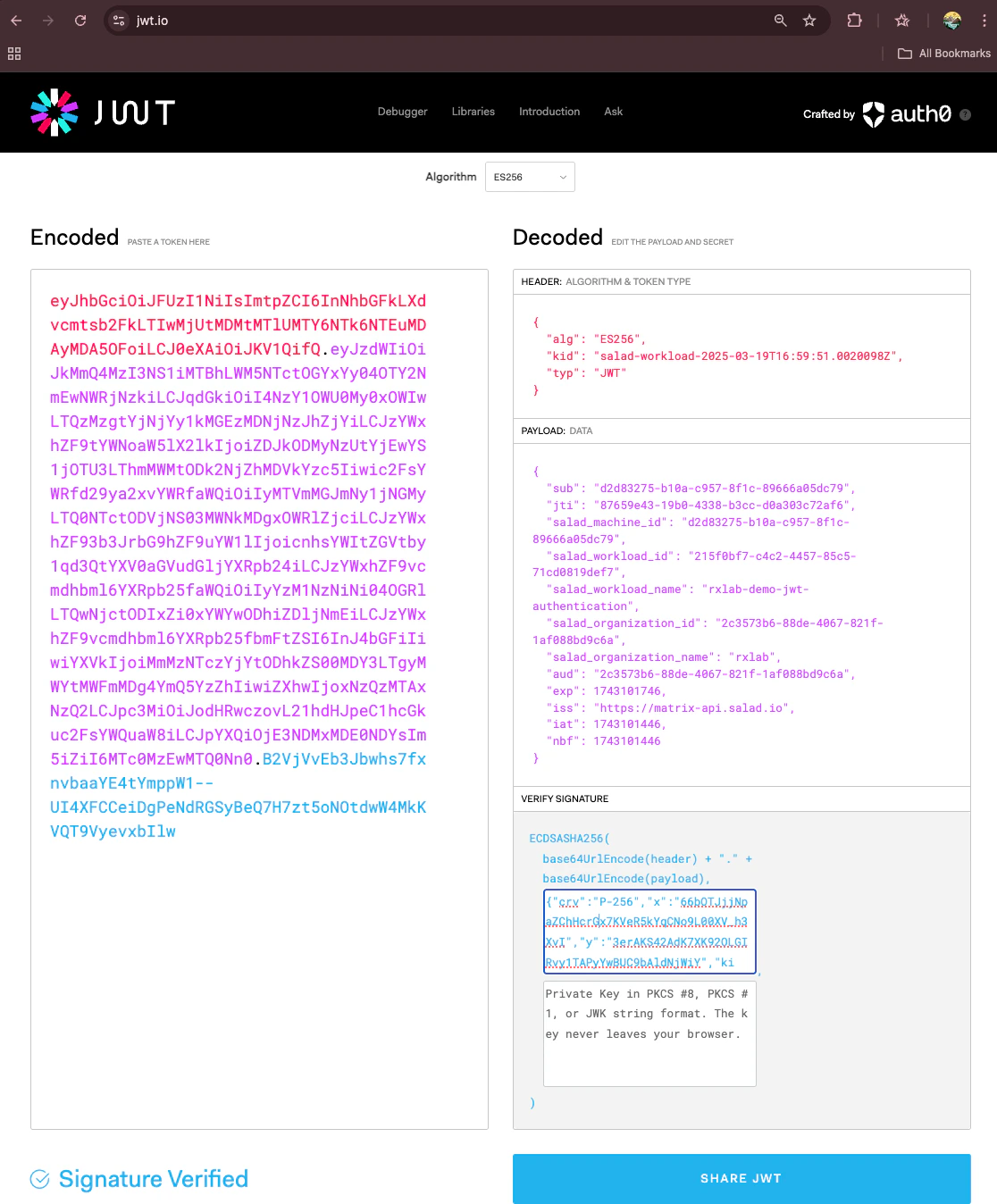 **Following the standard, the JWT consists of three parts, separated by dots (.):**
**Header** – Contains metadata about the token, such as the signing algorithm (alg) and key ID (kid).
The kid value ("salad-workload-2025-03-19T16:59:51.0020098Z") corresponds to the older public key in the JWKS mentioned
above.
**Payload** – Contains claims (data) such as the subject (sub), expiration (exp), issuer (iss), and custom fields
specific to the application. In the example above:
The sub is set to the salad\_machine\_id, identifying the specific Salad node for which the token is issued.
The aud is set to the salad\_organization\_id, representing the organization within SaladCloud to which the node belongs.
The salad\_workload\_id is an alias for the salad\_container\_group\_id, which can be retrieved from the deployed container
group using environment variables or SaladCloud APIs.
The iat (issued at), nbf (not before) and exp (expiration) are all timestamps in Unix format, indicating when the token
was issued, the earliest time the token is valid and when the token will expire.
**Signature** – A cryptographic signature that guarantees the integrity of the token. It is generated using the
specified algorithm and a private key. To verify the signature, the public key referenced in the JWT header is required.
**Important details regarding the expiration of JWT:**
Applications can make multiple calls to the IMDS in a short period of time, and may receive a cached JWT instead of a
newly issued one. Below is an example of calling the IMDS ten times with a one-minute interval:
**Following the standard, the JWT consists of three parts, separated by dots (.):**
**Header** – Contains metadata about the token, such as the signing algorithm (alg) and key ID (kid).
The kid value ("salad-workload-2025-03-19T16:59:51.0020098Z") corresponds to the older public key in the JWKS mentioned
above.
**Payload** – Contains claims (data) such as the subject (sub), expiration (exp), issuer (iss), and custom fields
specific to the application. In the example above:
The sub is set to the salad\_machine\_id, identifying the specific Salad node for which the token is issued.
The aud is set to the salad\_organization\_id, representing the organization within SaladCloud to which the node belongs.
The salad\_workload\_id is an alias for the salad\_container\_group\_id, which can be retrieved from the deployed container
group using environment variables or SaladCloud APIs.
The iat (issued at), nbf (not before) and exp (expiration) are all timestamps in Unix format, indicating when the token
was issued, the earliest time the token is valid and when the token will expire.
**Signature** – A cryptographic signature that guarantees the integrity of the token. It is generated using the
specified algorithm and a private key. To verify the signature, the public key referenced in the JWT header is required.
**Important details regarding the expiration of JWT:**
Applications can make multiple calls to the IMDS in a short period of time, and may receive a cached JWT instead of a
newly issued one. Below is an example of calling the IMDS ten times with a one-minute interval:
 We can observe that 4 of the calls (**No. 1, 4, 7, and 10**) received a newly issued JWT with the full 5-minute
expiration time, while the remaining 6 calls received a cached JWT with less than 5 minutes of remaining active time
(approximately 3 to 4 minutes).
In practice, applications don't need to call the IMDS with every request to external systems. Instead, they can call the
IMDS once every 2\~3 minutes and use the returned JWT for subsequent requests. Applications should also be designed to
handle JWT expiration (e.g., when the token is rejected by external services) and automatically fetch a new token when
needed to ensure uninterrupted operation.
## Build Applications Using JWT Authentication
Typically, applications running on Salad nodes obtain the JWT and include it in the HTTP header when making requests to
external services. These services validate the JWT against the JWKS endpoint to authorize access or exchange it for
fine-grained access to other services.
Below are two code snippets: one for **applications** running on SaladCloud and the other for **external services** that
the applications call to return job results. These examples demonstrate how to use the JWT for authentication. For
simplicity, both snippets are executed on a Salad node.
Before running the code, ensure that the required Python dependencies are installed, including salad-cloud-imds-sdk,
Flask, pyjwt, and cryptography.
```python applications.py theme={null}
from salad_cloud_imds_sdk import SaladCloudImdsSdk, Environment
import requests
def get_jwt():
sdk = SaladCloudImdsSdk( base_url=Environment.DEFAULT.value, timeout=10000 )
result = sdk.metadata.get_container_token()
return result.jwt
# Call the IMDS every 2–3 minutes and reuse the returned JWT for subsequent requests, rather than requesting a new JWT each time.
jwt_token = get_jwt()
# Include the JWT in the HTTP Authorization header.
headers = { "Authorization": f"Bearer {jwt_token}", "Content-Type": "application/json" }
# The external service endpoint - HTTPS; for the demo, call the local HTTP service
url = "http://127.0.0.1:8000/protected"
# The job result (e.g., audio transcription)
data = {
"transcript": "abcdefg",
"audio_length": 3600,
"real_time_factor": 100
}
# Return the job result to the external service.
print("\nSending data:", data)
response = requests.post(url, headers=headers, json=data)
if response.status_code == 200:
print("\nSuccess:", response.json()) # If JWT is valid
else:
print("\nError:", response.json()) # If JWT is invalid or expired
```
```python external_services.py theme={null}
from flask import Flask, request, jsonify
import jwt
import requests
import json
from jwt.exceptions import InvalidTokenError
from datetime import datetime, timezone
app = Flask(__name__)
jwks_url = "https://matrix-rest-api.salad.com/.well-known/workload-jwks.json"
audience_salad_org_id = "2c3573b6-88de-4067-821f-1af088bd9c6a"
def get_public_key(jwks_uri, kid):
response = requests.get(jwks_uri)
response.raise_for_status()
jwks = response.json()
for key in jwks["keys"]:
if key["kid"] == kid: # Select the appropriate public key
return jwt.algorithms.ECAlgorithm.from_jwk(json.dumps(key))
return None
def validate_jwt(token, jwks_uri, audience_id):
try:
unverified_header = jwt.get_unverified_header(token) # Extract kid from JWT header
kid = unverified_header.get("kid")
if not kid:
raise ValueError("No 'kid' found in JWT header.")
# Fetch the JWKS periodically (e.g., daily), rather than on every JWT validation.
public_key = get_public_key(jwks_uri, kid)
if not public_key:
raise ValueError(f"Public key with kid '{kid}' not found in JWKS.")
# Decode and validate the JWT
# decoded_payload = jwt.decode(token, public_key, algorithms=["ES256"], audience=audience_id)
# You may skip the aud (salad_organization_id) validation
decoded_payload = jwt.decode(token, public_key, algorithms=["ES256"], options={"verify_aud": False})
return decoded_payload
except InvalidTokenError as e:
print(f"Invalid token: {e}")
except Exception as e:
print(f"Error: {e}")
return None
@app.route('/protected', methods=['POST'])
def protected():
auth_header = request.headers.get('Authorization')
if not auth_header:
return jsonify({"error": "Authorization header missing"}), 401
token = auth_header.split(" ")[1] # Extract the token part of the header.
decoded_payload = validate_jwt(token, jwks_url, audience_salad_org_id) # Validate the JWT.
if decoded_payload: # Signature Verified
# Further verify that the 'salad_organization_name' and 'salad_workload_id'('salad_container_group_id') are correct.
request_data = request.json
print("\nThe JWT:", json.dumps(decoded_payload,indent=4))
print("\nReceived data:", request_data)
return jsonify({"message": "JWT is valid, and the result has been received successfully."}), 200
else:
return jsonify({"error": "Invalid or expired token"}), 401
if __name__ == '__main__':
app.run(debug=True, port=8000)
```
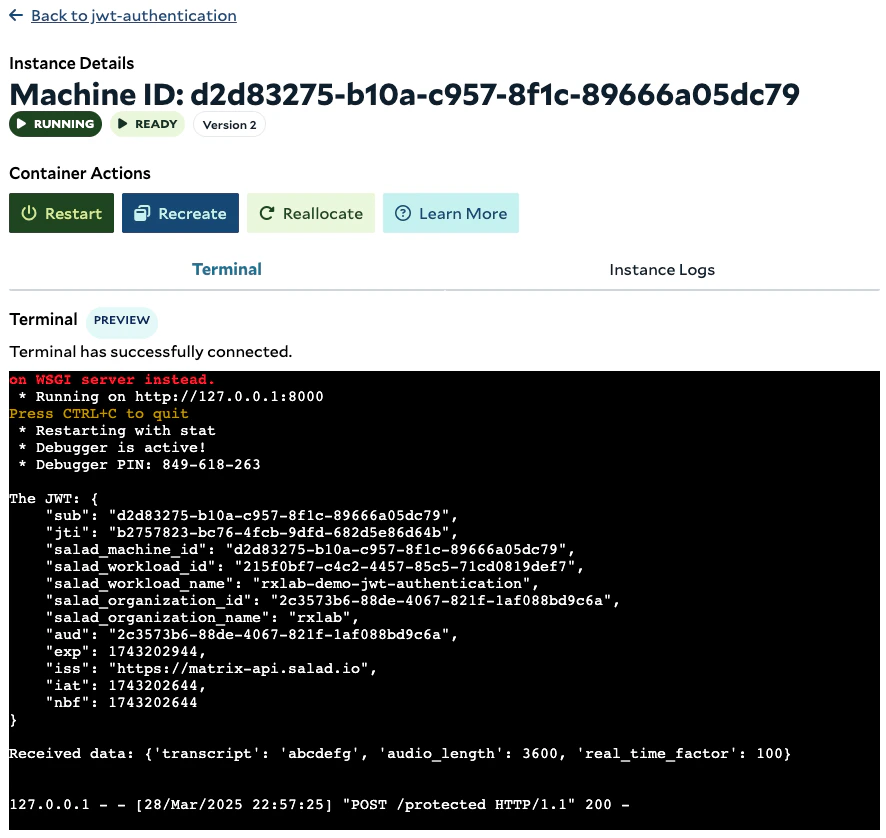
Open two terminals on the SaladCloud Portal. First, run external\_services.py, then run applications.py.
The application successfully sends the job result to the external service using the JWT. In the identity broker
scenario, the application can now retrieve real credentials for accessing public cloud services, such as job queues,
databases, and storage, and securely store them in memory.
We can observe that 4 of the calls (**No. 1, 4, 7, and 10**) received a newly issued JWT with the full 5-minute
expiration time, while the remaining 6 calls received a cached JWT with less than 5 minutes of remaining active time
(approximately 3 to 4 minutes).
In practice, applications don't need to call the IMDS with every request to external systems. Instead, they can call the
IMDS once every 2\~3 minutes and use the returned JWT for subsequent requests. Applications should also be designed to
handle JWT expiration (e.g., when the token is rejected by external services) and automatically fetch a new token when
needed to ensure uninterrupted operation.
## Build Applications Using JWT Authentication
Typically, applications running on Salad nodes obtain the JWT and include it in the HTTP header when making requests to
external services. These services validate the JWT against the JWKS endpoint to authorize access or exchange it for
fine-grained access to other services.
Below are two code snippets: one for **applications** running on SaladCloud and the other for **external services** that
the applications call to return job results. These examples demonstrate how to use the JWT for authentication. For
simplicity, both snippets are executed on a Salad node.
Before running the code, ensure that the required Python dependencies are installed, including salad-cloud-imds-sdk,
Flask, pyjwt, and cryptography.
```python applications.py theme={null}
from salad_cloud_imds_sdk import SaladCloudImdsSdk, Environment
import requests
def get_jwt():
sdk = SaladCloudImdsSdk( base_url=Environment.DEFAULT.value, timeout=10000 )
result = sdk.metadata.get_container_token()
return result.jwt
# Call the IMDS every 2–3 minutes and reuse the returned JWT for subsequent requests, rather than requesting a new JWT each time.
jwt_token = get_jwt()
# Include the JWT in the HTTP Authorization header.
headers = { "Authorization": f"Bearer {jwt_token}", "Content-Type": "application/json" }
# The external service endpoint - HTTPS; for the demo, call the local HTTP service
url = "http://127.0.0.1:8000/protected"
# The job result (e.g., audio transcription)
data = {
"transcript": "abcdefg",
"audio_length": 3600,
"real_time_factor": 100
}
# Return the job result to the external service.
print("\nSending data:", data)
response = requests.post(url, headers=headers, json=data)
if response.status_code == 200:
print("\nSuccess:", response.json()) # If JWT is valid
else:
print("\nError:", response.json()) # If JWT is invalid or expired
```
```python external_services.py theme={null}
from flask import Flask, request, jsonify
import jwt
import requests
import json
from jwt.exceptions import InvalidTokenError
from datetime import datetime, timezone
app = Flask(__name__)
jwks_url = "https://matrix-rest-api.salad.com/.well-known/workload-jwks.json"
audience_salad_org_id = "2c3573b6-88de-4067-821f-1af088bd9c6a"
def get_public_key(jwks_uri, kid):
response = requests.get(jwks_uri)
response.raise_for_status()
jwks = response.json()
for key in jwks["keys"]:
if key["kid"] == kid: # Select the appropriate public key
return jwt.algorithms.ECAlgorithm.from_jwk(json.dumps(key))
return None
def validate_jwt(token, jwks_uri, audience_id):
try:
unverified_header = jwt.get_unverified_header(token) # Extract kid from JWT header
kid = unverified_header.get("kid")
if not kid:
raise ValueError("No 'kid' found in JWT header.")
# Fetch the JWKS periodically (e.g., daily), rather than on every JWT validation.
public_key = get_public_key(jwks_uri, kid)
if not public_key:
raise ValueError(f"Public key with kid '{kid}' not found in JWKS.")
# Decode and validate the JWT
# decoded_payload = jwt.decode(token, public_key, algorithms=["ES256"], audience=audience_id)
# You may skip the aud (salad_organization_id) validation
decoded_payload = jwt.decode(token, public_key, algorithms=["ES256"], options={"verify_aud": False})
return decoded_payload
except InvalidTokenError as e:
print(f"Invalid token: {e}")
except Exception as e:
print(f"Error: {e}")
return None
@app.route('/protected', methods=['POST'])
def protected():
auth_header = request.headers.get('Authorization')
if not auth_header:
return jsonify({"error": "Authorization header missing"}), 401
token = auth_header.split(" ")[1] # Extract the token part of the header.
decoded_payload = validate_jwt(token, jwks_url, audience_salad_org_id) # Validate the JWT.
if decoded_payload: # Signature Verified
# Further verify that the 'salad_organization_name' and 'salad_workload_id'('salad_container_group_id') are correct.
request_data = request.json
print("\nThe JWT:", json.dumps(decoded_payload,indent=4))
print("\nReceived data:", request_data)
return jsonify({"message": "JWT is valid, and the result has been received successfully."}), 200
else:
return jsonify({"error": "Invalid or expired token"}), 401
if __name__ == '__main__':
app.run(debug=True, port=8000)
```
Open two terminals on the SaladCloud Portal. First, run external\_services.py, then run applications.py.
The application successfully sends the job result to the external service using the JWT. In the identity broker
scenario, the application can now retrieve real credentials for accessing public cloud services, such as job queues,
databases, and storage, and securely store them in memory.
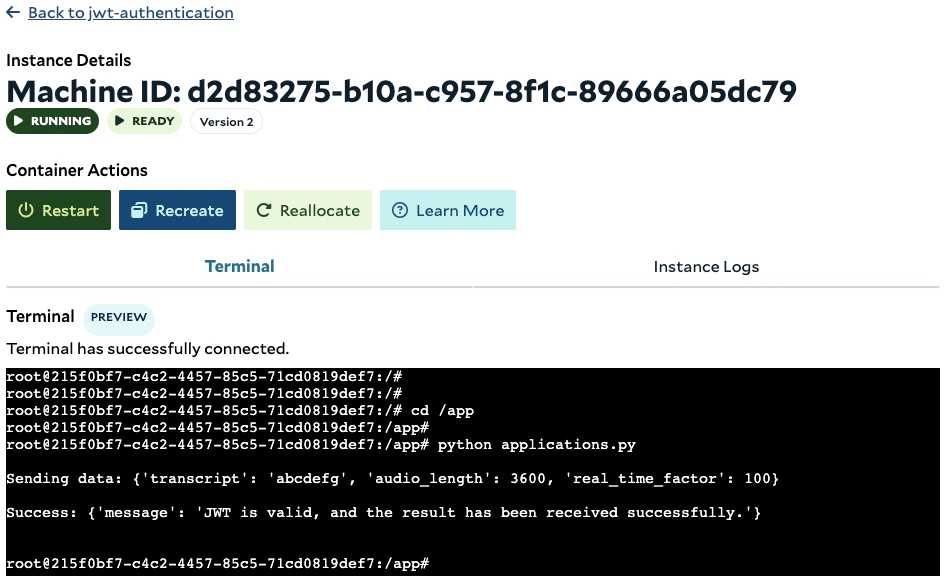 The service successfully validates the JWT and receives the result. Additionally, most proxies support JWT
authentication, allowing us to offload this function to the proxy, enabling services to focus on their core tasks.
For the identity broker, it can create temporary credentials, such as API keys, access tokens, or username/passwords,
and provide them to applications.
The service successfully validates the JWT and receives the result. Additionally, most proxies support JWT
authentication, allowing us to offload this function to the proxy, enabling services to focus on their core tasks.
For the identity broker, it can create temporary credentials, such as API keys, access tokens, or username/passwords,
and provide them to applications.