> ## Documentation Index
> Fetch the complete documentation index at: https://docs.salad.com/llms.txt
> Use this file to discover all available pages before exploring further.
# YOLO Inference API Recipes
> Deploy YOLO object detection models with Ultralytics on Salad Container Engine.
*Last Updated: July 09, 2025*
Deploy from the [SaladCloud Portal](https://portal.salad.com).
## Overview
Inference is powered by [Ultralytics YOLO](https://docs.ultralytics.com), a state-of-the-art object detection framework.
The API can process image and video files, as well as YouTube video URLs (non-live streams), and supports both visual
output (annotated images/videos) and structured JSON detection results.
This API accepts any model configuration supported by the Ultralytics YOLO library as query parameters — such as `conf`,
`iou`, `imgsz`, and others. For annotated videos, make sure they can be processed in less than 90 seconds, otherwise the
request will timeout.
### Output Types
* **`annotated=true`**: Returns an image or video file with bounding boxes and confidence scores rendered on top
* **`annotated=false`** (default): Returns structured JSON output with detection results
Omit the `Salad-Api-Key` header if you do not have authentication enabled.
## Example requests
### Image URL, JSON output
```shell theme={null}
curl -X POST https://vegetable-words-3e487ysdyhfkvjah.salad.cloud/process_url \
-H "Content-Type: application/json" \
-H "Salad-Api-Key: " \
-d '{"url": "https://upload.wikimedia.org/wikipedia/commons/6/6e/Golde33443.jpg"}'
```
### Image Upload with Confidence Threshold, Annotated output
```shell theme={null}
curl -X POST https://vegetable-words-3e487ysdyhfkvjah.salad.cloud/process_file?annotated=true&conf=0.5 \
-H "Content-Type: multipart/form-data" \
-H "Salad-Api-Key: " \
-F "file=@test_pic.jpg" \
--output result.jpg
```
### Process Local Video with object tracking, Annotated output
```shell theme={null}
curl -X POST https://vegetable-words-3e487ysdyhfkvjah.salad.cloud/process_file?annotated=true&track=true \
-H "Content-Type: multipart/form-data" \
-H "Salad-Api-Key: " \
-F "file=@new_york.mp4" \
--output result.mp4
```
### Process YouTube Video Link, JSON output
```shell theme={null}
curl -X POST https://vegetable-words-3e487ysdyhfkvjah.salad.cloud/process_url \
-H "Content-Type: application/json" \
-H "Salad-Api-Key: " \
-d '{"url": "https://www.youtube.com/watch?v=qCId-swJ19w"}'
```
### Add Custom Parameters (e.g. `imgsz`, `classes`, `max_det`)
```shell theme={null}
curl -X POST https://vegetable-words-3e487ysdyhfkvjah.salad.cloud/process_url?conf=0.4&imgsz=512&max_det=5 \
-H "Content-Type: application/json" \
-H "Salad-Api-Key: " \
-d '{"url": "https://upload.wikimedia.org/wikipedia/commons/6/6e/Golde33443.jpg"}'
```
You will get back a JSON response with object detections:
```json theme={null}
[
{
"name": "person",
"class": 0,
"confidence": 0.86155,
"box": {
"x1": 31.14127,
"y1": 69.07544,
"x2": 267.50793,
"y2": 335.46057
}
}
]
```
For video processing, timestamps are included:
```json theme={null}
[
{
"name": "person",
"class": 0,
"confidence": 0.95142,
"box": {
"x1": 0.48842,
"y1": 145.05518,
"x2": 499.85767,
"y2": 1277.97876
},
"timestamp": 0.13357753357753357
}
]
```
### Additional Parameters
The API supports all YOLO-compatible parameters as query params — including but not limited to:
* `conf` — confidence threshold (e.g., `conf=0.4`)
* `iou` — intersection-over-union threshold
* `imgsz` — image size
* `classes` — filter by class IDs
* `max_det` — maximum number of detections
[See the full list of YOLO parameters](https://docs.ultralytics.com/modes/predict/#inference-arguments)
## How To Use This Recipe
### Authentication
When deploying this recipe, you can optionally enable authentication in the container gateway. If you enable
authentication, all requests to your API will need to include your SaladCloud API key in the header `Salad-Api-Key`. See
the [documentation](/container-engine/how-to-guides/gateway/sending-requests) for more information about authentication.
### Replica Count
The recipe is configured for 3 replicas by default, and we recommend using at least 3 for testing, and at least 5 for
production workloads. SaladCloud's distributed GPU cloud is powered by idle gaming PCs around the world, in private
residences, gaming cafes, and esports arenas. A consequence of this unique infrastructure is that all nodes must be
considered interruptible without warning. If a 👨🍳 Chef (a compute host) decides they want to use their GPU to play a
video game, or their dog trips on the power cord, or their Wi-Fi goes out, the instance of your workload running on that
node will be interrupted, and a new instance will be allocated to a different node. This means you may want to slightly
over-provision the capacity you expect to need in order to have adequate coverage during node reallocations. Don't
worry, we only charge for instances that are actually running.
### Logging
SaladCloud offers a simple built-in method to view logs from the portal, to facilitate testing and development. For
production workloads, we highly recommend connecting an external logging source, such as Axiom. This can be done during
container group creation.
### Deploy It And Wait
When you deploy the recipe, SaladCloud will find the desired number of qualified nodes, and begin the process of
downloading the container image to the host machine. Depending on network conditions, downloading the container image
may take several minutes. Eventually, you will see instances enter the running state, and show a green checkmark in the
"Ready" column, indicating the workload is passing its readiness probe. Once at least 1 instance is running, the
container group will be considered running, but for production you will want to wait until an adequate number of nodes
have become ready before moving traffic over.
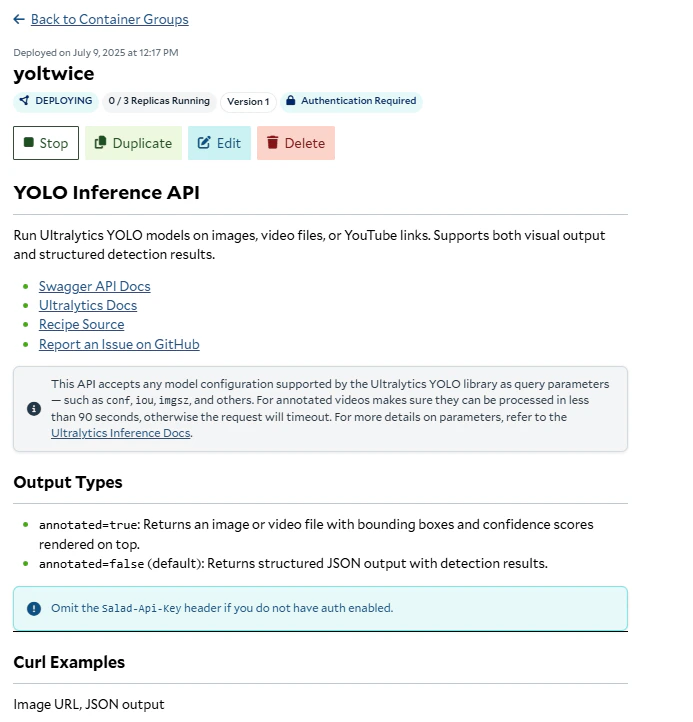 You will find helpful links and information in the readme on the container group page once deployed.
## Workload Customizations
### Hardware Considerations
For optimal performance, we recommend using a GPU with at least 12 GB VRAM for video processing workloads. YOLO is
optimized to run on a variety of hardware, but for high-volume workloads 12+ GB cards will be preferable. Note that
requests timeout after 90 seconds. If you need to process long videos you might need to use a larger GPU or integrate a
storage account to save results. With existing settings we recommend processing videos up to 30 seconds long. If you
only need to process images, or videos frame by frame you can use a smaller GPU.
### Custom Models
By default we are using the Large YOLOv11 model. You can extend the API by using custom YOLO models or other versions of
pretrained YOLO models. Replace the default model with your custom model file in the Docker image, and ensure the model
path/name is updated in the inference script. You can push your new image to your container registry and update your
container group configuration to reference this new model.
## Source Code
[ Github Repository](https://github.com/SaladTechnologies/salad-recipes/tree/master/recipes/yolo)
You will find helpful links and information in the readme on the container group page once deployed.
## Workload Customizations
### Hardware Considerations
For optimal performance, we recommend using a GPU with at least 12 GB VRAM for video processing workloads. YOLO is
optimized to run on a variety of hardware, but for high-volume workloads 12+ GB cards will be preferable. Note that
requests timeout after 90 seconds. If you need to process long videos you might need to use a larger GPU or integrate a
storage account to save results. With existing settings we recommend processing videos up to 30 seconds long. If you
only need to process images, or videos frame by frame you can use a smaller GPU.
### Custom Models
By default we are using the Large YOLOv11 model. You can extend the API by using custom YOLO models or other versions of
pretrained YOLO models. Replace the default model with your custom model file in the Docker image, and ensure the model
path/name is updated in the inference script. You can push your new image to your container registry and update your
container group configuration to reference this new model.
## Source Code
[ Github Repository](https://github.com/SaladTechnologies/salad-recipes/tree/master/recipes/yolo)