> ## Documentation Index
> Fetch the complete documentation index at: https://docs.salad.com/llms.txt
> Use this file to discover all available pages before exploring further.
# SAM3 Segmentation API Recipe
> Deploy Meta's Segment Anything Model 3 for zero-shot image segmentation on Salad Container Engine.
*Last Updated: January 29, 2026*
Deploy from the [SaladCloud Portal](https://portal.salad.com).
## Overview
**Segment Anything Model 3 (SAM3)** is Meta's third-generation foundation model for image segmentation. With 848 million
parameters, SAM3 introduces **Promptable Concept Segmentation (PCS)** - a breakthrough capability that allows you to
segment objects using natural language descriptions, not just coordinates.
Inference is powered by [Ultralytics SAM3](https://docs.ultralytics.com/models/sam-3/), providing a simple API for
zero-shot image segmentation.
### Key Capabilities
* **Zero-shot segmentation**: Segment any object without training
* **Open-vocabulary**: Use text prompts like "dog", "person in red shirt", or "coffee mug"
* **Multi-prompt support**: Combine point coordinates, bounding boxes, and text descriptions
* **High accuracy**: State-of-the-art segmentation quality across diverse image types
### Prompt Types
* **Point prompts**: Specify `points` as `[[x, y], ...]` and `labels` as `[1, 0, ...]` where 1=foreground, 0=background
* **Box prompts**: Specify `boxes` as `[[x1, y1, x2, y2], ...]` for bounding box coordinates
* **Text prompts**: Specify `text` as a natural language description (e.g., "dog", "person in red shirt")
### Output Types
* **`annotated=false`** (default): Returns JSON with RLE-encoded masks and metadata
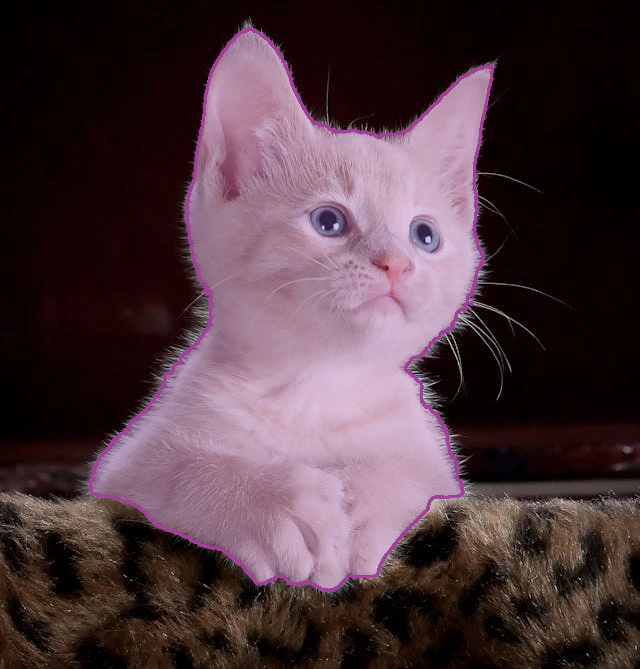
* **`annotated=true`**: Returns a PNG image with colored mask overlays drawn on the original image
## Example Requests
Omit the `Salad-Api-Key` header if you do not have authentication enabled.
### Box Prompt - Segment object within bounding box
```shell theme={null}
curl -X POST https://your-container-group.salad.cloud/segment_url \
-H "Content-Type: application/json" \
-H "Salad-Api-Key: " \
-d '{"url": "https://images.pexels.com/photos/45201/kitty-cat-kitten-pet-45201.jpeg?w=640", "boxes": [[100, 100, 400, 400]]}'
```
### Point Prompt - Segment object at coordinates
```shell theme={null}
curl -X POST https://your-container-group.salad.cloud/segment_url \
-H "Content-Type: application/json" \
-H "Salad-Api-Key: " \
-d '{"url": "https://images.pexels.com/photos/45201/kitty-cat-kitten-pet-45201.jpeg?w=640", "points": [[300, 200]], "labels": [1]}'
```
### Text Prompt - Open-vocabulary segmentation
```shell theme={null}
curl -X POST https://your-container-group.salad.cloud/segment_url \
-H "Content-Type: application/json" \
-H "Salad-Api-Key: " \
-d '{"url": "https://images.pexels.com/photos/45201/kitty-cat-kitten-pet-45201.jpeg?w=640", "text": "cat"}'
```
### File Upload with Annotated Output
```shell theme={null}
curl -X POST "https://your-container-group.salad.cloud/segment_file?annotated=true" \
-H "Salad-Api-Key: " \
-F "file=@image.jpg" \
-F "boxes=[[50, 50, 300, 400]]" \
--output result.png
```
### URL with Annotated Output
```shell theme={null}
curl -X POST "https://your-container-group.salad.cloud/segment_url?annotated=true" \
-H "Content-Type: application/json" \
-H "Salad-Api-Key: " \
-d '{"url": "https://example.com/image.jpg", "text": "dog"}' \
--output segmented.png
```
## Response Format
### JSON Response (annotated=false)
Returns an array of detected masks:
```json theme={null}
[
{
"mask_rle": {
"counts": [123, 45, 67, ...],
"size": [480, 640]
},
"area": 15234,
"bbox": [50.0, 100.0, 200.0, 350.0],
"confidence": 0.95
}
]
```
* **mask\_rle**: Run-length encoded binary mask
* **area**: Number of pixels in the mask
* **bbox**: Bounding box `[x1, y1, x2, y2]`
* **confidence**: Model confidence score
### Image Response (annotated=true)
Returns a PNG image (`image/png` content type) with:
* The original image as the background
* Semi-transparent colored overlays for each detected segment
* Contour outlines drawn around each mask boundary
* Each segment receives a unique random color for easy visual distinction
**Example Output:**
 ## How To Use This Recipe
### Prerequisites
Before deploying this recipe, you must:
1. Create a [HuggingFace account](https://huggingface.co/join)
2. Request access to the [facebook/sam3](https://huggingface.co/facebook/sam3) model
3. Create an access token at [HuggingFace Settings](https://huggingface.co/settings/tokens)
The HuggingFace token is required during deployment to download the SAM3 model weights.
### Authentication
When deploying this recipe, you can optionally enable authentication in the container gateway. If you enable
authentication, all requests to your API will need to include your SaladCloud API key in the header `Salad-Api-Key`. See
the [documentation](/container-engine/how-to-guides/gateway/sending-requests) for more information about authentication.
### Replica Count
The recipe is configured for 3 replicas by default, and we recommend using at least 3 for testing, and at least 5 for
production workloads. SaladCloud's distributed GPU cloud is powered by idle gaming PCs around the world. A consequence
of this unique infrastructure is that all nodes must be considered interruptible without warning. This means you may
want to slightly over-provision the capacity you expect to need in order to have adequate coverage during node
reallocations. Don't worry, we only charge for instances that are actually running.
### Logging
SaladCloud offers a simple built-in method to view logs from the portal, to facilitate testing and development. For
production workloads, we highly recommend connecting an external logging source, such as Axiom. This can be done during
container group creation.
### Deploy It And Wait
When you deploy the recipe, SaladCloud will find the desired number of qualified nodes, and begin the process of
downloading the container image and SAM3 model weights.
Once at least 1 instance is running and passing health checks, the container group will be considered running. For
production, wait until an adequate number of nodes have become ready before moving traffic over.
## Workload Customizations
### Hardware Considerations
SAM3 requires approximately 4-8GB of VRAM for inference. The default configuration uses RTX 4060Ti GPUs with 16GB VRAM,
which provides ample headroom for the model.
For high-throughput workloads, you may want to consider:
* Using GPUs with more VRAM for batch processing
* Increasing replica count for parallel request handling
### Custom Models
The recipe supports different SAM3 model variants. You can specify the model name when deploying.
## API Reference
### Endpoints
| Endpoint | Method | Description |
| --------------- | ------ | ------------------------------ |
| `/segment_file` | POST | Segment an uploaded image file |
| `/segment_url` | POST | Segment an image from URL |
| `/health` | GET | Health check endpoint |
| `/docs` | GET | Swagger API documentation |
### Parameters
| Parameter | Type | Description |
| ----------- | ------- | ------------------------------------------------------- |
| `points` | array | Point coordinates `[[x, y], ...]` |
| `labels` | array | Point labels `[1, 0, ...]` (1=foreground, 0=background) |
| `boxes` | array | Bounding boxes `[[x1, y1, x2, y2], ...]` |
| `text` | string | Text prompt for open-vocabulary segmentation |
| `annotated` | boolean | Return annotated image (true) or JSON (false) |
## Source Code
[ Github Repository](https://github.com/SaladTechnologies/salad-recipes/tree/master/recipes/sam3)
## How To Use This Recipe
### Prerequisites
Before deploying this recipe, you must:
1. Create a [HuggingFace account](https://huggingface.co/join)
2. Request access to the [facebook/sam3](https://huggingface.co/facebook/sam3) model
3. Create an access token at [HuggingFace Settings](https://huggingface.co/settings/tokens)
The HuggingFace token is required during deployment to download the SAM3 model weights.
### Authentication
When deploying this recipe, you can optionally enable authentication in the container gateway. If you enable
authentication, all requests to your API will need to include your SaladCloud API key in the header `Salad-Api-Key`. See
the [documentation](/container-engine/how-to-guides/gateway/sending-requests) for more information about authentication.
### Replica Count
The recipe is configured for 3 replicas by default, and we recommend using at least 3 for testing, and at least 5 for
production workloads. SaladCloud's distributed GPU cloud is powered by idle gaming PCs around the world. A consequence
of this unique infrastructure is that all nodes must be considered interruptible without warning. This means you may
want to slightly over-provision the capacity you expect to need in order to have adequate coverage during node
reallocations. Don't worry, we only charge for instances that are actually running.
### Logging
SaladCloud offers a simple built-in method to view logs from the portal, to facilitate testing and development. For
production workloads, we highly recommend connecting an external logging source, such as Axiom. This can be done during
container group creation.
### Deploy It And Wait
When you deploy the recipe, SaladCloud will find the desired number of qualified nodes, and begin the process of
downloading the container image and SAM3 model weights.
Once at least 1 instance is running and passing health checks, the container group will be considered running. For
production, wait until an adequate number of nodes have become ready before moving traffic over.
## Workload Customizations
### Hardware Considerations
SAM3 requires approximately 4-8GB of VRAM for inference. The default configuration uses RTX 4060Ti GPUs with 16GB VRAM,
which provides ample headroom for the model.
For high-throughput workloads, you may want to consider:
* Using GPUs with more VRAM for batch processing
* Increasing replica count for parallel request handling
### Custom Models
The recipe supports different SAM3 model variants. You can specify the model name when deploying.
## API Reference
### Endpoints
| Endpoint | Method | Description |
| --------------- | ------ | ------------------------------ |
| `/segment_file` | POST | Segment an uploaded image file |
| `/segment_url` | POST | Segment an image from URL |
| `/health` | GET | Health check endpoint |
| `/docs` | GET | Swagger API documentation |
### Parameters
| Parameter | Type | Description |
| ----------- | ------- | ------------------------------------------------------- |
| `points` | array | Point coordinates `[[x, y], ...]` |
| `labels` | array | Point labels `[1, 0, ...]` (1=foreground, 0=background) |
| `boxes` | array | Bounding boxes `[[x1, y1, x2, y2], ...]` |
| `text` | string | Text prompt for open-vocabulary segmentation |
| `annotated` | boolean | Return annotated image (true) or JSON (false) |
## Source Code
[ Github Repository](https://github.com/SaladTechnologies/salad-recipes/tree/master/recipes/sam3)