> ## Documentation Index
> Fetch the complete documentation index at: https://docs.salad.com/llms.txt
> Use this file to discover all available pages before exploring further.
# Ollama Recipes
> Deploy any language model from the Ollama catalog with Ollama on Salad Container Engine.
*Last Updated: July 9, 2025*
Deploy from the [SaladCloud Portal](https://portal.salad.com).
## Overview
Inference is powered by [Ollama](https://ollama.com/), a lightweight, extensible framework for building and running
language models on your machine. Ollama provides a simple API for creating, running, and managing models, and has a
library of pre-built models that can be easily used.
You can deploy any model from the [Ollama Model Library](https://ollama.com/library) by providing the model name via
environment variable. Popular models include:
* **Code Generation**: `codellama`, `codegemma`, `starcoder2`
* **Chat Models**: `llama3.1`, `llama3.2`, `mistral`, `gemma2`, `qwen2.5`
* **Specialized Models**: `llava` (vision), `nomic-embed-text` (embeddings), `all-minilm` (embeddings)
* **Custom Models**: Any model available in the Ollama library
Don't see the model you want? Check the complete [Ollama Model Library](https://ollama.com/library) for all available
models, or create your own custom model using a Modelfile.
## Example request
Submit chat completion requests to the `/v1/chat/completions` endpoint, and receive generated text in response.
```shell theme={null}
curl -X POST https://vegetable-words-3e487ysdyhfkvjah.salad.cloud/v1/chat/completions \
-H "Content-Type: application/json" \
-H "Salad-Api-Key: " \
-d @request.json
```
```json request.json theme={null}
{
"model": "llama3.1",
"messages": [
{
"role": "user",
"content": "Write a Python function to calculate fibonacci numbers:"
}
],
"max_tokens": 300,
"temperature": 0.7,
"stream": false
}
```
You will get back a json response with the generated text:
````json theme={null}
{
"id": "chatcmpl-1234567890abcdef",
"object": "chat.completion",
"created": 1704067200,
"model": "llama3.1",
"choices": [
{
"index": 0,
"message": {
"role": "assistant",
"content": "Here's a Python function to calculate Fibonacci numbers:\n\n```python\ndef fibonacci(n):\n if n <= 0:\n return []\n elif n == 1:\n return [0]\n elif n == 2:\n return [0, 1]\n \n fib_sequence = [0, 1]\n for i in range(2, n):\n fib_sequence.append(fib_sequence[i-1] + fib_sequence[i-2])\n \n return fib_sequence\n```"
},
"finish_reason": "stop"
}
],
"usage": {
"prompt_tokens": 12,
"completion_tokens": 145,
"total_tokens": 157
}
}
````
## How To Use This Recipe
### Model Selection
When deploying this recipe, you can specify any model from the [Ollama Model Library](https://ollama.com/library) by
setting the `OLLAMA_MODEL_NAME` environment variable. For example:
* `OLLAMA_MODEL_NAME=llama3.1` - Meta's Llama 3.1 8B model
* `OLLAMA_MODEL_NAME=mistral` - Mistral 7B model
* `OLLAMA_MODEL_NAME=codellama` - Code Llama for code generation
* `OLLAMA_MODEL_NAME=llava` - Llava vision-language model
### Authentication
When deploying this recipe, you can optionally enable authentication in the container gateway. If you enable
authentication, all requests to your API will need to include your SaladCloud API key in the header `Salad-Api-Key`. See
the [documentation](/container-engine/how-to-guides/gateway/sending-requests) for more information about authentication.
### Replica Count
The recipe is configured for 3 replicas by default, and we recommend using at least 3 for testing, and at least 5 for
production workloads. SaladCloud's distributed GPU cloud is powered by idle gaming PCs around the world, in private
residences, gaming cafes, and esports arenas. A consequence of this unique infrastructure is that all nodes must be
considered interruptible without warning. If a 👨🍳 Chef (a compute host) decides they want to use their GPU to play a
video game, or their dog trips on the power cord, or their Wi-Fi goes out, the instance of your workload running on that
node will be interrupted, and a new instance will be allocated to a different node. This means you may want to slightly
over-provision the capacity you expect to need in order to have adequate coverage during node reallocations. Don't
worry, we only charge for instances that are actually running.
### Logging
SaladCloud offers a simple built-in method to view logs from the portal, to facilitate testing and development. For
production workloads, we highly recommend connecting an external logging source, such as Axiom. This can be done during
container group creation.
### Deploy It And Wait
When you deploy the recipe, SaladCloud will find the desired number of qualified nodes, and begin the process of
downloading the container image to the host machine. The model will be downloaded before the container will pass its
readiness probe, to avoid traffic being routed to nodes that do not have the model downloaded yet. This may take several
minutes depending on the model size and network conditions of that particular node. Remember, these are residential PCs
with residential internet connections, and performance will vary across different nodes.
Eventually, you will see instances enter the running state, and show a green checkmark in the "Ready" column, indicating
the workload is passing its readiness probe. Once at least 1 instance is running, the container group will be considered
running, but for production you will want to wait until an adequate number of nodes have become ready before moving
traffic over.
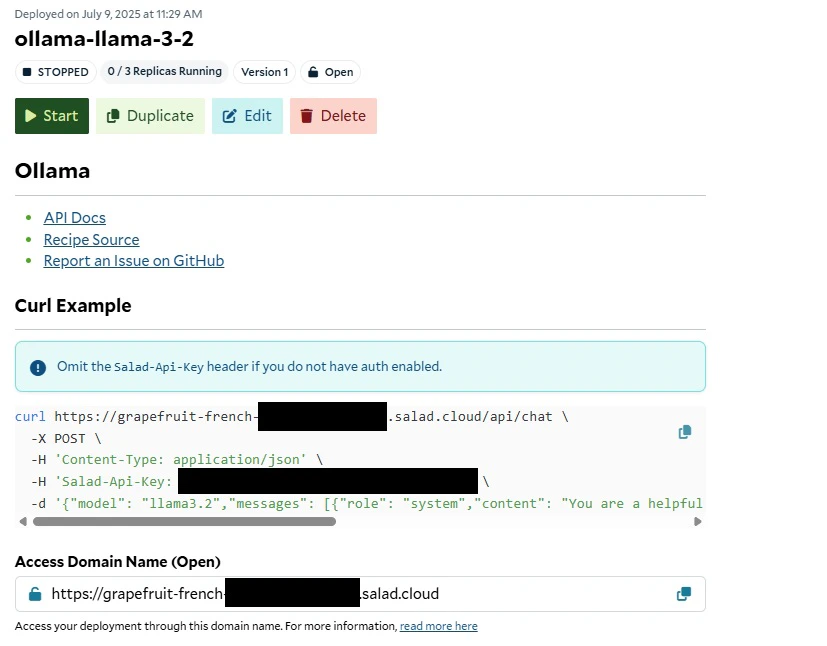 You will find helpful links and information in the readme on the container group page once deployed.
## Source Code
[ Github Repository](https://github.com/SaladTechnologies/salad-recipes/tree/master/recipes/ollama)
You will find helpful links and information in the readme on the container group page once deployed.
## Source Code
[ Github Repository](https://github.com/SaladTechnologies/salad-recipes/tree/master/recipes/ollama)