> ## Documentation Index
> Fetch the complete documentation index at: https://docs.salad.com/llms.txt
> Use this file to discover all available pages before exploring further.
# GROMACS Kelpie Recipe
> Integrate GROMACS workloads with Salad Kelpie.
*Last Updated: August 25, 2025*
Deploy from the [SaladCloud Portal](https://portal.salad.com).
## Overview
Please familiarize yourself with [GROMACS](https://www.gromacs.org/) and
[GROMACS with Job Queue](https://docs.salad.com/container-engine/how-to-guides/molecular-dynamics-simulation/gromacs-job-queue)
on SaladCloud before running the recipe.
You’ll need to provide access to S3-compatible storage when launching the recipe. After the container group is running,
you can submit jobs to the Salad Kelpie. The instances then retrieve them from the Kelpie platform, download necessary
files from the storage, execute the simulations, and upload both the state and results.
The environment includes:
* **Python Environment** - Miniconda 25.5.1 with Python 3.12
* **GROMACS 2024.5(CUDA 11.8)without MPI** - For high-performance molecular dynamics simulations
* **VS Code Server** - Optional remote development access
* **Kelpie 0.6.0** - The Kelpie worker, which retrieves jobs from the Kelpie platform and calls simulation applications
* **GROMACS Application** - Support chunked simulations with self-managed data synchronization
## Deployment
The following variables are required to run the recipe:
```bash theme={null}
# Unique identifier for each container group on SaladCloud.
CONTAINER_GROUP_NAME="gromacs-kelpie-recipe-001"
# Access to the S3-compatible Cloud Storage
AWS_ENDPOINT_URL=https://******.r2.cloudflarestorage.com
AWS_ACCESS_KEY_ID=******
AWS_SECRET_ACCESS_KEY=******
AWS_REGION=******
# The name of current project where the container group is created.
SALAD_PROJECT=******
# Replica count, based on need
Replicas=2
```
You can adjust the hardware configuration—including vCPU, memory, and GPU—as needed.
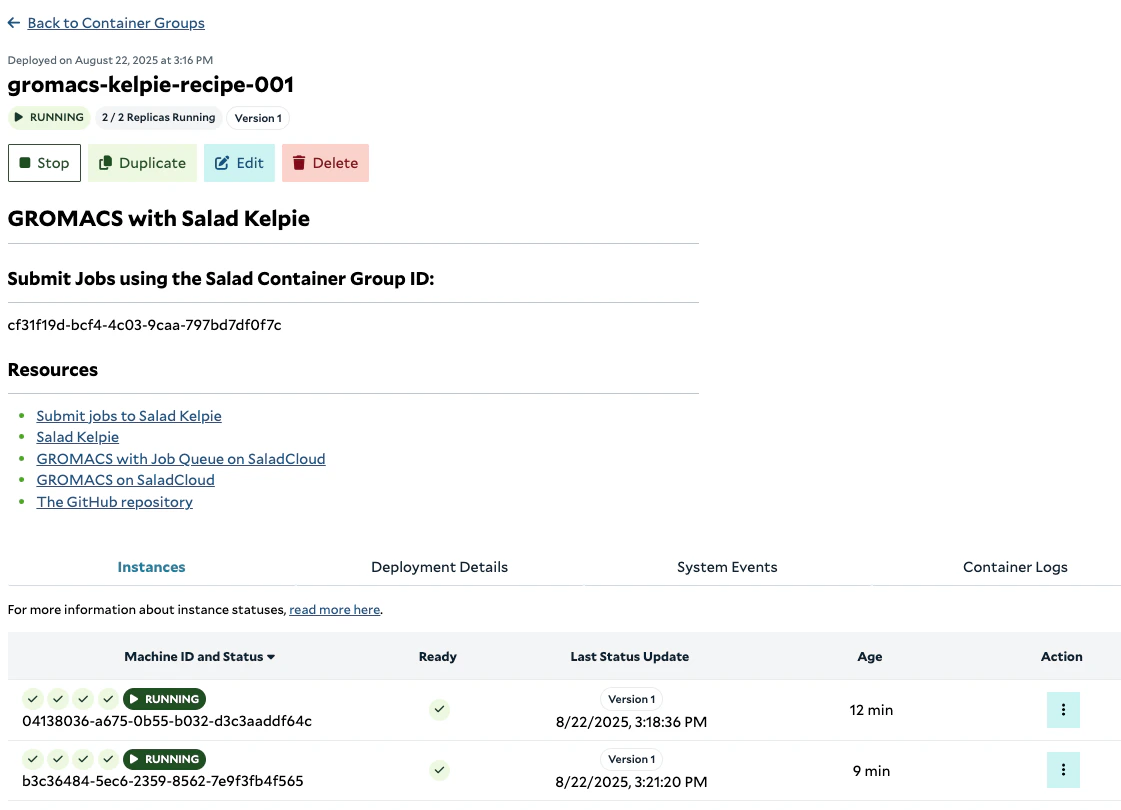
Once the container group is running, record its Salad Container Group ID for use when submitting jobs.
 ## Job Submission and Monitoring
Ensure that all job input files are uploaded to the storage before submitting the jobs.
```bash theme={null}
BUCKET/PREFIX/job1/j1.tpr
```
The following environment variables are required to run
[submit\_jobs.py](https://github.com/SaladTechnologies/mds/blob/main/gromacs-kelpie/no_sync_client/11_submit_jobs.py):
```bash theme={null}
# Access to the Kelpie platform.
KELPIE_API_URL=https://kelpie.saladexamples.com
SALAD_API_KEY=salad_cloud_user_******
SALAD_ORGANIZATION=******
SALAD_PROJECT=******
# Retrieve the ID upon workload creation or query in SaladCloud.
SALAD_CONTAINER_GROUP_ID=
BUCKET="BUCKET_NAME"
PREFIX="PREFIX_NAME"
# To keep track of all submitted job IDs for querying their status later.
JOB_HISTORY="job_history.txt"
```
To monitor the status of a job, run
[query\_job.py](https://github.com/SaladTechnologies/mds/blob/main/gromacs-kelpie/no_sync_client/17_query_job.py).
The following files are generated during the job execution and uploaded back to the storage:
```bash theme={null}
BUCKET/PREFIX/job1/j1.tpr # Original input file
BUCKET/PREFIX/job1/history.txt
BUCKET/PREFIX/job1/j1.cpt
BUCKET/PREFIX/job1/j1.part0001.edr
BUCKET/PREFIX/job1/j1.part0001.gro
BUCKET/PREFIX/job1/j1.part0001.log
BUCKET/PREFIX/job1/j1.part0001.trr
```
For more information on job definition, submission, and processing, see
[this link](https://docs.salad.com/container-engine/how-to-guides/molecular-dynamics-simulation/gromacs-job-queue#salad-kelpie-with-self-managed-data-synchronization)
.
## Source Code
The complete source code for this recipe is available in the
[SaladCloud Recipes GitHub repository](https://github.com/SaladTechnologies/salad-recipes/tree/master/recipes/gromacs-kelpie).
## Resources
* [Salad Kelpie](https://docs.salad.com/container-engine/how-to-guides/job-processing/kelpie)
* [GROMACS with Job Queue on SaladCloud](https://docs.salad.com/container-engine/how-to-guides/molecular-dynamics-simulation/gromacs-job-queue)
* [GROMACS on SaladCloud](https://docs.salad.com/guides/molecular-dynamics-simulation/gromacs-srcg)
* [The GitHub repository](https://github.com/SaladTechnologies/mds/tree/main/gromacs-kelpie)
## Job Submission and Monitoring
Ensure that all job input files are uploaded to the storage before submitting the jobs.
```bash theme={null}
BUCKET/PREFIX/job1/j1.tpr
```
The following environment variables are required to run
[submit\_jobs.py](https://github.com/SaladTechnologies/mds/blob/main/gromacs-kelpie/no_sync_client/11_submit_jobs.py):
```bash theme={null}
# Access to the Kelpie platform.
KELPIE_API_URL=https://kelpie.saladexamples.com
SALAD_API_KEY=salad_cloud_user_******
SALAD_ORGANIZATION=******
SALAD_PROJECT=******
# Retrieve the ID upon workload creation or query in SaladCloud.
SALAD_CONTAINER_GROUP_ID=
BUCKET="BUCKET_NAME"
PREFIX="PREFIX_NAME"
# To keep track of all submitted job IDs for querying their status later.
JOB_HISTORY="job_history.txt"
```
To monitor the status of a job, run
[query\_job.py](https://github.com/SaladTechnologies/mds/blob/main/gromacs-kelpie/no_sync_client/17_query_job.py).
The following files are generated during the job execution and uploaded back to the storage:
```bash theme={null}
BUCKET/PREFIX/job1/j1.tpr # Original input file
BUCKET/PREFIX/job1/history.txt
BUCKET/PREFIX/job1/j1.cpt
BUCKET/PREFIX/job1/j1.part0001.edr
BUCKET/PREFIX/job1/j1.part0001.gro
BUCKET/PREFIX/job1/j1.part0001.log
BUCKET/PREFIX/job1/j1.part0001.trr
```
For more information on job definition, submission, and processing, see
[this link](https://docs.salad.com/container-engine/how-to-guides/molecular-dynamics-simulation/gromacs-job-queue#salad-kelpie-with-self-managed-data-synchronization)
.
## Source Code
The complete source code for this recipe is available in the
[SaladCloud Recipes GitHub repository](https://github.com/SaladTechnologies/salad-recipes/tree/master/recipes/gromacs-kelpie).
## Resources
* [Salad Kelpie](https://docs.salad.com/container-engine/how-to-guides/job-processing/kelpie)
* [GROMACS with Job Queue on SaladCloud](https://docs.salad.com/container-engine/how-to-guides/molecular-dynamics-simulation/gromacs-job-queue)
* [GROMACS on SaladCloud](https://docs.salad.com/guides/molecular-dynamics-simulation/gromacs-srcg)
* [The GitHub repository](https://github.com/SaladTechnologies/mds/tree/main/gromacs-kelpie)