> ## Documentation Index
> Fetch the complete documentation index at: https://docs.salad.com/llms.txt
> Use this file to discover all available pages before exploring further.
# ComfyUI API Recipes
> Deploy popular image generation models with ComfyUI API on Salad Container Engine.
*Last Updated: January 8, 2026*
Deploy from the [SaladCloud Portal](https://portal.salad.com).
## Overview
Inference is powered by [ComfyUI](https://github.com/comfyanonymous/ComfyUI/), exposed via
[ComfyUI API](https://github.com/SaladTechnologies/comfyui-api) (v1.16.1) to facilitate horizontally scalable operation.
Users can make an HTTP request to the provided endpoints and get back one or more outputs in base64 encoded form, via
Webhook, or uploaded to S3, Azure Blob Storage, or Hugging Face.
**THIS RECIPE DOES NOT SERVE THE WEB UI**.
For a comprehensive deployment guide covering custom images, dynamic model loading, video generation, and job queues,
see the [ComfyUI Deployment Guide](/container-engine/how-to-guides/ai-machine-learning/deploy-stable-diffusion-comfy).
Several models are available, including:
* [Dreamshaper 8](https://civitai.com/models/4384/dreamshaper) - Fine-tuned from Stable Diffusion 1.5, great quality
images, very low hardware requirements, supports many different art styles, and has a commercial-friendly license.
* [FLUX.1-Dev](https://huggingface.co/black-forest-labs/FLUX.1-dev) - Foundational image generation model by Black
Forest Labs, specifically [this FP8 version](https://huggingface.co/Comfy-Org/flux1-dev) provided by the Comfy Org.
* [FLUX.1-Schnell](https://huggingface.co/black-forest-labs/FLUX.1-schnell) - A faster, more efficient version of
FLUX.1-Dev, specifically [this FP8 version](https://huggingface.co/Comfy-Org/flux1-schnell) provided by the Comfy Org.
* [Stable Diffusion XL](https://huggingface.co/stabilityai/stable-diffusion-xl-base-1.0) - a foundational image
generation model by Stability AI. It includes the base and
[refiner model](https://huggingface.co/stabilityai/stable-diffusion-xl-refiner-1.0).
* [Stable Diffusion 3.5 Medium](https://huggingface.co/stabilityai/stable-diffusion-3.5-medium) - a foundational image
generation model by Stability AI.
Don't see the model you want? It's easy to customize this recipe to run any ComfyUI workflow. Check out the
[example Docker images](https://github.com/SaladTechnologies/salad-recipes/tree/master/recipes/comfyui) to see how it's
done.
## Example request
Submit API-formatted ComfyUI prompts to the `/prompt` endpoint, and receive base64-encoded images in response.
```shell theme={null}
curl -X POST https://vegetable-words-3e487ysdyhfkvjah.salad.cloud/prompt \
-H "Content-Type: application/json" \
-H "Salad-Api-Key: " \
-d @prompt.json \
| jq -r .images[0] | base64 --decode > output.jpg
```
```json prompt.json theme={null}
{
"prompt": {
"6": {
"inputs": {
"text": "leafy green spaceship descending from orbit into a lush bio-organic cityscape. the sky is pale purple, and red storm clouds form in the distance, crackling with lightning.",
"clip": ["30", 1]
},
"class_type": "CLIPTextEncode",
"_meta": {
"title": "CLIP Text Encode (Positive Prompt)"
}
},
"8": {
"inputs": {
"samples": ["31", 0],
"vae": ["30", 2]
},
"class_type": "VAEDecode",
"_meta": {
"title": "VAE Decode"
}
},
"9": {
"inputs": {
"filename_prefix": "ComfyUI",
"images": ["8", 0]
},
"class_type": "SaveImage",
"_meta": {
"title": "Save Image"
}
},
"27": {
"inputs": {
"width": 1024,
"height": 1024,
"batch_size": 1
},
"class_type": "EmptySD3LatentImage",
"_meta": {
"title": "EmptySD3LatentImage"
}
},
"30": {
"inputs": {
"ckpt_name": "flux1-dev-fp8.safetensors"
},
"class_type": "CheckpointLoaderSimple",
"_meta": {
"title": "Load Checkpoint"
}
},
"31": {
"inputs": {
"seed": 793373912447585,
"steps": 20,
"cfg": 1,
"sampler_name": "euler",
"scheduler": "simple",
"denoise": 1,
"model": ["30", 0],
"positive": ["35", 0],
"negative": ["33", 0],
"latent_image": ["27", 0]
},
"class_type": "KSampler",
"_meta": {
"title": "KSampler"
}
},
"33": {
"inputs": {
"text": "",
"clip": ["30", 1]
},
"class_type": "CLIPTextEncode",
"_meta": {
"title": "CLIP Text Encode (Negative Prompt)"
}
},
"35": {
"inputs": {
"guidance": 3.5,
"conditioning": ["6", 0]
},
"class_type": "FluxGuidance",
"_meta": {
"title": "FluxGuidance"
}
}
},
"webhook": "https://example.com/webhook",
"convert_output": {
"format": "jpeg",
"options": {
"quality": 80,
"progressive": true
}
}
}
```
You will get back a json response with the base64-encoded image data, which you can decode and save to a file.
```json theme={null}
{
"id": "1234567890abcdef",
"prompt": ...,
"images": ["base64-encoded-image-data"]
}
```
## How To Use This Recipe
### Authentication
When deploying this recipe, you can optionally enable authentication in the container gateway. If you enable
authentication, all requests to your API will need to include your SaladCloud API key in the header `Salad-Api-Key`. See
the [documentation](/container-engine/how-to-guides/gateway/sending-requests) for more information about authentication.
### Replica Count
The recipe is configured for 3 replicas by default, and we recommend using at least 3 for testing, and at least 5 for
production workloads. SaladCloud's distributed GPU cloud is powered by idle gaming PCs around the world, in private
residences, gaming cafes, and esports arenas. A consequence of this unique infrastructure is that all nodes must be
considered interruptible without warning. If a 👨🍳 Chef (a compute host) decides they want to use their GPU to play a
video game, or their dog trips on the power cord, or their Wi-Fi goes out, the instance of your workload running on that
node will be interrupted, and a new instance will be allocated to a different node. This means you may want to slightly
over-provision the capacity you expect to need in order to have adequate coverage during node reallocations. Don’t
worry, we only charge for instances that are actually running.
### Logging
SaladCloud offers a simple built-in method to view logs from the portal, to facilitate testing and development. For
production workloads, we highly recommend connecting an external logging source, such as Axiom. This can be done during
container group creation.
### Deploy It And Wait
When you deploy the recipe, SaladCloud will find the desired number of qualified nodes, and begin the process of
downloading the container image to the host machine. Depending on the model you choose, the image can be anywhere from
6GB for Dreamshaper 8, up to 16GB for the Flux models, and it may take up to tens of minutes to download to some
machines, depending on the network conditions of that particular node. Remember, these are residential PCs with
residential internet connections, and performance will vary across different nodes.
Eventually, you will see instances enter the running state, and show a green checkmark in the “Ready” column, indicating
the workload is passing its readiness probe. Once at least 1 instance is running, the container group will be considered
running, but for production you will want to wait until an adequate number of nodes have become ready before moving
traffic over.
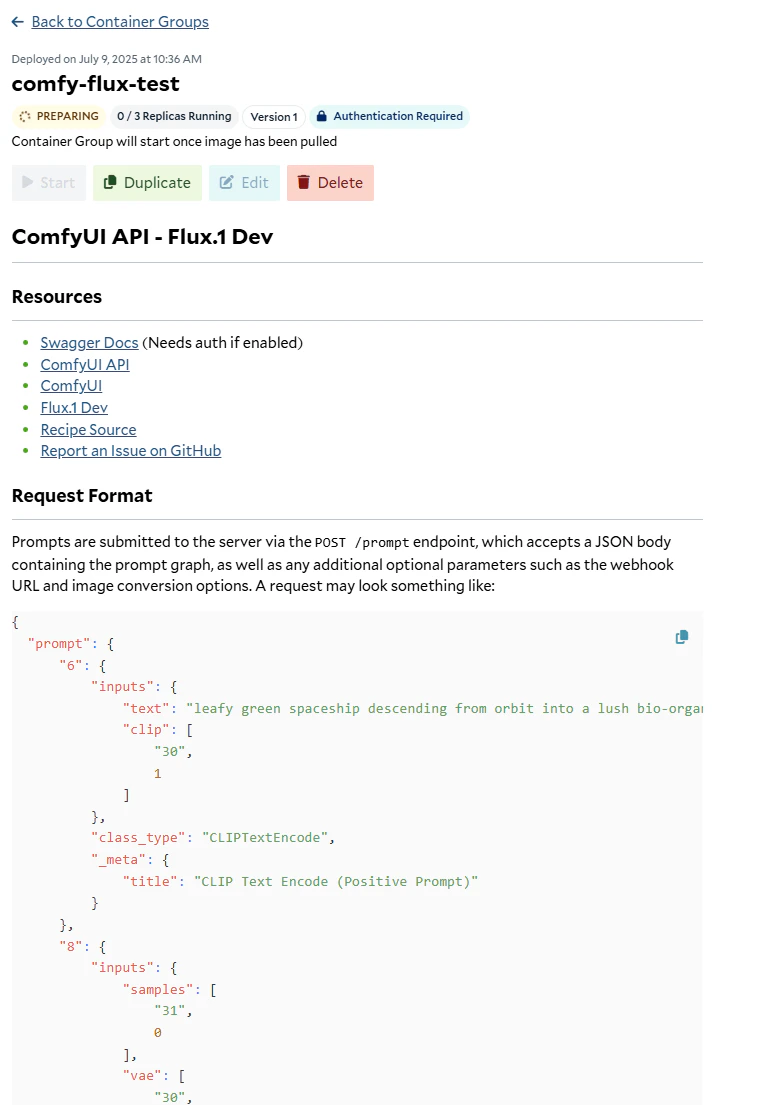 You will find helpful links and information in the readme on the container group page once deployed.
## Source Code
[ Github Repository](https://github.com/SaladTechnologies/salad-recipes/tree/master/recipes/comfyui)
You will find helpful links and information in the readme on the container group page once deployed.
## Source Code
[ Github Repository](https://github.com/SaladTechnologies/salad-recipes/tree/master/recipes/comfyui)