> ## Documentation Index
> Fetch the complete documentation index at: https://docs.salad.com/llms.txt
> Use this file to discover all available pages before exploring further.
# Application Deployment
> Integrate unlimited GPU resources from SaladCloud into your Kubernetes clusters
Kubernetes and SaladCloud serve distinct functions with different feature sets, and not all Kubernetes APIs and
parameters have direct equivalents in SaladCloud APIs. Additionally, special handling is required when using Kubernetes
APIs to pass specific parameters to SaladCloud. **When deploying applications through the Salad VK nodes, these factors
must be carefully considered and managed.**
## Scheduling Pods on VK nodes
Each VK node in the Kubernetes cluster is exclusively tied to an organization's project on SaladCloud, and any GPU
resources not created by the VK node will be automatically removed. VK nodes are also deployed with specific labels,
annotations, and taints, which are utilized for efficient scheduling. Here is an example:
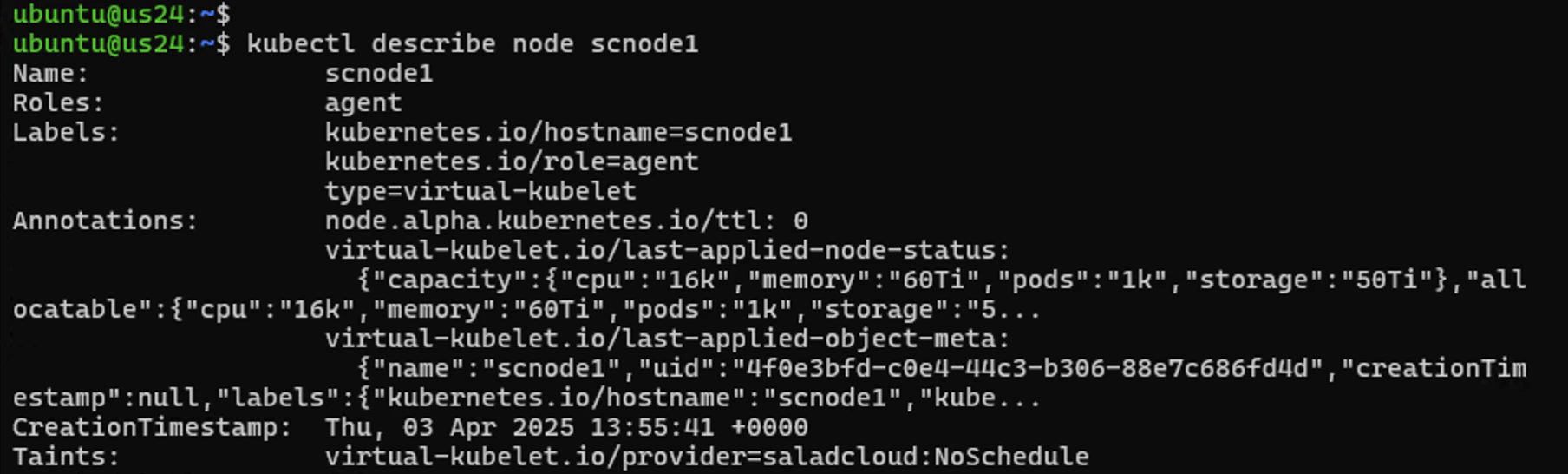 The node name and labels can be used to schedule pods on one or more VK nodes, offering flexibility in targeting
specific VK nodes or a group of VK nodes.
The **virtual-kubelet.io/provider=saladcloud:NoSchedule** taint prevents pods from being scheduled unless they
explicitly tolerate it. As a result, only pods from deployments that are explicitly configured to tolerate this taint,
such as GPU workloads, will be scheduled on the VK nodes, while other pods will be excluded.
The capacity defined in the annotations should also be considered when determining the maximum number of virtual pods
(container groups on SaladCloud) that each VK node can manage.
## Using SaladCloud APIs/SDKs
Before creating Kubernetes manifests to deploy GPU resources on SaladCloud, it is recommended to first familiarize
yourself with SaladCloud’s [key features](/container-engine/tutorials/deployment/docker-run) and
[APIs](/reference/api-usage).
Here are code snippets demonstrating how to interact with SaladCloud using
[its Python SDK](https://github.com/SaladTechnologies/salad-cloud-sdk-python). First, set up a Python virtual
environment and install the SDK, and retrieve your SaladCloud account details, including your organization name, project
name and API key.
**When using the Salad VK solution, you may need a large number of single-replica container groups on SaladCloud.** Be
sure to check your organization's quotas, and contact us for adjustments if they are insufficient.
```python theme={null}
from salad_cloud_sdk import SaladCloudSdk
import os
from dotenv import load_dotenv
load_dotenv()
SALAD_API_KEY = os.getenv("SALAD_API_KEY","")
ORGANIZATION_NAME = os.getenv("ORGANIZATION_NAME","")
sdk = SaladCloudSdk(
api_key=SALAD_API_KEY,
timeout=10000
)
result = sdk.quotas.get_quotas(organization_name=ORGANIZATION_NAME)
print(result)
```
You can deploy multiple container groups of different GPU types on SaladCloud using a Kubernetes deployment manifest,
and you may require their respective IDs, GPU names, and pricing details.
```python theme={null}
from salad_cloud_sdk import SaladCloudSdk
import os
from dotenv import load_dotenv
load_dotenv()
SALAD_API_KEY = os.getenv("SALAD_API_KEY","")
ORGANIZATION_NAME = os.getenv("ORGANIZATION_NAME","")
sdk = SaladCloudSdk(
api_key=SALAD_API_KEY,
timeout=10000
)
result = sdk.organization_data.list_gpu_classes(organization_name=ORGANIZATION_NAME)
for x in result.items:
print(f'ID {x.id_}, Name {x.name}, high {x.prices[0].price}, medium {x.prices[1].price}, low {x.prices[2].price}, batch {x.prices[3].price}')
```
Before deploying a container group programmatically, you can first manually create one using the SaladCloud Portal. You
can then retrieve the deployment details through its APIs/SDKs, which may greatly help guide your programmatic
deployment.
```python theme={null}
from salad_cloud_sdk import SaladCloudSdk
import os
from dotenv import load_dotenv
load_dotenv()
SALAD_API_KEY = os.getenv("SALAD_API_KEY","")
ORGANIZATION_NAME = os.getenv("ORGANIZATION_NAME","")
PROJECT_NAME = os.getenv("PROJECT_NAME","")
CONTAINER_GROUP_NAME = "THE_NAME_OF_MANUALLY_CREATED_CONTAINER_GROUP_WITHIN_THE_PROJECT"
sdk = SaladCloudSdk(
api_key=SALAD_API_KEY,
timeout=10000
)
result = sdk.container_groups.get_container_group(
organization_name=ORGANIZATION_NAME,
project_name=PROJECT_NAME,
container_group_name=CONTAINER_GROUP_NAME
)
print(result)
```
Now, let's deploy a typical container group on Saladcloud.
```python theme={null}
from salad_cloud_sdk import SaladCloudSdk
from salad_cloud_sdk.models import CreateContainerGroup
import os
from dotenv import load_dotenv
load_dotenv()
SALAD_API_KEY = os.getenv("SALAD_API_KEY","")
ORGANIZATION_NAME = os.getenv("ORGANIZATION_NAME","")
PROJECT_NAME = os.getenv("PROJECT_NAME","")
sdk = SaladCloudSdk(
api_key=SALAD_API_KEY,
timeout=10000
)
request_body = CreateContainerGroup(
# Each deployment should have a unique name.
name=”NEW_CONTAINER_GROUP_NAME”,
display_name=”NEW_CONTAINER_GROUP_NAME”,
container={
# From a public or private repository
"image": "docker.io/saladtechnologies/misc:0.0.2-test",
# Required If the image is from a private repository
"registry_authentication": {
"docker_hub": {
"username": “XXXXXXXX”,
"personal_access_token": “YYYYYYYY”
}
},
# 4 vCPU, 8 GiB of memory, 25 GiB of disk space, RTX 3090 or 4090,
"resources": {
"cpu": 4,
"memory": 8192,
"gpu_classes": [ 'ed563892-aacd-40f5-80b7-90c9be6c759b',
'a5db5c50-cbcb-4596-ae80-6a0c8090d80f'],
"storage_amount": 26843545600,
},
# Override both the ENTRYPOINT and CMD in Dockerfile.
# The containers running on SaladCloud must have a continuously running process.
"command": ['sh', '-c', 'sleep infinity' ],
"priority": "high",
"environment_variables": {'AWS_ACCESS_KEY_ID': "abc",
'AWS_SECRET_ACCESS_KEY': "efg",
'HOST': "::",
'PORT': "8888"
},
},
autostart_policy = True,
restart_policy = "always",
replicas = 3,
# By default, nodes are from all regions.
country_codes = [ "us","ca","mx" ],
# To use SaladCloud’s Container Gateway, the local server must listen on a port of IPv6 or dual-stack.
networking = {
"protocol": "http",
"port": 8888,
"auth": False,
"load_balancer": "least_number_of_connections",
"single_connection_limit": False,
"client_request_timeout": 100000,
"server_response_timeout": 100000
},
# To monitor the health of application.
liveness_probe = {
"http": {
"path": "/hc",
"port": 8888,
"scheme": "http",
"headers": []
},
"initial_delay_seconds": 30,
"period_seconds": 5,
"timeout_seconds": 3,
"success_threshold": 1,
"failure_threshold": 3,
}
)
result = sdk.container_groups.create_container_group(
request_body = request_body,
organization_name = ORGANIZATION_NAME,
project_name = PROJECT_NAME
)
print(result)
```
The above code deploys a [high-priority](/container-engine/explanation/billing-pricing/priority-pricing) container group
with 3 replicas across Canada, the US, and Mexico. The selected resource configuration includes 4 vCPUs, 8 GiB of
memory, 25 GiB of disk space, and two GPU types (RTX 3090 or 4090).
**Each container group runs one image.** If the image is stored in a private repository, such as Docker Hub, the Docker
username and access token are provided to allow SaladCloud to pull the image.
**Environment variables can be defined and passed to containers, enabling configuration of running parameters and
granting access to external resources like job queues, databases, or cloud storage.**
Sensitive credentials, such as those for private repositories or external services, should always be handled securely
through environment variables (hardcoded in the example code for simplicity).
**The command is to override both the ENTRYPOINT and CMD in the Dockerfile.** With this feature, you don’t need to
modify the Dockerfile, rebuild and push the image every time you change settings and code or run different applications.
SaladCloud’s Container Gateway is enabled, and a public URL will be generated upon deployment, providing external access
to the containers. In this case, the server within the containers must listen on a port of IPv6 or dual-stack.
Finally, a liveness probe is defined to monitor the health of the application running on the node. If the probe fails,
SaladCloud will allocate a new node to run the image.
## Defining a Kubernetes Deployment Manifest
Here is the corresponding Kubernetes deployment manifest to achieve a similar outcome on SaladCloud as the Python code
above:
```yaml vkapp_demo.yaml theme={null}
apiVersion: apps/v1
kind: Deployment
metadata:
labels:
app: vkapp-demo
name: vkapp-demo
namespace: default
spec:
replicas: 3
selector:
matchLabels:
app: vkapp-demo
template:
metadata:
annotations:
salad.com/container-group-priority: 'high'
salad.com/country-codes: 'us,ca,mx'
salad.com/gpu-classes: 'a5db5c50-cbcb-4596-ae80-6a0c8090d80f,ed563892-aacd-40f5-80b7-90c9be6c759b'
# salad.com/networking-protocol: "http"
# salad.com/networking-port: "8888"
# salad.com/networking-auth: "false"
labels:
app: vkapp-demo
Spec:
imagePullSecrets:
- name: my-docker-hub-registry-secret
containers:
- image: docker.io/saladtechnologies/misc:0.0.2-test
name: misc-test
command: ['sh', '-c', 'sleep infinity']
ports:
- containerPort: 8888
livenessProbe:
httpGet:
scheme: HTTP
path: /hc
port: 8888
host: localhost
initialDelaySeconds: 30
periodSeconds: 5
timeoutSeconds: 3
successThreshold: 1
failureThreshold: 3
resources:
requests:
cpu: '4'
memory: 8Gi
limits:
cpu: '4'
memory: 8Gi
env:
- name: AWS_ACCESS_KEY_ID
value: 'abc'
- name: AWS_SECRET_ACCESS_KEY
value: 'efg'
- name: HOST
value: '::'
- name: PORT
value: '8888'
nodeSelector:
kubernetes.io/role: agent
type: virtual-kubelet
nodeName: scnode1
os:
name: linux
restartPolicy: Always
tolerations:
- key: virtual-kubelet.io/provider
operator: Equal
value: saladcloud
effect: NoSchedule
```
## Mapping from Kubernetes to SaladCloud
Let’s explore the details of how the parameters are mapped from Kubernetes APIs to SaladCloud APIs.
| No | SaladCloud APIs | Kubernetes APIs |
| :- | :-------------------------------------------------- | :------------------------------------------------------------------------------------------------------------------------------------------------------------------------------------------------------------------------------------------------------------------------------------ |
| 1 | Organization and Project for managing GPU resources | Define the tolerations under spec.template.spec.tolerations, and specify the VK node (associated with the organization's project) under spec.template.spec.nodeName. The spec.template.spec.nodeSelector is used to target a group of VK nodes, and is not necessary in this example. |
| 2 | Registry\_Authentication for private repository | Create a docker-registry secret first, and then reference the secret under the spec.template.spec.imagePullSecrets. |
| 3 | Container Image (only one image). | Define a main container image under the spec.template.spec.containers.image. |
| 4 | GPU types | Use salad.com/gpu–classes under the spec.template.metadata.annotations. Multiple GPU types can be specified for a deployment. |
| 5 | Priority | Use salad.com/container-group-priority under the spec.template.metadata.annotations. |
| 6 | Country Codes | Use salad.com/country-codes under the spec.template.metadata.annotations. Multiple country codes can be specified for a deployment. By default, nodes are from all regions. |
| 7 | Networking (Container Gateway) | Use salad.com/networking-XXX under the spec.template.metadata.annotations. |
| 8 | Resources (CPU, memory, disk space) | Define the resources(requests, limits) under the spec.template.spec.containers. |
| 9 | Environment Variables | Define the environment variables under the spec.template.spec.containers. |
| 10 | Startup/Readiness/Liveness Probe | Define the probe under the spec.template.spec.containers. |
| 11 | Command | Define the command under the spec.template.spec.containers, and the args will be ignored by the Salad VK provider. |
Kubernetes automatically injects additional environment variables when a Pod is launched, including service discovery
variables and Kubernetes API access details within the assigned namespace. The VK provider also injects the
POD\_METADATA\_YAM environment variable, which facilitates synchronization between the Kubernetes cluster and SaladCloud.
**All these environment variables will be propagated to SaladCloud and can be observed in the corresponding container
groups.**
If the environment variables grant containers running on SaladCloud access (sensitive credentials) to external resources
such as job queues, databases, or cloud storage, they should not be hardcoded in the Kubernetes deployment manifest.
Instead, it’s best to define them as Kubernetes secrets and reference them securely within the deployment manifest.
Additionally, access to the Kubernetes namespace where the virtual pods run should be managed carefully according to
least privilege principles, as environment variables can be dynamically retrieved, ensuring better security and limits
exposure to these sensitive credentials.
For Networking (Container Gateway), the generated URL will be written back to the annotations of each pod upon
deployment in a future version **(not supported in v0.2.3)**. In the meantime, alternative access methods are available
for these virtual pods—please refer to
[the service access guide](/container-engine/how-to-guides/platform-integrations/service-access) for details.
If the above example does not fully cover the mappings for your use cases, you may test and adjust the deployment
manifest, check the created resources on SaladCloud, and review
[the source code](https://github.com/SaladTechnologies/virtual-kubelet-saladcloud/blob/v0.2.3/internal/provider/provider.go)
for further insights.
There are still [some issues](https://github.com/SaladTechnologies/virtual-kubelet-saladcloud/issues) which are being
addressed, please check them first before proceeding.
## Applying Kubernetes Deployment Strategies and Features
Kubernetes provides a variety of deployment strategies and features that can be leveraged to manage GPU resources on
SaladCloud. Let’s explore some examples of how these can be applied.
For the **vkapp\_demo** deployment with two replicas, we adjust the container group priority from high to low and then
apply the change. This triggers the default rolling update strategy, which gradually replaces old pods with new ones
(**rather than updating existing ones via the SaladCloud Update APIs**). This strategy helps minimize downtime, ensuring
that the application remains available throughout the update process.
The node name and labels can be used to schedule pods on one or more VK nodes, offering flexibility in targeting
specific VK nodes or a group of VK nodes.
The **virtual-kubelet.io/provider=saladcloud:NoSchedule** taint prevents pods from being scheduled unless they
explicitly tolerate it. As a result, only pods from deployments that are explicitly configured to tolerate this taint,
such as GPU workloads, will be scheduled on the VK nodes, while other pods will be excluded.
The capacity defined in the annotations should also be considered when determining the maximum number of virtual pods
(container groups on SaladCloud) that each VK node can manage.
## Using SaladCloud APIs/SDKs
Before creating Kubernetes manifests to deploy GPU resources on SaladCloud, it is recommended to first familiarize
yourself with SaladCloud’s [key features](/container-engine/tutorials/deployment/docker-run) and
[APIs](/reference/api-usage).
Here are code snippets demonstrating how to interact with SaladCloud using
[its Python SDK](https://github.com/SaladTechnologies/salad-cloud-sdk-python). First, set up a Python virtual
environment and install the SDK, and retrieve your SaladCloud account details, including your organization name, project
name and API key.
**When using the Salad VK solution, you may need a large number of single-replica container groups on SaladCloud.** Be
sure to check your organization's quotas, and contact us for adjustments if they are insufficient.
```python theme={null}
from salad_cloud_sdk import SaladCloudSdk
import os
from dotenv import load_dotenv
load_dotenv()
SALAD_API_KEY = os.getenv("SALAD_API_KEY","")
ORGANIZATION_NAME = os.getenv("ORGANIZATION_NAME","")
sdk = SaladCloudSdk(
api_key=SALAD_API_KEY,
timeout=10000
)
result = sdk.quotas.get_quotas(organization_name=ORGANIZATION_NAME)
print(result)
```
You can deploy multiple container groups of different GPU types on SaladCloud using a Kubernetes deployment manifest,
and you may require their respective IDs, GPU names, and pricing details.
```python theme={null}
from salad_cloud_sdk import SaladCloudSdk
import os
from dotenv import load_dotenv
load_dotenv()
SALAD_API_KEY = os.getenv("SALAD_API_KEY","")
ORGANIZATION_NAME = os.getenv("ORGANIZATION_NAME","")
sdk = SaladCloudSdk(
api_key=SALAD_API_KEY,
timeout=10000
)
result = sdk.organization_data.list_gpu_classes(organization_name=ORGANIZATION_NAME)
for x in result.items:
print(f'ID {x.id_}, Name {x.name}, high {x.prices[0].price}, medium {x.prices[1].price}, low {x.prices[2].price}, batch {x.prices[3].price}')
```
Before deploying a container group programmatically, you can first manually create one using the SaladCloud Portal. You
can then retrieve the deployment details through its APIs/SDKs, which may greatly help guide your programmatic
deployment.
```python theme={null}
from salad_cloud_sdk import SaladCloudSdk
import os
from dotenv import load_dotenv
load_dotenv()
SALAD_API_KEY = os.getenv("SALAD_API_KEY","")
ORGANIZATION_NAME = os.getenv("ORGANIZATION_NAME","")
PROJECT_NAME = os.getenv("PROJECT_NAME","")
CONTAINER_GROUP_NAME = "THE_NAME_OF_MANUALLY_CREATED_CONTAINER_GROUP_WITHIN_THE_PROJECT"
sdk = SaladCloudSdk(
api_key=SALAD_API_KEY,
timeout=10000
)
result = sdk.container_groups.get_container_group(
organization_name=ORGANIZATION_NAME,
project_name=PROJECT_NAME,
container_group_name=CONTAINER_GROUP_NAME
)
print(result)
```
Now, let's deploy a typical container group on Saladcloud.
```python theme={null}
from salad_cloud_sdk import SaladCloudSdk
from salad_cloud_sdk.models import CreateContainerGroup
import os
from dotenv import load_dotenv
load_dotenv()
SALAD_API_KEY = os.getenv("SALAD_API_KEY","")
ORGANIZATION_NAME = os.getenv("ORGANIZATION_NAME","")
PROJECT_NAME = os.getenv("PROJECT_NAME","")
sdk = SaladCloudSdk(
api_key=SALAD_API_KEY,
timeout=10000
)
request_body = CreateContainerGroup(
# Each deployment should have a unique name.
name=”NEW_CONTAINER_GROUP_NAME”,
display_name=”NEW_CONTAINER_GROUP_NAME”,
container={
# From a public or private repository
"image": "docker.io/saladtechnologies/misc:0.0.2-test",
# Required If the image is from a private repository
"registry_authentication": {
"docker_hub": {
"username": “XXXXXXXX”,
"personal_access_token": “YYYYYYYY”
}
},
# 4 vCPU, 8 GiB of memory, 25 GiB of disk space, RTX 3090 or 4090,
"resources": {
"cpu": 4,
"memory": 8192,
"gpu_classes": [ 'ed563892-aacd-40f5-80b7-90c9be6c759b',
'a5db5c50-cbcb-4596-ae80-6a0c8090d80f'],
"storage_amount": 26843545600,
},
# Override both the ENTRYPOINT and CMD in Dockerfile.
# The containers running on SaladCloud must have a continuously running process.
"command": ['sh', '-c', 'sleep infinity' ],
"priority": "high",
"environment_variables": {'AWS_ACCESS_KEY_ID': "abc",
'AWS_SECRET_ACCESS_KEY': "efg",
'HOST': "::",
'PORT': "8888"
},
},
autostart_policy = True,
restart_policy = "always",
replicas = 3,
# By default, nodes are from all regions.
country_codes = [ "us","ca","mx" ],
# To use SaladCloud’s Container Gateway, the local server must listen on a port of IPv6 or dual-stack.
networking = {
"protocol": "http",
"port": 8888,
"auth": False,
"load_balancer": "least_number_of_connections",
"single_connection_limit": False,
"client_request_timeout": 100000,
"server_response_timeout": 100000
},
# To monitor the health of application.
liveness_probe = {
"http": {
"path": "/hc",
"port": 8888,
"scheme": "http",
"headers": []
},
"initial_delay_seconds": 30,
"period_seconds": 5,
"timeout_seconds": 3,
"success_threshold": 1,
"failure_threshold": 3,
}
)
result = sdk.container_groups.create_container_group(
request_body = request_body,
organization_name = ORGANIZATION_NAME,
project_name = PROJECT_NAME
)
print(result)
```
The above code deploys a [high-priority](/container-engine/explanation/billing-pricing/priority-pricing) container group
with 3 replicas across Canada, the US, and Mexico. The selected resource configuration includes 4 vCPUs, 8 GiB of
memory, 25 GiB of disk space, and two GPU types (RTX 3090 or 4090).
**Each container group runs one image.** If the image is stored in a private repository, such as Docker Hub, the Docker
username and access token are provided to allow SaladCloud to pull the image.
**Environment variables can be defined and passed to containers, enabling configuration of running parameters and
granting access to external resources like job queues, databases, or cloud storage.**
Sensitive credentials, such as those for private repositories or external services, should always be handled securely
through environment variables (hardcoded in the example code for simplicity).
**The command is to override both the ENTRYPOINT and CMD in the Dockerfile.** With this feature, you don’t need to
modify the Dockerfile, rebuild and push the image every time you change settings and code or run different applications.
SaladCloud’s Container Gateway is enabled, and a public URL will be generated upon deployment, providing external access
to the containers. In this case, the server within the containers must listen on a port of IPv6 or dual-stack.
Finally, a liveness probe is defined to monitor the health of the application running on the node. If the probe fails,
SaladCloud will allocate a new node to run the image.
## Defining a Kubernetes Deployment Manifest
Here is the corresponding Kubernetes deployment manifest to achieve a similar outcome on SaladCloud as the Python code
above:
```yaml vkapp_demo.yaml theme={null}
apiVersion: apps/v1
kind: Deployment
metadata:
labels:
app: vkapp-demo
name: vkapp-demo
namespace: default
spec:
replicas: 3
selector:
matchLabels:
app: vkapp-demo
template:
metadata:
annotations:
salad.com/container-group-priority: 'high'
salad.com/country-codes: 'us,ca,mx'
salad.com/gpu-classes: 'a5db5c50-cbcb-4596-ae80-6a0c8090d80f,ed563892-aacd-40f5-80b7-90c9be6c759b'
# salad.com/networking-protocol: "http"
# salad.com/networking-port: "8888"
# salad.com/networking-auth: "false"
labels:
app: vkapp-demo
Spec:
imagePullSecrets:
- name: my-docker-hub-registry-secret
containers:
- image: docker.io/saladtechnologies/misc:0.0.2-test
name: misc-test
command: ['sh', '-c', 'sleep infinity']
ports:
- containerPort: 8888
livenessProbe:
httpGet:
scheme: HTTP
path: /hc
port: 8888
host: localhost
initialDelaySeconds: 30
periodSeconds: 5
timeoutSeconds: 3
successThreshold: 1
failureThreshold: 3
resources:
requests:
cpu: '4'
memory: 8Gi
limits:
cpu: '4'
memory: 8Gi
env:
- name: AWS_ACCESS_KEY_ID
value: 'abc'
- name: AWS_SECRET_ACCESS_KEY
value: 'efg'
- name: HOST
value: '::'
- name: PORT
value: '8888'
nodeSelector:
kubernetes.io/role: agent
type: virtual-kubelet
nodeName: scnode1
os:
name: linux
restartPolicy: Always
tolerations:
- key: virtual-kubelet.io/provider
operator: Equal
value: saladcloud
effect: NoSchedule
```
## Mapping from Kubernetes to SaladCloud
Let’s explore the details of how the parameters are mapped from Kubernetes APIs to SaladCloud APIs.
| No | SaladCloud APIs | Kubernetes APIs |
| :- | :-------------------------------------------------- | :------------------------------------------------------------------------------------------------------------------------------------------------------------------------------------------------------------------------------------------------------------------------------------ |
| 1 | Organization and Project for managing GPU resources | Define the tolerations under spec.template.spec.tolerations, and specify the VK node (associated with the organization's project) under spec.template.spec.nodeName. The spec.template.spec.nodeSelector is used to target a group of VK nodes, and is not necessary in this example. |
| 2 | Registry\_Authentication for private repository | Create a docker-registry secret first, and then reference the secret under the spec.template.spec.imagePullSecrets. |
| 3 | Container Image (only one image). | Define a main container image under the spec.template.spec.containers.image. |
| 4 | GPU types | Use salad.com/gpu–classes under the spec.template.metadata.annotations. Multiple GPU types can be specified for a deployment. |
| 5 | Priority | Use salad.com/container-group-priority under the spec.template.metadata.annotations. |
| 6 | Country Codes | Use salad.com/country-codes under the spec.template.metadata.annotations. Multiple country codes can be specified for a deployment. By default, nodes are from all regions. |
| 7 | Networking (Container Gateway) | Use salad.com/networking-XXX under the spec.template.metadata.annotations. |
| 8 | Resources (CPU, memory, disk space) | Define the resources(requests, limits) under the spec.template.spec.containers. |
| 9 | Environment Variables | Define the environment variables under the spec.template.spec.containers. |
| 10 | Startup/Readiness/Liveness Probe | Define the probe under the spec.template.spec.containers. |
| 11 | Command | Define the command under the spec.template.spec.containers, and the args will be ignored by the Salad VK provider. |
Kubernetes automatically injects additional environment variables when a Pod is launched, including service discovery
variables and Kubernetes API access details within the assigned namespace. The VK provider also injects the
POD\_METADATA\_YAM environment variable, which facilitates synchronization between the Kubernetes cluster and SaladCloud.
**All these environment variables will be propagated to SaladCloud and can be observed in the corresponding container
groups.**
If the environment variables grant containers running on SaladCloud access (sensitive credentials) to external resources
such as job queues, databases, or cloud storage, they should not be hardcoded in the Kubernetes deployment manifest.
Instead, it’s best to define them as Kubernetes secrets and reference them securely within the deployment manifest.
Additionally, access to the Kubernetes namespace where the virtual pods run should be managed carefully according to
least privilege principles, as environment variables can be dynamically retrieved, ensuring better security and limits
exposure to these sensitive credentials.
For Networking (Container Gateway), the generated URL will be written back to the annotations of each pod upon
deployment in a future version **(not supported in v0.2.3)**. In the meantime, alternative access methods are available
for these virtual pods—please refer to
[the service access guide](/container-engine/how-to-guides/platform-integrations/service-access) for details.
If the above example does not fully cover the mappings for your use cases, you may test and adjust the deployment
manifest, check the created resources on SaladCloud, and review
[the source code](https://github.com/SaladTechnologies/virtual-kubelet-saladcloud/blob/v0.2.3/internal/provider/provider.go)
for further insights.
There are still [some issues](https://github.com/SaladTechnologies/virtual-kubelet-saladcloud/issues) which are being
addressed, please check them first before proceeding.
## Applying Kubernetes Deployment Strategies and Features
Kubernetes provides a variety of deployment strategies and features that can be leveraged to manage GPU resources on
SaladCloud. Let’s explore some examples of how these can be applied.
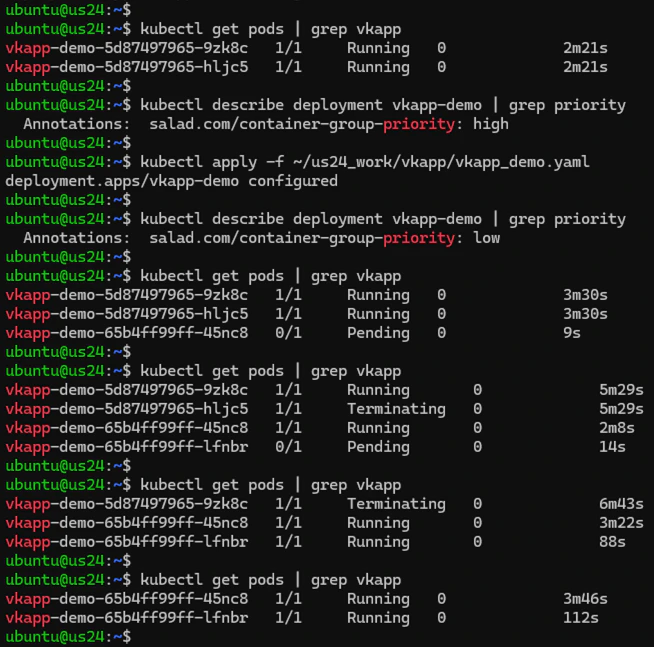
For the **vkapp\_demo** deployment with two replicas, we adjust the container group priority from high to low and then
apply the change. This triggers the default rolling update strategy, which gradually replaces old pods with new ones
(**rather than updating existing ones via the SaladCloud Update APIs**). This strategy helps minimize downtime, ensuring
that the application remains available throughout the update process.
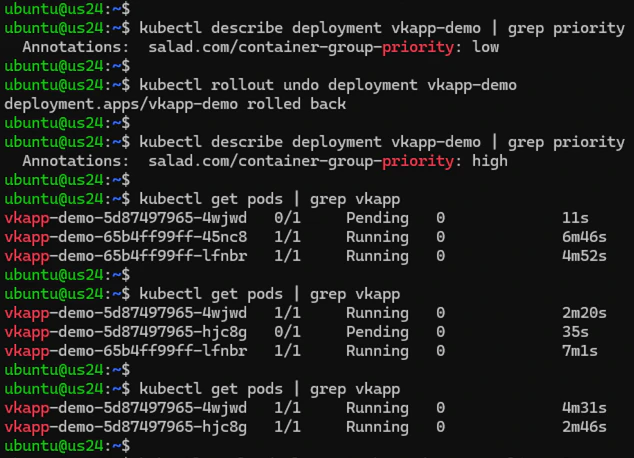
 If the new update doesn’t work as expected, we can easily roll back to the previous version or any of the earlier
versions, restoring the application to its prior state.
If the new update doesn’t work as expected, we can easily roll back to the previous version or any of the earlier
versions, restoring the application to its prior state.
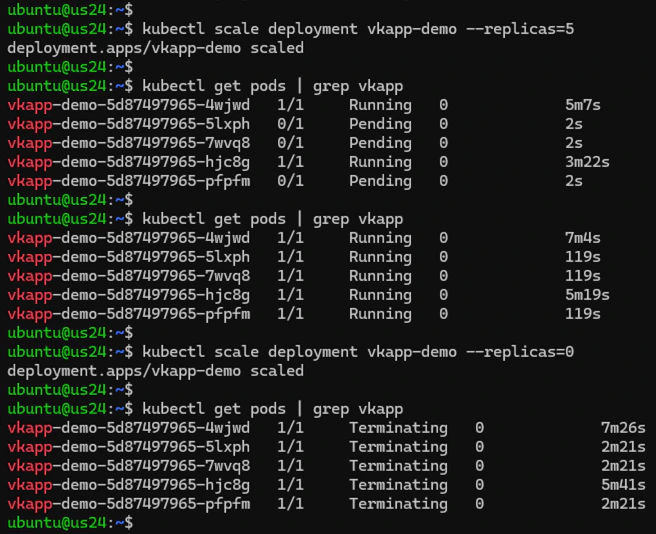
 We can easily scale the workload up or down based on demands, including temporarily shutting down the application by
setting the replica count to zero.
We can easily scale the workload up or down based on demands, including temporarily shutting down the application by
setting the replica count to zero.
 DevOps tools like Jenkins, Argo CD, Flux, and others can be deployed to automate deployment and management, further
simplifying the entire process.
## Common Commands
```
# Deploy and Undeploy
kubectl apply -f vkapp_demo.yaml
kubectl delete -f vkapp_demo.yaml
# Troubleshooting
kubectl get pod | grep vkapp
kubectl describe deployment vkapp-demo | grep priority
kubectl -n default get all
kubectl describe pod
kubectl logs -f
# Scaling
kubectl scale deployment vkapp-demo --replicas=5
kubectl scale deployment vkapp-demo --replicas=0
```
DevOps tools like Jenkins, Argo CD, Flux, and others can be deployed to automate deployment and management, further
simplifying the entire process.
## Common Commands
```
# Deploy and Undeploy
kubectl apply -f vkapp_demo.yaml
kubectl delete -f vkapp_demo.yaml
# Troubleshooting
kubectl get pod | grep vkapp
kubectl describe deployment vkapp-demo | grep priority
kubectl -n default get all
kubectl describe pod
kubectl logs -f
# Scaling
kubectl scale deployment vkapp-demo --replicas=5
kubectl scale deployment vkapp-demo --replicas=0
```