> ## Documentation Index
> Fetch the complete documentation index at: https://docs.salad.com/llms.txt
> Use this file to discover all available pages before exploring further.
# Authenticated Requests
*Last Updated: October 15, 2024*
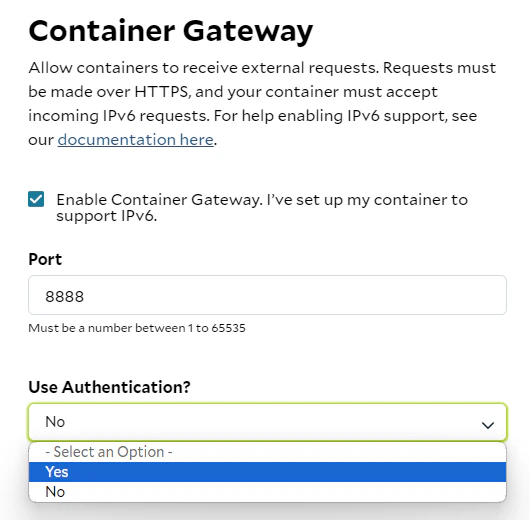
If you have selected authentication for the Container Gateway, the access domain name will indicated it is "Protected"
and a lock icon will be shown. You will need to provide your API key in the header of requests.
First, you'll need the domain name of your container group and your API key. You can view and copy your API key at
[portal](https://portal.salad.com/api-key).
Obtain the domain name in the details of your deployment, e.g.
 You can Copy the domain name by clicking the copy icon on the right.
Send a request to the access domain name with your API key included in the header as `Salad-Api-Key` however you'd like,
e.g.
```
curl --location '[YOUR ACCESS DOMAIN NAME HERE]'
--header 'Content-Type: application/json'
--header 'Salad-Api-Key: [YOUR API KEY HERE]'
--data '{
...
}'
```
# Optional Container Gateway Authentication
Please note that requiring authenticated networking to the containers is optional, You can choose whether to enable or
disable authentication for your containers. However, we recommend implementing your own authentication if you plan not
to use ours.
You can Copy the domain name by clicking the copy icon on the right.
Send a request to the access domain name with your API key included in the header as `Salad-Api-Key` however you'd like,
e.g.
```
curl --location '[YOUR ACCESS DOMAIN NAME HERE]'
--header 'Content-Type: application/json'
--header 'Salad-Api-Key: [YOUR API KEY HERE]'
--data '{
...
}'
```
# Optional Container Gateway Authentication
Please note that requiring authenticated networking to the containers is optional, You can choose whether to enable or
disable authentication for your containers. However, we recommend implementing your own authentication if you plan not
to use ours.