> ## Documentation Index
> Fetch the complete documentation index at: https://docs.salad.com/llms.txt
> Use this file to discover all available pages before exploring further.
# Axiom
*Last Updated: October 15, 2024*
Axiom is our preferred external logging service provider.
To enable external logging service using Axiom, please follow these steps:
# Step 1: Get Dataset Name and API Key from Axiom
# Step 2: Add the Axiom configuration to your Container Group
* Click “Edit” on External Logging Services
* Select Axiom from the dropdown
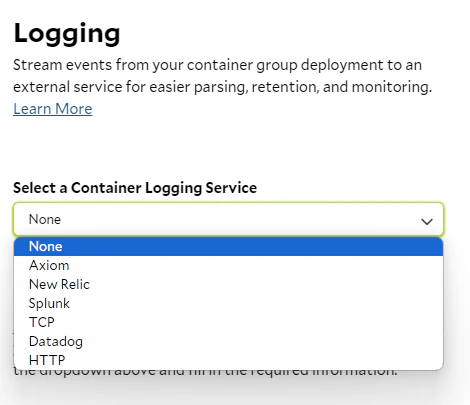 * Input the Dataset Name and API Key
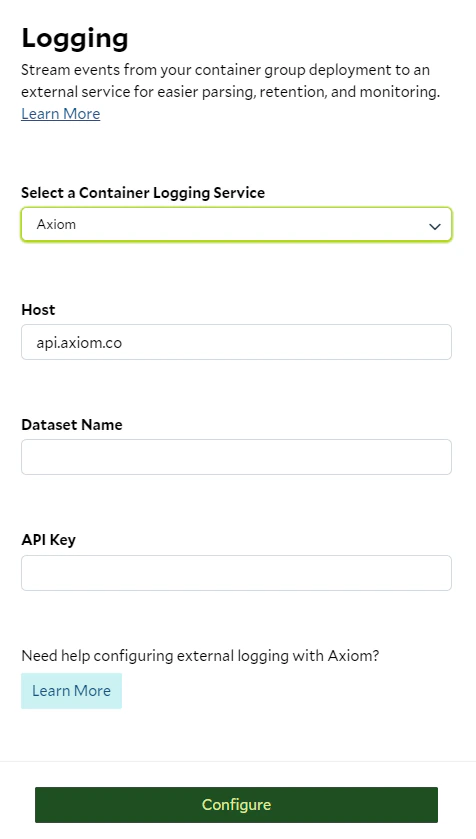 * Click the "Configure" button at the bottom.
# Step 3: Deploy Container Group
* Finish setting up the rest of your container group settings, and deploy it!
* Start the container group to run your container
* Your logs will be seamlessly transmitted to Axiom
# Step 4: Verify Logs in Axiom
* Once the container is running and logging something, verify that your logs are available in Axiom.
* Click the "Configure" button at the bottom.
# Step 3: Deploy Container Group
* Finish setting up the rest of your container group settings, and deploy it!
* Start the container group to run your container
* Your logs will be seamlessly transmitted to Axiom
# Step 4: Verify Logs in Axiom
* Once the container is running and logging something, verify that your logs are available in Axiom.