> ## Documentation Index
> Fetch the complete documentation index at: https://docs.salad.com/llms.txt
> Use this file to discover all available pages before exploring further.
# Run TGI (Text Generation Interface) by Hugging Face
*Last Updated: August 04, 2025*
TGI (Text Generation Interface) is a toolkit for deploying and service Large Language Models (LLMs). TGI enables
high-performance text generation for the most popular open-source LLMs, including Llama, Falcon, StarCoder, BLOOM,
GPT-NeoX, and T5.
[Learn More Here](https://huggingface.co/docs/text-generation-inference/main/en/index)
[Github Repo](https://github.com/huggingface/text-generation-inference)
# Deploying TGI on Salad
## Container
Hugging Face provides a pre-built docker available via the Github Container registry.
```Text Docker theme={null}
ghcr.io/huggingface/text-generation-inference:1.1.1
```
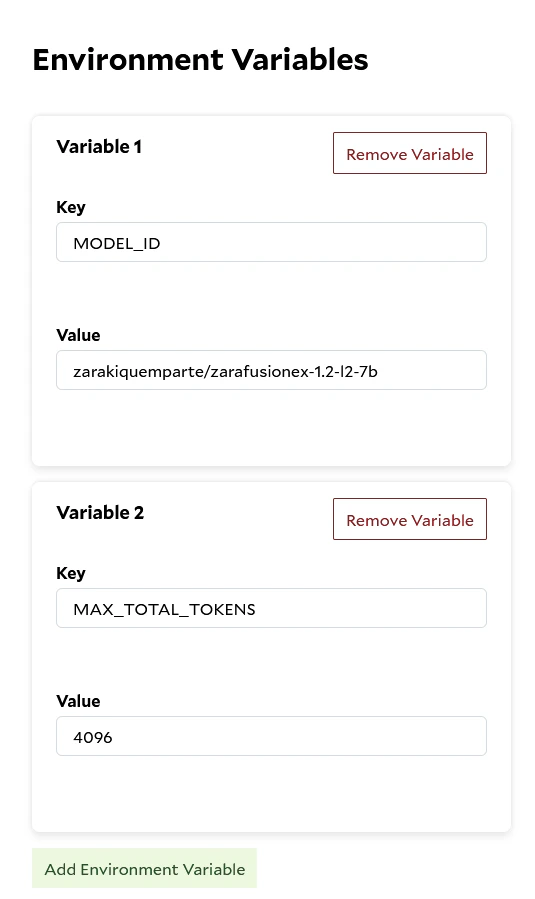
In order to deploy the container on Salad, you will need to configure the container with your desired models, plus any
additional settings. These options can either be configured as part of the `CMD` or can be set as
[Environment Variables](/container-engine/how-to-guides/environment-variables) when creating your container group. Here
is a complete list of
[all TGI options](https://huggingface.co/docs/text-generation-inference/main/en/basic_tutorials/launcher)
 ## Required - Container Gateway Setup
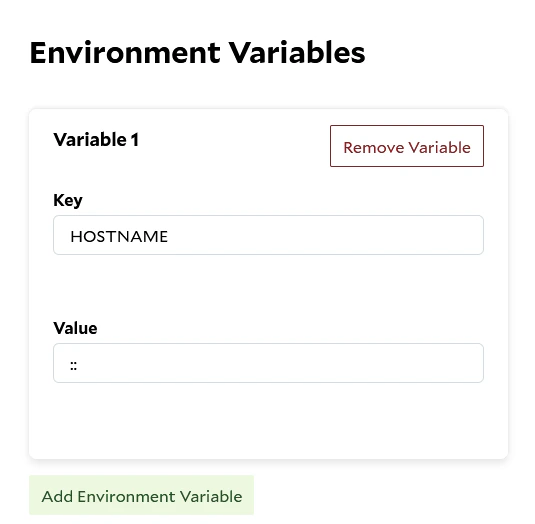
In addition to any options that you need to run the model, you will need to configure TGI to use
[IPv6](/container-engine/how-to-guides/gateway/enabling-ipv6) in order to be compatible with SaladCloud's Container
Gateway feature. This is done by simply setting `HOSTNAME` to `::`
## Required - Container Gateway Setup
In addition to any options that you need to run the model, you will need to configure TGI to use
[IPv6](/container-engine/how-to-guides/gateway/enabling-ipv6) in order to be compatible with SaladCloud's Container
Gateway feature. This is done by simply setting `HOSTNAME` to `::`
 ## Recommended - Health Probes
[Health Probes](/container-engine/explanation/infrastructure-platform/health-probes) help ensure that your container
only serves traffic it is ready and ensures that the container continues to run as expected. When the TGI container
starts up, it begins to download the specific model before it can start serving requests. While the model is
downloading, the API is unavailable. The simplest health probe is to check the `/health` endpoint. If the endpoint is
running, then the model is ready to serve traffic.
### Exec Health Probe
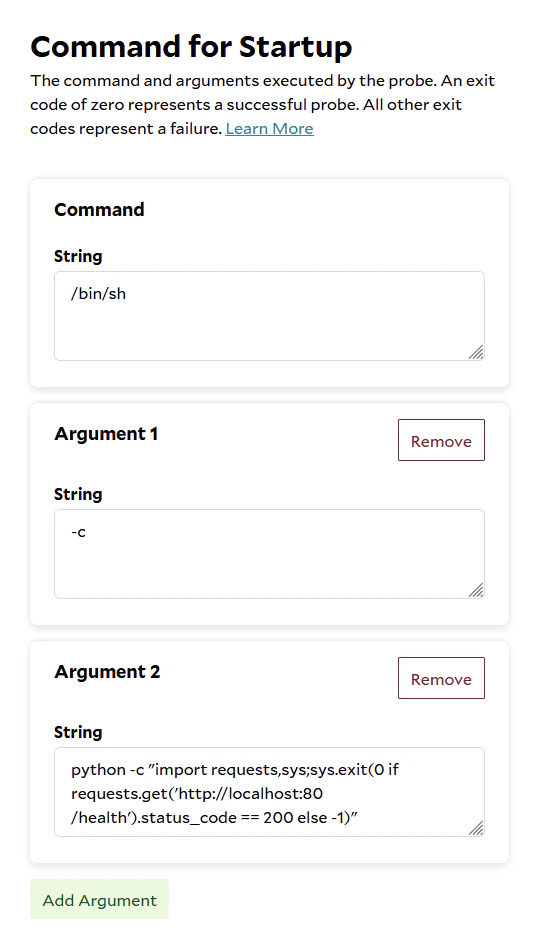
The `exec` health probe will run the given command inside the container, if the command returns an exit code of 0, the
container is considered in a healthy state. Any other exit codes indicate the container is not ready yet.
The TGI container does not include `curl` or `wget` so in order to check the `:80/health` API we decided to use python's
requests to check the API.
```Text bin theme={null}
python -c "import requests,sys;sys.exit(0 if requests.get('http://localhost:80/health').status_code == 200 else -1)"
```
## Recommended - Health Probes
[Health Probes](/container-engine/explanation/infrastructure-platform/health-probes) help ensure that your container
only serves traffic it is ready and ensures that the container continues to run as expected. When the TGI container
starts up, it begins to download the specific model before it can start serving requests. While the model is
downloading, the API is unavailable. The simplest health probe is to check the `/health` endpoint. If the endpoint is
running, then the model is ready to serve traffic.
### Exec Health Probe
The `exec` health probe will run the given command inside the container, if the command returns an exit code of 0, the
container is considered in a healthy state. Any other exit codes indicate the container is not ready yet.
The TGI container does not include `curl` or `wget` so in order to check the `:80/health` API we decided to use python's
requests to check the API.
```Text bin theme={null}
python -c "import requests,sys;sys.exit(0 if requests.get('http://localhost:80/health').status_code == 200 else -1)"
```
 ### Required Environment Variables
* `SHARDED=true` Enables TGI's sharded mode. If this is set and no additional options are provided, TGI will use **all
visible GPUs**. Requires `CUDA_VISIBLE_DEVICES` to be set to expose GPUs to TGI.
* `NUM_SHARD=` Specifies how many shards to split the model across. Must match the number of GPUs you want TGI to
use (and must be ≤ the number of visible devices). If this environment variable is set, `SHARDED` is not required.
`CUDA_VISIBLE_DEVICES` must still be set to expose specified GPUs to TGI.
* `CUDA_VISIBLE_DEVICES=0,1,2,3,4,5,6,7` **Required to expose multiple GPUs to the TGI container.** By default, TGI will
only detect one GPU unless this variable is set. You can also use this to run **multiple workloads** on a single 8-GPU
node by isolating which GPUs are used by each container. To specify which GPUs TGI should use, provide a list of
integers as a value.
#### Example: Use All 8 GPUs
### Required Environment Variables
* `SHARDED=true` Enables TGI's sharded mode. If this is set and no additional options are provided, TGI will use **all
visible GPUs**. Requires `CUDA_VISIBLE_DEVICES` to be set to expose GPUs to TGI.
* `NUM_SHARD=` Specifies how many shards to split the model across. Must match the number of GPUs you want TGI to
use (and must be ≤ the number of visible devices). If this environment variable is set, `SHARDED` is not required.
`CUDA_VISIBLE_DEVICES` must still be set to expose specified GPUs to TGI.
* `CUDA_VISIBLE_DEVICES=0,1,2,3,4,5,6,7` **Required to expose multiple GPUs to the TGI container.** By default, TGI will
only detect one GPU unless this variable is set. You can also use this to run **multiple workloads** on a single 8-GPU
node by isolating which GPUs are used by each container. To specify which GPUs TGI should use, provide a list of
integers as a value.
#### Example: Use All 8 GPUs
 or
or
 #### Example: Use Only 2 GPUs
