> ## Documentation Index
> Fetch the complete documentation index at: https://docs.salad.com/llms.txt
> Use this file to discover all available pages before exploring further.
# Deploy SLIP with Cog HTTP Prediction Server
*Last Updated: October 10, 2024*
[Cog](https://cog.run/) is an open-source tool that helps simplify the work of building inference applications for
various AI models. It provides CLI tools, Python modules for prediction and fine-tuning, and an HTTP prediction server
using FastAPI.
Using [the Cog HTTP prediction server](https://github.com/replicate/cog/blob/main/python/cog/server/http.py), we mainly
need to provide two functions in Python: one for downloading/loading the models and another for running the inference.
The server handles everything else, such as input/output, logging, health checks, and exception handling. It supports
synchronous prediction, streaming output and asynchronous prediction with a webhook; its health-check feature is
impressive, providing different running statuses (STARTING, READY, BUSY and FAILED) within the server.
The Cog prediction server can be further customized to meet specific needs. For instance, its path operation functions
for the health checks and predictions are, by default, declared with `async def`, running in the same main thread. By
declaring the predictions function with `def`, a new thread will be spawned to run the prediction when a new request
arrives.This setup can prevent long-running synchronous predictions from blocking timely responses to health queries.
Another example is IPv6 support: the server is hardcoded to listen on an IPv4 port, we can modify the code to use IPv6
by replacing `0.0.0.0` with `::` when launching its underlying Uvicorn server.
The [BLIP](https://arxiv.org/pdf/2201.12086) (Bootstrapping Language-Image Pre-training) supports multiple image-to-text
tasks, such as Image Captioning, Visual Question Answering and Image Text Matching. Each task requires a dedicated and
fine-tuned BLIP model that is 1\~2 GB in size. We can run inference for the three models of these three tasks
simultaneously on a SaladCloud node that has a GPU with 8GB VRAM.
[LAVIS](https://github.com/salesforce/LAVIS) (A Library for Language-Vision Intelligence) is the Python deep learning
library, and provides the unified access to the pretrained models, datasets and tasks for multimodal applications,
including BLIP, CLIP and others.
Let’s use BLIP as an example to see how to build a publicly-accessible and scalable inference endpoint using the Cog
HTTP prediction server on SaladCloud, capable of handling various image-to-text tasks.
# Build the container image
The following 4 files are necessary for building the image, and we also provide some test code in
[the Github Repo](https://github.com/SaladTechnologies/cog-deploy).
```yml theme={null}
build:
gpu: true
predict: 'predict.py:Predictor'
```
The yaml file defines how to build a Docker image and how to run predictions. In this example, We only use the Cog HTTP
prediction server (not its CLI tools), the file is quite simple. When the prediction server is launched, it will read
the file, and then set the number of Uvicorn worker processes to 1 (when the GPU is enabled) and run the provided code -
predict.py for inference.
```
salesforce-lavis==1.0.2
cog==0.9.8
```
Based on the PyTorch base image, we only need to install two Python packages and their dependencies for this
application.
```Dockerfile theme={null}
# Base Image
FROM docker.io/pytorch/pytorch:2.3.0-cuda12.1-cudnn8-runtime
RUN apt-get update && apt-get install -y curl
RUN pip install --upgrade pip
WORKDIR /app
# Install LAVIS and Cog HTTP prediction server
COPY requirements.txt ./requirements.txt
RUN pip install -r requirements.txt
# Optional, build the downloaded models into the container image.
# The models can also be downloaded dynamically when the container is running.
# COPY ./torch /root/.cache/torch
COPY cog.yaml /app
COPY predict.py /app
# Modify the installed Cog prediction server to use IPv6
RUN sed -i 's/0.0.0.0/::/g' /opt/conda/lib/python3.10/site-packages/cog/server/http.py
# Run the Cog HTTP prediction server
CMD ["python", "-m", "cog.server.http"]
EXPOSE 5000
```
You can download the models first and build them into the container image. This way, when the workload is running on
SaladCloud, it can start the inference immediately. Alternatively, the models can also be downloaded dynamically when
the container is running. This approach has the advantage of smaller image sizes, allowing for faster builds and pushes.
For the inbound connection, the containers running on SaladCloud need to listen on an IPv6 port. The Cog HTTP prediction
server is currently hardcoded to use an IPv4 port, but this can be easily modified by a `sed` command in the Dockerfile.
```python theme={null}
from cog import BasePredictor, Input, Path
import time
import torch
from lavis.models import load_model_and_preprocess
from PIL import Image
class Predictor(BasePredictor):
def setup(self) -> None:
......
def predict(
self,
image: Path = Input( description="Input image" ),
task: str = Input( choices=[ "image_captioning", "visual_question_answering", "image_text_matching" ],
default="image_captioning", description="Choose a task." ),
question: str = Input( default=None, description="Type question for the input image for visual question answering task." ),
caption: str = Input( default=None, description="Type caption for the input image for image text matching task." ),
) -> str:
......
```
The Predictor Class is implemented with 2 member functions that will be called by the Cog prediction server:
setup(), download and load the 3 models into the GPU.
predict(), run the inference based on inputs and return the results.
# Test the image
```
# Build
docker image build -t docker.io/saladtechnologies/sip:0.0.3-blip -f Dockerfile .
# Run with GPU
docker run --rm --gpus all docker.io/saladtechnologies/sip:0.0.3-blip
# Run without GPU
docker run --rm docker.io/saladtechnologies/sip:0.0.3-blip
# Push to Docker Hub
docker push docker.io/saladtechnologies/sip:0.0.3-blip
```
After the container is running, you can log into it and do some tests for health checks and predictions.

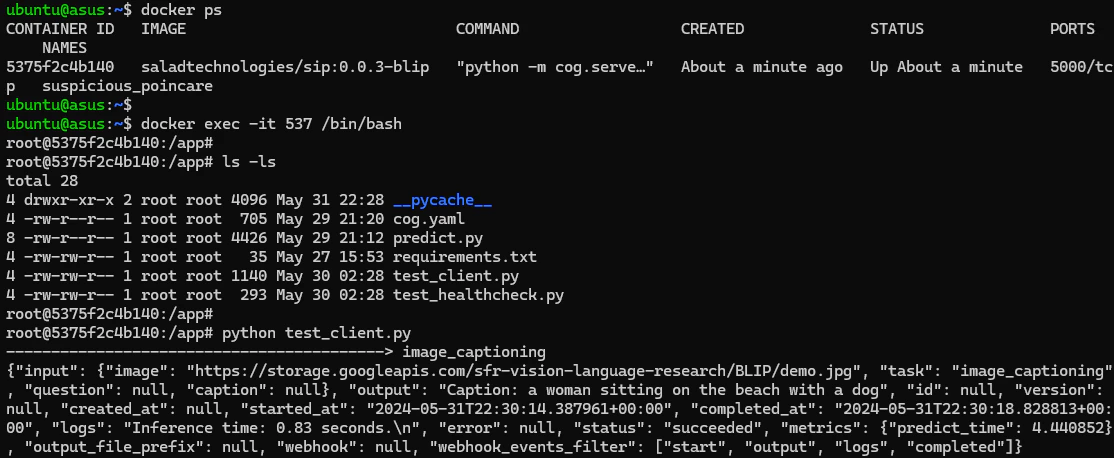 The Cog HTTP prediction server is now using IPv6. The port number is configurable via the environment variable - ‘PORT’.
 # Deploy the image on SaladCloud
Create a container group with the following parameters:
```md theme={null}
# Image Source
saladtechnologies/sip:0.0.3-blip
# Replica Count
3
# Resource
2 vCPUs, 8GB Memory Any GPU types with 8 GB or more VRAM
# Container Gateway
Enabled, Port 5000
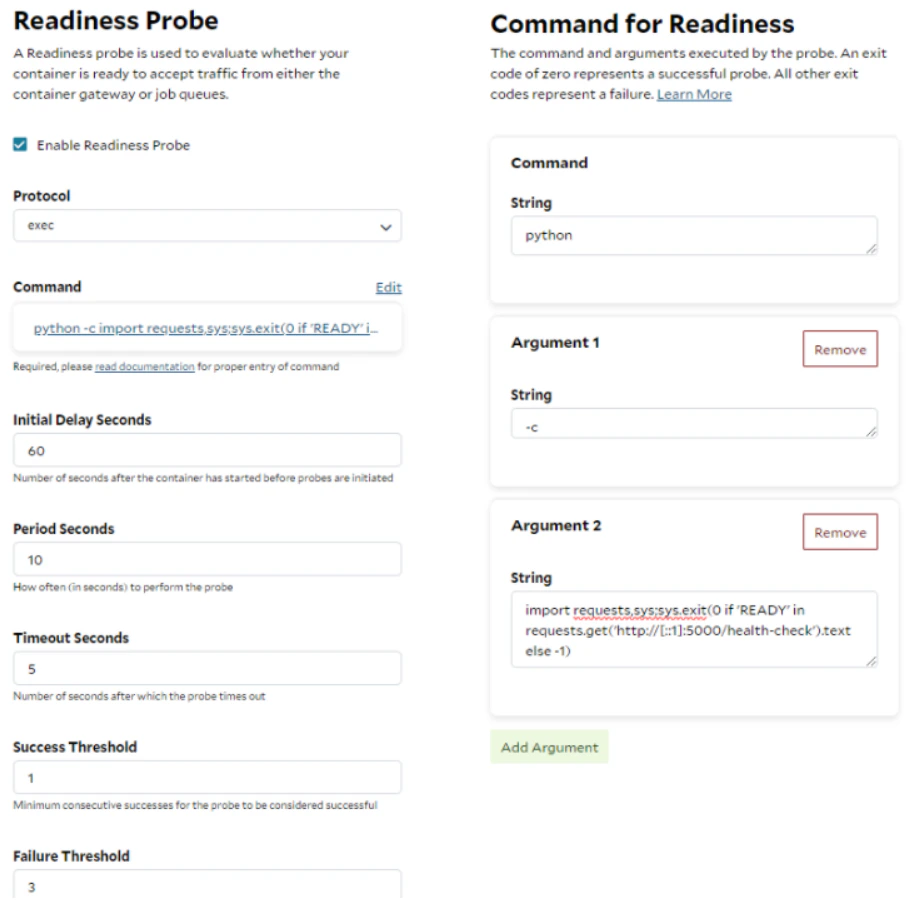
# Readiness Probe (Protocol: exec)
Enabled Protocol: exec
Command: python Argument1: -c Argument2: import requests,sys;sys.exit(0 if 'READY' in
requests.get('http://[::1]:5000/health-check').text else -1)
Initial Delay Seconds: 60 Period Seconds: 10 Timeout Seconds: 5 Success Threshold: 1 Failure Threshold: 3
# Environment Variables (Optional)
COG_LOG_LEVEL, INFO (Default) / DEBUG / WARNING PORT, 5000 (Default) or others
```
The Readiness Probe is used to evaluate whether a container is ready to accept the traffic from the load balancer. The
probe with the protocol - exec, will run the given command inside the container, if the command returns an exit code of
0, the container is considered in a healthy state. Any other exit codes indicate the container is not ready yet. A
Python script is provided here and run regularly to check whether the models have been loaded successfully and the Cog
HTTP prediction server is ready.
# Deploy the image on SaladCloud
Create a container group with the following parameters:
```md theme={null}
# Image Source
saladtechnologies/sip:0.0.3-blip
# Replica Count
3
# Resource
2 vCPUs, 8GB Memory Any GPU types with 8 GB or more VRAM
# Container Gateway
Enabled, Port 5000
# Readiness Probe (Protocol: exec)
Enabled Protocol: exec
Command: python Argument1: -c Argument2: import requests,sys;sys.exit(0 if 'READY' in
requests.get('http://[::1]:5000/health-check').text else -1)
Initial Delay Seconds: 60 Period Seconds: 10 Timeout Seconds: 5 Success Threshold: 1 Failure Threshold: 3
# Environment Variables (Optional)
COG_LOG_LEVEL, INFO (Default) / DEBUG / WARNING PORT, 5000 (Default) or others
```
The Readiness Probe is used to evaluate whether a container is ready to accept the traffic from the load balancer. The
probe with the protocol - exec, will run the given command inside the container, if the command returns an exit code of
0, the container is considered in a healthy state. Any other exit codes indicate the container is not ready yet. A
Python script is provided here and run regularly to check whether the models have been loaded successfully and the Cog
HTTP prediction server is ready.
 # Test the inference endpoint
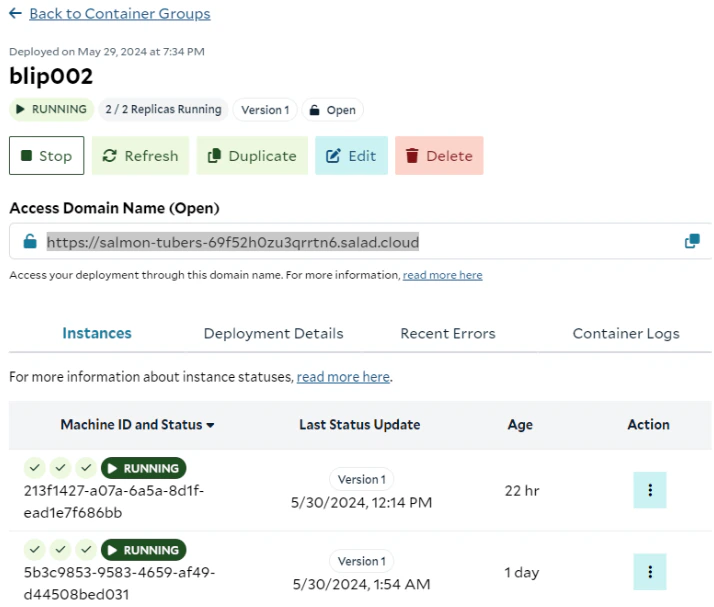
After the container group is deployed, an access domain name will be created and can be used to access the application.
# Test the inference endpoint
After the container group is deployed, an access domain name will be created and can be used to access the application.
 ```shell theme={null}
# image_captioning
curl -s -X POST \
-H "Content-Type: application/json" \
-d $'{ "input": {
"task": "image_captioning",
"image": "https://storage.googleapis.com/sfr-vision-language-research/BLIP/demo.jpg" } }' \
https://salmon-tubers-69f52h0zu3qrrtn6.salad.cloud/predictions
# visual_question_answering
curl -s -X POST \
-H "Content-Type: application/json" \
-d $'{ "input": {
"task": "visual_question_answering",
"question": "where is the dog?",
"image": "https://storage.googleapis.com/sfr-vision-language-research/BLIP/demo.jpg" } }' \
https://salmon-tubers-69f52h0zu3qrrtn6.salad.cloud/predictions
# image_text_matching
curl -s -X POST \
-H "Content-Type: application/json" \
-d $'{ "input": {
"task": "image_text_matching",
"caption": "a dog and a women are sitting at the beach",
"image": "https://storage.googleapis.com/sfr-vision-language-research/BLIP/demo.jpg" } }' \
https://salmon-tubers-69f52h0zu3qrrtn6.salad.cloud/predictions
```
```shell theme={null}
# image_captioning
curl -s -X POST \
-H "Content-Type: application/json" \
-d $'{ "input": {
"task": "image_captioning",
"image": "https://storage.googleapis.com/sfr-vision-language-research/BLIP/demo.jpg" } }' \
https://salmon-tubers-69f52h0zu3qrrtn6.salad.cloud/predictions
# visual_question_answering
curl -s -X POST \
-H "Content-Type: application/json" \
-d $'{ "input": {
"task": "visual_question_answering",
"question": "where is the dog?",
"image": "https://storage.googleapis.com/sfr-vision-language-research/BLIP/demo.jpg" } }' \
https://salmon-tubers-69f52h0zu3qrrtn6.salad.cloud/predictions
# image_text_matching
curl -s -X POST \
-H "Content-Type: application/json" \
-d $'{ "input": {
"task": "image_text_matching",
"caption": "a dog and a women are sitting at the beach",
"image": "https://storage.googleapis.com/sfr-vision-language-research/BLIP/demo.jpg" } }' \
https://salmon-tubers-69f52h0zu3qrrtn6.salad.cloud/predictions
```