> ## Documentation Index
> Fetch the complete documentation index at: https://docs.salad.com/llms.txt
> Use this file to discover all available pages before exploring further.
# Tailscale Solution Overview
> Securely integrate unlimited GPU resources from SaladCloud into your applications
## Introduction
[Tailscale](https://tailscale.com/) is a modern VPN solution built on WireGuard, designed to provide secure, scalable
networking across diverse environments. It simplifies the process of connecting devices, whether they’re behind
firewalls, NATs, or across private networks.
Unlike traditional VPN services, Tailscale focuses on helping devices traverse NATs and firewalls while establishing
connections through its coordination server. **Once the connection is established, traffic is typically sent directly
between devices in a peer-to-peer fashion, without routing through Tailscale’s servers.** In some cases where strict
NATs or firewalls prevent direct connections, Tailscale uses its DERP (Designated Encrypted Relay for Packets) servers
to relay encrypted traffic, ensuring reliable communication. Please check these links
\[[1](https://tailscale.com/blog/how-nat-traversal-works),[2](https://tailscale.com/blog/how-tailscale-works)] for
details on how it works.
A [tailnet](https://tailscale.com/kb/1136/tailnet) is a private network created and managed by Tailscale that allows
devices to securely communicate with each other as if they were on the same local network, regardless of their physical
location. Each Tailnet is isolated from others, meaning devices within one Tailnet cannot communicate with devices in
another unless explicitly allowed.
## Use Cases
SaladCloud primarily handles GPU-intensive workloads across most use cases, while also interacting with external
services or systems to receive requests or jobs and deliver results.
[Its native networking](/container-engine/explanation/infrastructure-platform/networking) allows all nodes to initiate
outbound connections to these systems. When the Container Gateway is enabled, the external systems can also send HTTP
requests to a group of Salad nodes and receive responses seamlessly.
Integrating Tailscale with SaladCloud unlocks additional use cases, including:
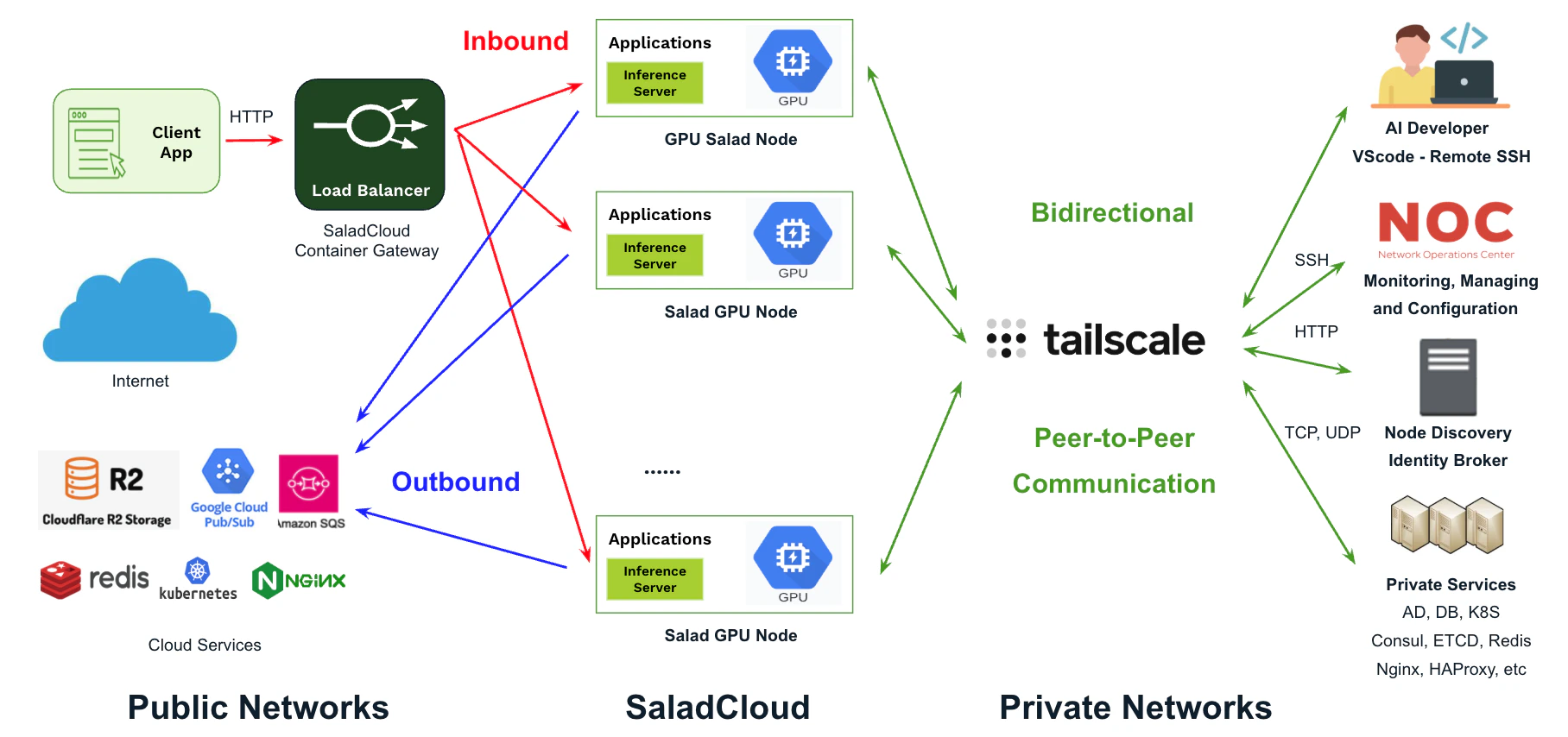 * **Remote Development:** Developers can use [VSCode - Remote SSH](https://code.visualstudio.com/docs/remote/ssh) and
[JupyterLab](https://jupyter.org/) on Mac or Windows to seamlessly test and debug their code running on Salad GPU
nodes.
* **Network Management and Troubleshooting:** Network operators can SSH into Salad nodes for configuration, management,
and troubleshooting purposes.
* **Node Discovery and Identity Broker:** Detecting when nodes come online or go offline, while implementing an identity
broker for private, centralized authentication and authorization. This setup provides temporary credentials to Salad
nodes for accessing external systems using
[JWT authentication](/container-engine/tutorials/security/jwt-authentication).
* **Accessing Private Services:** Connecting Salad nodes to private services hosted on-premises or in the cloud,
including databases, message queues, Kubernetes clusters, and proxies.
* **Enabling Meshed Communication:** Facilitating secure, direct communication between Salad nodes and private systems
in a mesh network.
Tailscale is fully compatible with SaladCloud's networking. While enabling the new use cases through the integration,
the Container Gateway and outbound connections in SaladCloud remain unaffected.
## Scenarios and Protocols
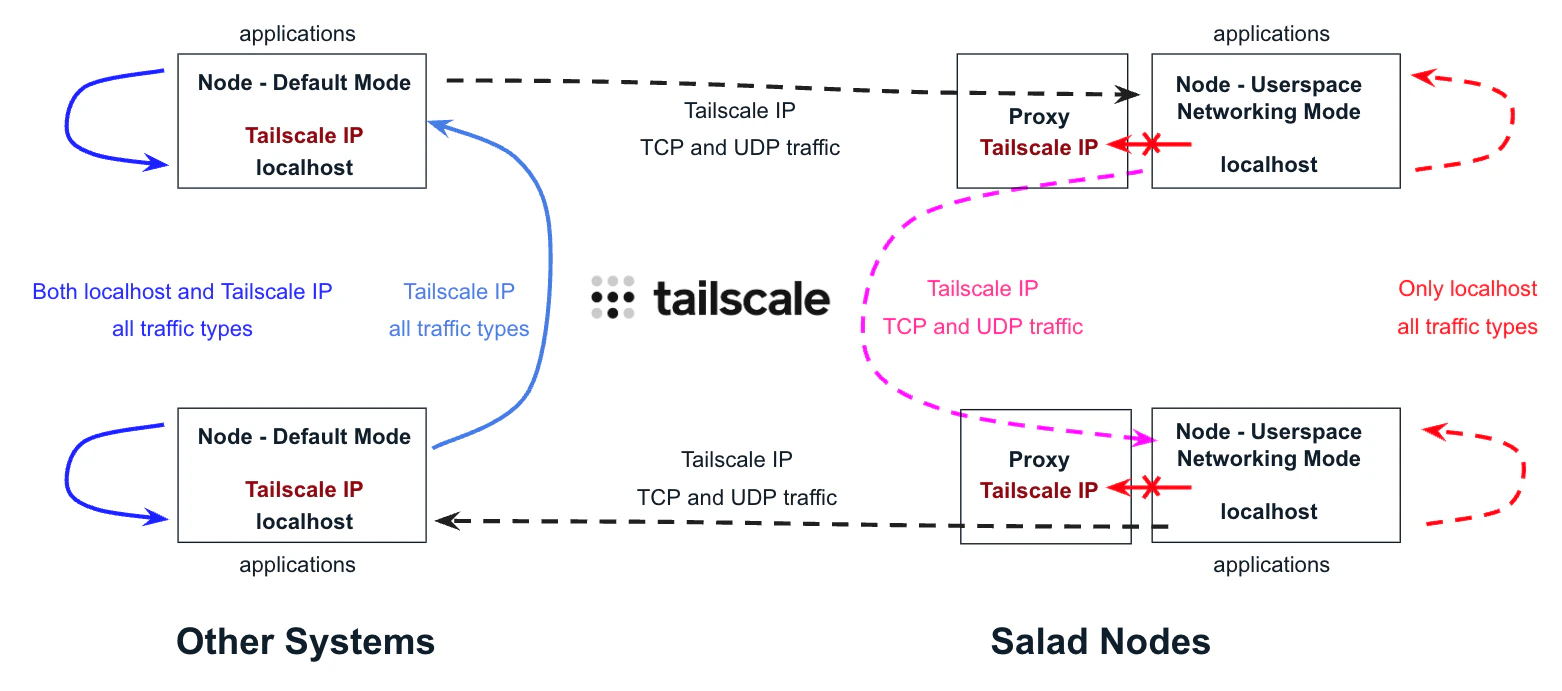
By default, Tailscale on Linux systems uses the **/dev/net/tun** device driver to create a virtual interface with a
Tailscale IP, allowing nodes to access themselves and others for all traffic types via their Tailscale IPs.
However, on SaladCloud, workloads run as containers in non-privileged mode and do not have access to the device driver.
To integrate SaladCloud with Tailscale, we leverage
[its userspace networking mode](https://tailscale.com/kb/1112/userspace-networking), which provides a local SOCKS5 and
HTTP proxy, enabling applications to communicate across nodes.
The [SOCKS5](https://datatracker.ietf.org/doc/html/rfc1928) proxy is a versatile and flexible solution that supports
both TCP and UDP traffic. In contrast, the HTTP proxy operates over TCP and is limited to proxying only HTTP and HTTPS
traffic.
For a node in Tailscale’s userspace network mode, outbound connections to other nodes within the same Tailnet must be
explicitly configured to use the SOCKS5 or HTTP proxy through
[environment variables](https://tailscale.com/kb/1112/userspace-networking#configure-your-application-to-use-socks5-or-http)
or network proxying tools like [proxychains](https://github.com/haad/proxychains), while inbound connections are
automatically routed through the SOCKS5 proxy by Tailscale.
Here is a summary of the supported communication scenarios and protocols when integrating SaladCloud with Tailscale.
| Supported Communication Scenarios and Protocols | Target:
* **Remote Development:** Developers can use [VSCode - Remote SSH](https://code.visualstudio.com/docs/remote/ssh) and
[JupyterLab](https://jupyter.org/) on Mac or Windows to seamlessly test and debug their code running on Salad GPU
nodes.
* **Network Management and Troubleshooting:** Network operators can SSH into Salad nodes for configuration, management,
and troubleshooting purposes.
* **Node Discovery and Identity Broker:** Detecting when nodes come online or go offline, while implementing an identity
broker for private, centralized authentication and authorization. This setup provides temporary credentials to Salad
nodes for accessing external systems using
[JWT authentication](/container-engine/tutorials/security/jwt-authentication).
* **Accessing Private Services:** Connecting Salad nodes to private services hosted on-premises or in the cloud,
including databases, message queues, Kubernetes clusters, and proxies.
* **Enabling Meshed Communication:** Facilitating secure, direct communication between Salad nodes and private systems
in a mesh network.
Tailscale is fully compatible with SaladCloud's networking. While enabling the new use cases through the integration,
the Container Gateway and outbound connections in SaladCloud remain unaffected.
## Scenarios and Protocols
By default, Tailscale on Linux systems uses the **/dev/net/tun** device driver to create a virtual interface with a
Tailscale IP, allowing nodes to access themselves and others for all traffic types via their Tailscale IPs.
However, on SaladCloud, workloads run as containers in non-privileged mode and do not have access to the device driver.
To integrate SaladCloud with Tailscale, we leverage
[its userspace networking mode](https://tailscale.com/kb/1112/userspace-networking), which provides a local SOCKS5 and
HTTP proxy, enabling applications to communicate across nodes.
The [SOCKS5](https://datatracker.ietf.org/doc/html/rfc1928) proxy is a versatile and flexible solution that supports
both TCP and UDP traffic. In contrast, the HTTP proxy operates over TCP and is limited to proxying only HTTP and HTTPS
traffic.
For a node in Tailscale’s userspace network mode, outbound connections to other nodes within the same Tailnet must be
explicitly configured to use the SOCKS5 or HTTP proxy through
[environment variables](https://tailscale.com/kb/1112/userspace-networking#configure-your-application-to-use-socks5-or-http)
or network proxying tools like [proxychains](https://github.com/haad/proxychains), while inbound connections are
automatically routed through the SOCKS5 proxy by Tailscale.
Here is a summary of the supported communication scenarios and protocols when integrating SaladCloud with Tailscale.
| Supported Communication Scenarios and Protocols | Target:
Default Mode
(Other Systems) | Target:
Userspace Networking Mode
(Salad Nodes) |
| :------------------------------------------------------------ | :---------------------------------------------------------------------------------------------------------------------------------------------------------------------------------------------- | :-------------------------------------------------------------------------------------------------------------------------------------------------------------------------------------------------------------------------------------------------------------- |
| **Source:
Default Mode
(Other Systems)** | The application can access peers via their Tailscale IPs for all traffic types.
The application can access itself via its Tailscale IP or the localhost (127.0.0.1) for all traffic types. | The application can access peers using their Tailscale IPs for TCP and UDP traffic. |
| **Source:
Userspace Networking Mode
(Salad Nodes)** | The application can access peers via their Tailscale IPs for TCP and UDP traffic by using the local proxy provided by Tailscale. | The application can access peers via their Tailscale IPs for TCP and UDP traffic by using the local proxy provided by Tailscale.
The application can access itself via the localhost (127.0.0.1) for all traffic types, but cannot reach its Tailscale IP. |
**Note: Not all devices in the default mode can access their own Tailscale IPs, as this depends on the operating system,
network configuration, and firewall settings.**
 ## Summary
After integrating SaladCloud with Tailscale, you can fully utilize Tailscale’s features, solutions, and ecosystem to
build a wide range of applications:
* Salad nodes can securely connect to systems within the same tailnet, including on-premises datacenters and private
services hosted on public clouds. This enables simpler development of distributed applications over TCP or UDP.
* With [Tailscale’s pre-built Kubernetes integration](https://tailscale.com/kb/1185/kubernetes), Salad nodes can
directly access pods and services—such as self-managed RabbitMQ and Redis—within public or private Kubernetes
clusters.
* Network operators and developers can easily use SSH clients or VSCode on Mac or Windows to test and debug applications
running on Salad nodes.
* You can build clustered applications on Salad nodes using TCP or UDP communication. However, ensure that in-cluster
communication uses Tailscale IPs, while intra-node communication uses the localhost. Note that
[Ray](https://www.ray.io/) is currently incompatible with the solution because it uses a single IP for both in-cluster
and intra-node communication.
You can begin testing the integration solution with [a Tailscale personal account](https://tailscale.com/pricing), which
supports up to 100 nodes, allowing you to explore a variety of use cases.
## Summary
After integrating SaladCloud with Tailscale, you can fully utilize Tailscale’s features, solutions, and ecosystem to
build a wide range of applications:
* Salad nodes can securely connect to systems within the same tailnet, including on-premises datacenters and private
services hosted on public clouds. This enables simpler development of distributed applications over TCP or UDP.
* With [Tailscale’s pre-built Kubernetes integration](https://tailscale.com/kb/1185/kubernetes), Salad nodes can
directly access pods and services—such as self-managed RabbitMQ and Redis—within public or private Kubernetes
clusters.
* Network operators and developers can easily use SSH clients or VSCode on Mac or Windows to test and debug applications
running on Salad nodes.
* You can build clustered applications on Salad nodes using TCP or UDP communication. However, ensure that in-cluster
communication uses Tailscale IPs, while intra-node communication uses the localhost. Note that
[Ray](https://www.ray.io/) is currently incompatible with the solution because it uses a single IP for both in-cluster
and intra-node communication.
You can begin testing the integration solution with [a Tailscale personal account](https://tailscale.com/pricing), which
supports up to 100 nodes, allowing you to explore a variety of use cases.