> ## Documentation Index
> Fetch the complete documentation index at: https://docs.salad.com/llms.txt
> Use this file to discover all available pages before exploring further.
# Virtual Kubelet Solution Overview
> Integrate unlimited GPU resources from SaladCloud into your Kubernetes clusters
## Introduction
[Kubernetes](https://kubernetes.io/docs/home/) (K8s) is a powerful open-source container orchestration platform that
automates the deployment, scaling, and management of containerized applications.
[Kubelet](https://kubernetes.io/docs/reference/command-line-tools-reference/kubelet/) is a core component that runs on
each node in a Kubernetes cluster, ensuring that containers operate as expected. It communicates with the Kubernetes
control plane and interacts with container runtimes like Docker or containerd to start, stop, and monitor containers
while maintaining the desired state defined in Pod specifications.
[Virtual Kubelet](https://github.com/virtual-kubelet/virtual-kubelet) (VK) extends Kubernetes by acting as an
abstraction layer that allows workloads to run on external or virtual resources, such as cloud services, as if they were
standard nodes. This enables greater scalability, flexibility, and efficient resource utilization without requiring
additional physical nodes.
You can access SaladCloud directly through its APIs/SDKs in your Kubernetes applications. However, with **the Salad
Virtual Kubelet solution (v0.2.3)**, you can now provision and manage GPU resources on SaladCloud using Kubernetes APIs.
This solution includes:
* [VK Provider Source Code](https://github.com/SaladTechnologies/virtual-kubelet-saladcloud/tree/v0.2.3) - Can be
compiled into the VK binary.
* [Dockerfile](https://github.com/SaladTechnologies/virtual-kubelet-saladcloud/blob/v0.2.3/docker/Dockerfile) - Used to
build the VK container image that includes the pre-built VK binary.
* [Helm Chart](https://github.com/SaladTechnologies/virtual-kubelet-saladcloud/tree/v0.2.3/charts/virtual-kubelet-saladcloud-chart) -
Deploys the VK image on your Kubernetes cluster.
To ensure compatibility, the versions/tags of the VK solution, provider source code, docker image and Helm chart are
consistently aligned.
## Solution Highlights
By translating between Kubernetes APIs and SaladCloud APIs, the Salad VK solution can integrate unlimited GPU resources
from SaladCloud into your Kubernetes clusters, providing scalable and efficient acceleration for AI/ML workloads.
Kubernetes users can provision, scale, and manage SaladCloud GPU resources using familiar Kubernetes APIs while
utilizing flexible deployment strategies such as Rolling Updates, Recreate, and Blue-Green deployments. Additionally,
popular DevOps tools like Jenkins, Argo CD, and Flux can be seamlessly integrated for automated deployment and
management.
Furthermore, Kubernetes-based Event-Driven Autoscaler (KEDA) can be leveraged to implement custom scaling logic,
dynamically adjusting GPU resources on SaladCloud based on workload demand on Kubernetes.
## How It Works
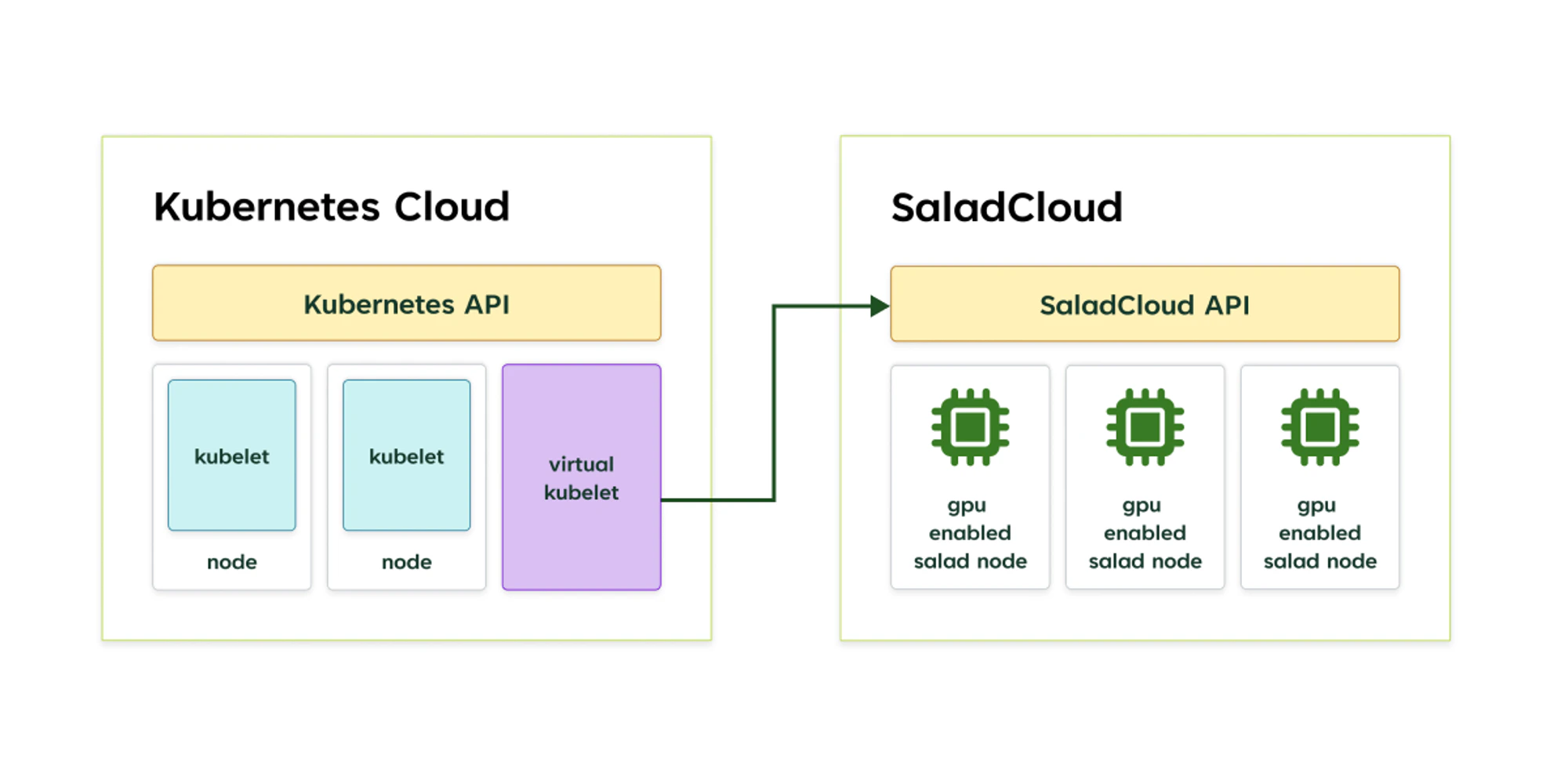
**Each Salad VK instance** functions as **a virtual node** in your Kubernetes cluster, interacting with the Kubernetes
API server and managing GPU resources for **a single project** within your organization on SaladCloud through its
APIs/SDKs. Multiple VK instances can run simultaneously, allowing you to simulate multiple virtual nodes in your cluster
and manage multiple different projects on SaladCloud.
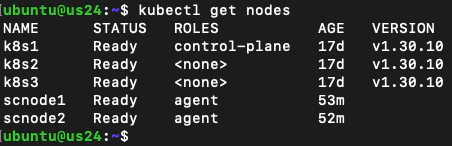
 Here is an example of a Kubernetes cluster with 3 regular nodes (**k8s1, k8s2, k8s3**) and 2 virtual nodes (**scnode1,
scnode2**) using the Salad VK provider:
Here is an example of a Kubernetes cluster with 3 regular nodes (**k8s1, k8s2, k8s3**) and 2 virtual nodes (**scnode1,
scnode2**) using the Salad VK provider:
 When you schedule **a pod** with GPU support on the selected virtual node using Kubernetes APIs, the Salad VK provider
will create **a GPU-powered, single-replica container group** on SaladCloud by using its APIs/SDKs. This container group
is then represented as **a virtual pod** running on the virtual node within your Kubernetes cluster.
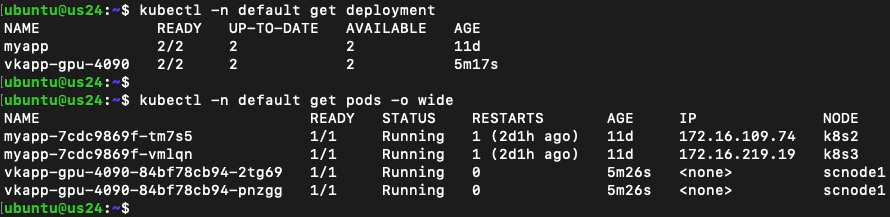
Let's consider another example: In the default namespace, there are 2 deployments:
* The **myapp** deployment, which has 2 pods (myapp-xxxxxxxx-xxxxx) running on nodes k8s2 and k8s3, and the
**vkapp-gpu-4090** deployment, with 2 virtual pods (vkapp-gpu-4090-xxxxxxxx-xxxxx) running on the scnode1 virtual
node.
When you schedule **a pod** with GPU support on the selected virtual node using Kubernetes APIs, the Salad VK provider
will create **a GPU-powered, single-replica container group** on SaladCloud by using its APIs/SDKs. This container group
is then represented as **a virtual pod** running on the virtual node within your Kubernetes cluster.
Let's consider another example: In the default namespace, there are 2 deployments:
* The **myapp** deployment, which has 2 pods (myapp-xxxxxxxx-xxxxx) running on nodes k8s2 and k8s3, and the
**vkapp-gpu-4090** deployment, with 2 virtual pods (vkapp-gpu-4090-xxxxxxxx-xxxxx) running on the scnode1 virtual
node.
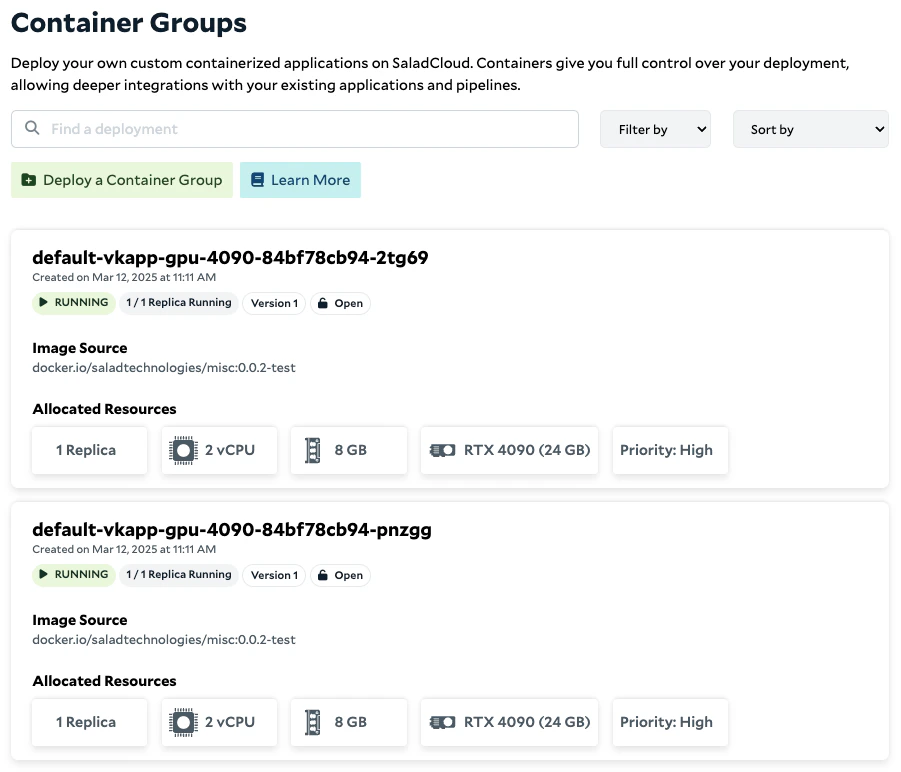
 * **The 2 virtual pods correspond to 2 single-replica container groups** on SaladCloud. You can further adjust the GPU
node count , update or rollback through the Kubernetes vkapp-gpu-4090 deployment.
* **The 2 virtual pods correspond to 2 single-replica container groups** on SaladCloud. You can further adjust the GPU
node count , update or rollback through the Kubernetes vkapp-gpu-4090 deployment.
 ## Key Specifications and Known Limitations
Kubernetes and SaladCloud serve distinct functions and offer unique features. The VK solution also has certain
limitations, as both nodes and pods are virtual and simulated, which may affect performance and functionality in
specific scenarios.
Below are the key specifications and known limitations to consider when building applications across Kubernetes and
SaladCloud:
| No | Description | |
| :- | :---------------------------------------------------------------------------------------------------------------------------------------------------------------------------------------------------------------------------------------------------------------------------- | :--------------------------------------------------------------------------------------------------------------------------------------------------------------------------------------------------------------------------------------------------------------------------------------------------------------------------------------------------------------------------------------------- |
| 1 | There are several ways to install a Salad VK instance into your Kubernetes cluster. **The simplest method is to use the provided Helm chart.** Alternatively, you can build a custom binary, image, or Helm chart for a more tailored installation. | Please refer to [the installation guide](/container-engine/how-to-guides/platform-integrations/installation-helm-chart) for detailed instructions. |
| 2 | You can simultaneously run multiple VK nodes in a Kubernetes cluster. **Each VK node is exclusively tied to a single project on SaladCloud, and any resources not created by the VK node will be automatically removed.** | Ensure that each VK node is deployed with its own dedicated, empty project on SaladCloud. |
| 3 | Each virtual pod created by a VK node corresponds to a single-replica container group on SaladCloud. A Kubernetes deployment with multiple replicas is mapped to multiple single-replica container groups. | **Make sure to check your organization's quotas if you require a large number of container groups on SaladCloud.** |
| 4 | Each container group on SaladCloud requires a unique resource name. You cannot reuse a previously used name, even if the container group has already been removed. | The Kubernetes deployment automatically appends a random suffix to the pod names it generates, ensuring each pod name is unique. **If you provision pods directly, rather than using a Kubernetes deployment, you must use unique names for each deployment.** |
| 5 | For the resources on SaladCloud managed by a VK node, manual changes outside the VK node may lead to discrepancies between the Kubernetes deployment and the resources on SaladCloud. | **It is recommended not to modify resources managed by the VK node directly through the SaladCloud Portal or APIs.** |
| 6 | The VK provider does not implement CNI (Container Network Interface) or CSI (Container Storage Interface). Consequently Kubernetes services cannot be used to expose virtual pods, and volume mounting is not supported. | There are a few methods for service access and data exchange across regular pods and the virtual pods in Kubernetes clusters, **including using external queue/storage and deploying an ingress gateway for virtual pods to access regular pods.** Please refer to [the service access guide](/container-engine/how-to-guides/platform-integrations/service-access) for detailed instructions. |
| 7 | The VK provider does not support features like kubectl logs and kubectl exec for the virtual pods. | You can access container logs through the SaladCloud Portal, which also offers an interactive terminal, enabling you to log into running containers. |
| 8 | **Due to the substantial differences between Kubernetes and SaladCloud, not all Kubernetes APIs and parameters have direct equivalents in SaladCloud. Additionally, special handling is required when using Kubernetes APIs to pass specific parameters to SaladCloud APIs.** | Please refer to [the application deployment guide](/container-engine/how-to-guides/platform-integrations/application-deployment) for detailed instructions. |
## Recommandations
Although the Salad VK solution enables you to manage both regular pods and the virtual GPU pods within the same
Kubernetes cluster, there are notable differences between the two, particularly in geolocation, latency and jitter,
supported APIs and protocols, and other factors.
Successful applications across Kubernetes and SaladCloud must be designed to handle and tolerate
[the distributed and dynamic nature of SaladCloud](/container-engine/tutorials/performance/high-performance-apps),
including variable startup times, performance variances and the potential for interruptions. Additionally, **containers
on SaladCloud are not run in privileged mode**, which may impose restrictions on mounting volumes via NFS and accessing
network devices for VPN connections. In such cases, you may consider alternative solutions, such as userspace networking
and storage tools, to overcome these limitations.
If converting between Kubernetes APIs and SaladCloud APIs introduces additional complexity and challenges to your use
case, you can always opt to use SaladCloud APIs/SDKs directly. Leveraging SaladCloud’s native tools allows you to
simplify the process, gain better control over resource management, streamline workflows, and ensure full compatibility
with SaladCloud’s infrastructure and capabilities.
## Key Specifications and Known Limitations
Kubernetes and SaladCloud serve distinct functions and offer unique features. The VK solution also has certain
limitations, as both nodes and pods are virtual and simulated, which may affect performance and functionality in
specific scenarios.
Below are the key specifications and known limitations to consider when building applications across Kubernetes and
SaladCloud:
| No | Description | |
| :- | :---------------------------------------------------------------------------------------------------------------------------------------------------------------------------------------------------------------------------------------------------------------------------- | :--------------------------------------------------------------------------------------------------------------------------------------------------------------------------------------------------------------------------------------------------------------------------------------------------------------------------------------------------------------------------------------------- |
| 1 | There are several ways to install a Salad VK instance into your Kubernetes cluster. **The simplest method is to use the provided Helm chart.** Alternatively, you can build a custom binary, image, or Helm chart for a more tailored installation. | Please refer to [the installation guide](/container-engine/how-to-guides/platform-integrations/installation-helm-chart) for detailed instructions. |
| 2 | You can simultaneously run multiple VK nodes in a Kubernetes cluster. **Each VK node is exclusively tied to a single project on SaladCloud, and any resources not created by the VK node will be automatically removed.** | Ensure that each VK node is deployed with its own dedicated, empty project on SaladCloud. |
| 3 | Each virtual pod created by a VK node corresponds to a single-replica container group on SaladCloud. A Kubernetes deployment with multiple replicas is mapped to multiple single-replica container groups. | **Make sure to check your organization's quotas if you require a large number of container groups on SaladCloud.** |
| 4 | Each container group on SaladCloud requires a unique resource name. You cannot reuse a previously used name, even if the container group has already been removed. | The Kubernetes deployment automatically appends a random suffix to the pod names it generates, ensuring each pod name is unique. **If you provision pods directly, rather than using a Kubernetes deployment, you must use unique names for each deployment.** |
| 5 | For the resources on SaladCloud managed by a VK node, manual changes outside the VK node may lead to discrepancies between the Kubernetes deployment and the resources on SaladCloud. | **It is recommended not to modify resources managed by the VK node directly through the SaladCloud Portal or APIs.** |
| 6 | The VK provider does not implement CNI (Container Network Interface) or CSI (Container Storage Interface). Consequently Kubernetes services cannot be used to expose virtual pods, and volume mounting is not supported. | There are a few methods for service access and data exchange across regular pods and the virtual pods in Kubernetes clusters, **including using external queue/storage and deploying an ingress gateway for virtual pods to access regular pods.** Please refer to [the service access guide](/container-engine/how-to-guides/platform-integrations/service-access) for detailed instructions. |
| 7 | The VK provider does not support features like kubectl logs and kubectl exec for the virtual pods. | You can access container logs through the SaladCloud Portal, which also offers an interactive terminal, enabling you to log into running containers. |
| 8 | **Due to the substantial differences between Kubernetes and SaladCloud, not all Kubernetes APIs and parameters have direct equivalents in SaladCloud. Additionally, special handling is required when using Kubernetes APIs to pass specific parameters to SaladCloud APIs.** | Please refer to [the application deployment guide](/container-engine/how-to-guides/platform-integrations/application-deployment) for detailed instructions. |
## Recommandations
Although the Salad VK solution enables you to manage both regular pods and the virtual GPU pods within the same
Kubernetes cluster, there are notable differences between the two, particularly in geolocation, latency and jitter,
supported APIs and protocols, and other factors.
Successful applications across Kubernetes and SaladCloud must be designed to handle and tolerate
[the distributed and dynamic nature of SaladCloud](/container-engine/tutorials/performance/high-performance-apps),
including variable startup times, performance variances and the potential for interruptions. Additionally, **containers
on SaladCloud are not run in privileged mode**, which may impose restrictions on mounting volumes via NFS and accessing
network devices for VPN connections. In such cases, you may consider alternative solutions, such as userspace networking
and storage tools, to overcome these limitations.
If converting between Kubernetes APIs and SaladCloud APIs introduces additional complexity and challenges to your use
case, you can always opt to use SaladCloud APIs/SDKs directly. Leveraging SaladCloud’s native tools allows you to
simplify the process, gain better control over resource management, streamline workflows, and ensure full compatibility
with SaladCloud’s infrastructure and capabilities.