> ## Documentation Index
> Fetch the complete documentation index at: https://docs.salad.com/llms.txt
> Use this file to discover all available pages before exploring further.
# Health Probes
*Last Updated: October 30, 2024*
# Overview
Health probes provide an automated way for SaladCloud users to trigger certain actions based on the status of the
containers in a container group deployment. SCE supports three types of probes: Startup, Liveness, and Readiness probes.
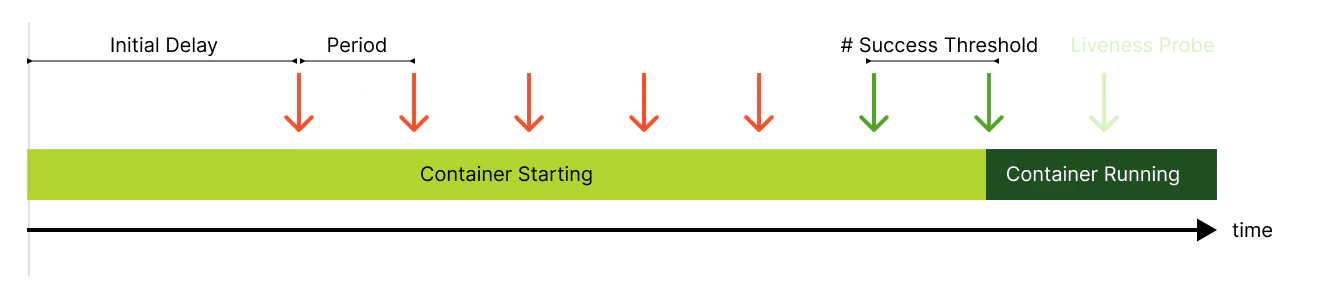
These probes run for each container deployed in the container group. If configured, the Startup probe runs first, and
the Liveness/Readiness probes (if configured) are suspended until after the Startup probe is successful.
> ⚠️ Caution
>
> Health probes can be extremely useful for catching deadlocks in an application, recovering from errors during
> container initialization, and ensuring local resources are available before exposing nodes via the Container Gateway.
>
> However, misconfigured health probes can easily cause unnecessary termination of containers, leading to slower
> deployment and less reliable application uptime. It is important to first understand the normal behavior of your own
> containers on SaladCloud in order to minimize false positives when configuring health probes.
# Probe Protocols
Salad Container Engine (SCE) supports four probe protocols: `exec`,` TCP`, `gRPC`, and` HTTP/1.X`. These protocols
provide a way to check the health of containers and trigger actions based on the results of the probes.
## `Exec Protocol`
The exec protocol executes a command inside the container and checks the exit code. If the exit code is zero, the probe
is considered successful. If the exit code is non-zero, the probe is considered a failure.
Parameters for this protocol include:
* **Command :** The command to be executed within the container.
* *Example:* Command : `cat`and argument `/etc/hostname`
## `TCP Protocol`
The TCP probe checks whether a TCP port inside the container is open and ready to accept the traffic. The probe sends a
SYN packet to the port and checks the response code. If the response code indicates that the port is open, the probe is
considered successful.
Note that using TCP probes without a Container Gateway enabled may result in unexpected behavior.
Parameters for this protocol include:
* **Port:** The port number for the TCP connection (between 1 to 65535).
* *Example:* `8080`
## `gRPC Protocol`
The gRPC probe checks the health of a gRPC service running inside the container. The probe sends a request to the
service and checks the response code. Parameters for this protocol include:
* **Service:** The service field used to distinguish between different types of probes or features.
* *Example:* `"liveness"` service field in gRPC allows you to differentiate between probes of different types or for
different features.
* **Port:** The port number for the gRPC connection (between 1 to 65535).
* *Example:* `50051`
## `HTTP/1.X Protocol`
The HTTP/1.X probe checks the health of an HTTP service running inside the container. The probe sends an HTTP GET
request and checks the response code.
Parameters for this protocol include:
* **Path**: The path for the HTTP request.
* *Example*: `/healthz`
* **Port**: The port number for the HTTP connection (between 1 to 65535).
* *Example*: `80`
## Common Probe Protocol Parameters
* `Initial Delay Seconds`: Number of seconds after the container starts before probes are initiated.
* `Period Seconds`: How often (in seconds) to perform the probe.
* `Timeout Seconds`: Number of seconds after which the probe times out.
* `Success Threshold`: Minimum consecutive successes for the probe to be considered successful.
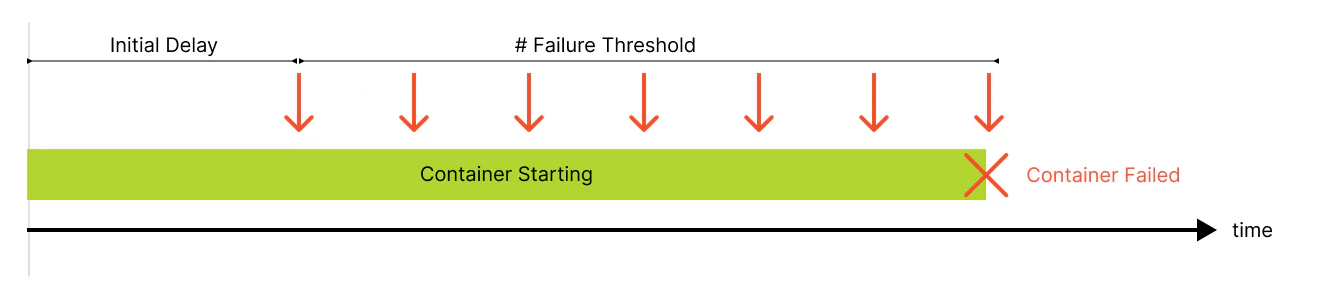
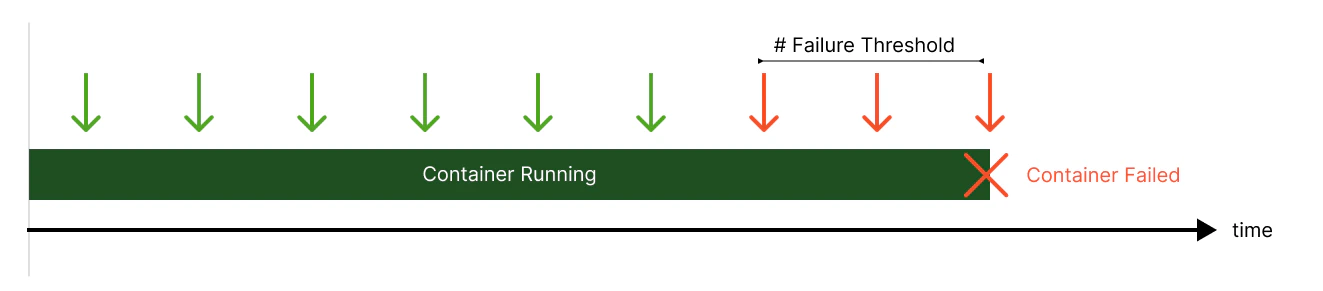
* `Failure Threshold`: Number of consecutive failures of the probe before the container is reallocated.
# Probe States
Each probe can be in 1 of 3 states:
* `Unknown`- The container is neither in a success or failure state yet. Causes no change to the system.
* `Success` - The probe has met the `successThreshold` and has not yet failed.
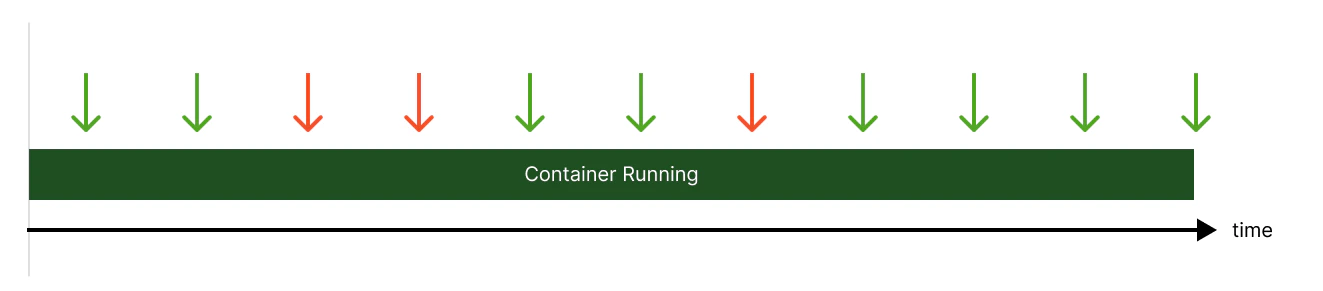
* `Failure` - The container failed the diagnostic. In the case of a failed Startup or Liveness probe, the container will
be automatically reallocated to a new node. In the case of a failed Readiness probe, the container will continue to
run on the node, but no networking traffic will be routed to it.
# Probe Timing
## Startup Probe
### Successful Startup Probe
 ### Failed Startup Probe
 ## Liveness Probe
### Successful Liveness Probe
## Liveness Probe
### Successful Liveness Probe
 ### Failed Liveness Probe
 ## Readiness Probe
### Successful Readiness Probe
## Readiness Probe
### Successful Readiness Probe
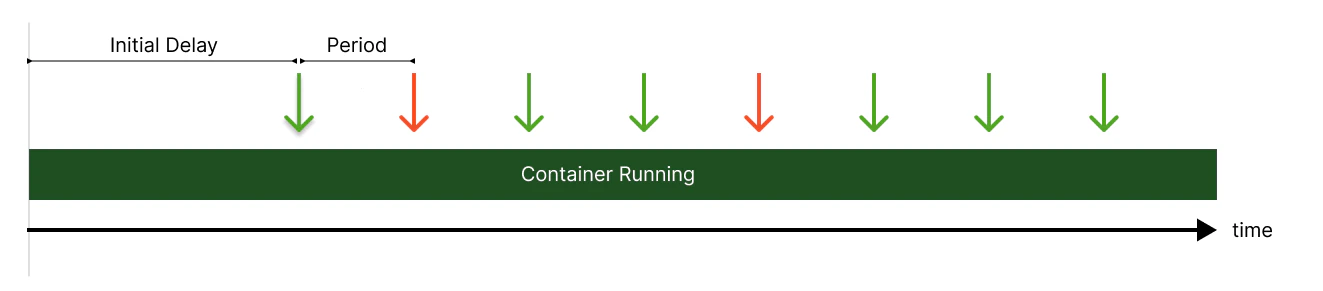 ### Failed Readiness Probe
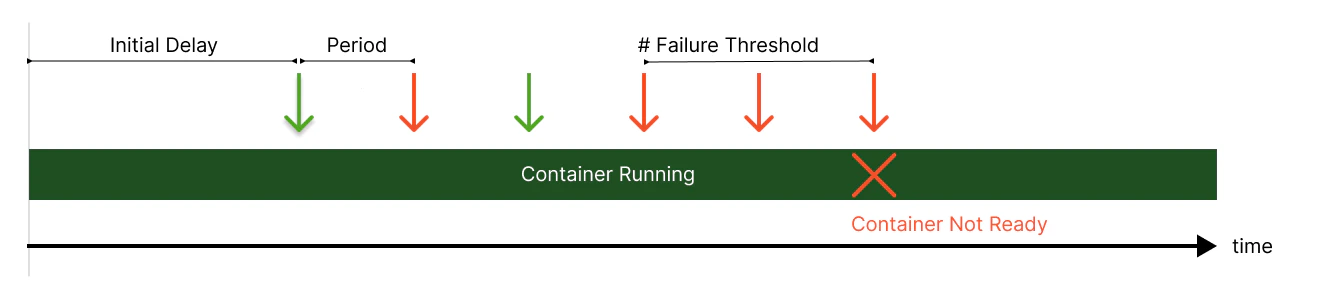
# Enabling Health Probes
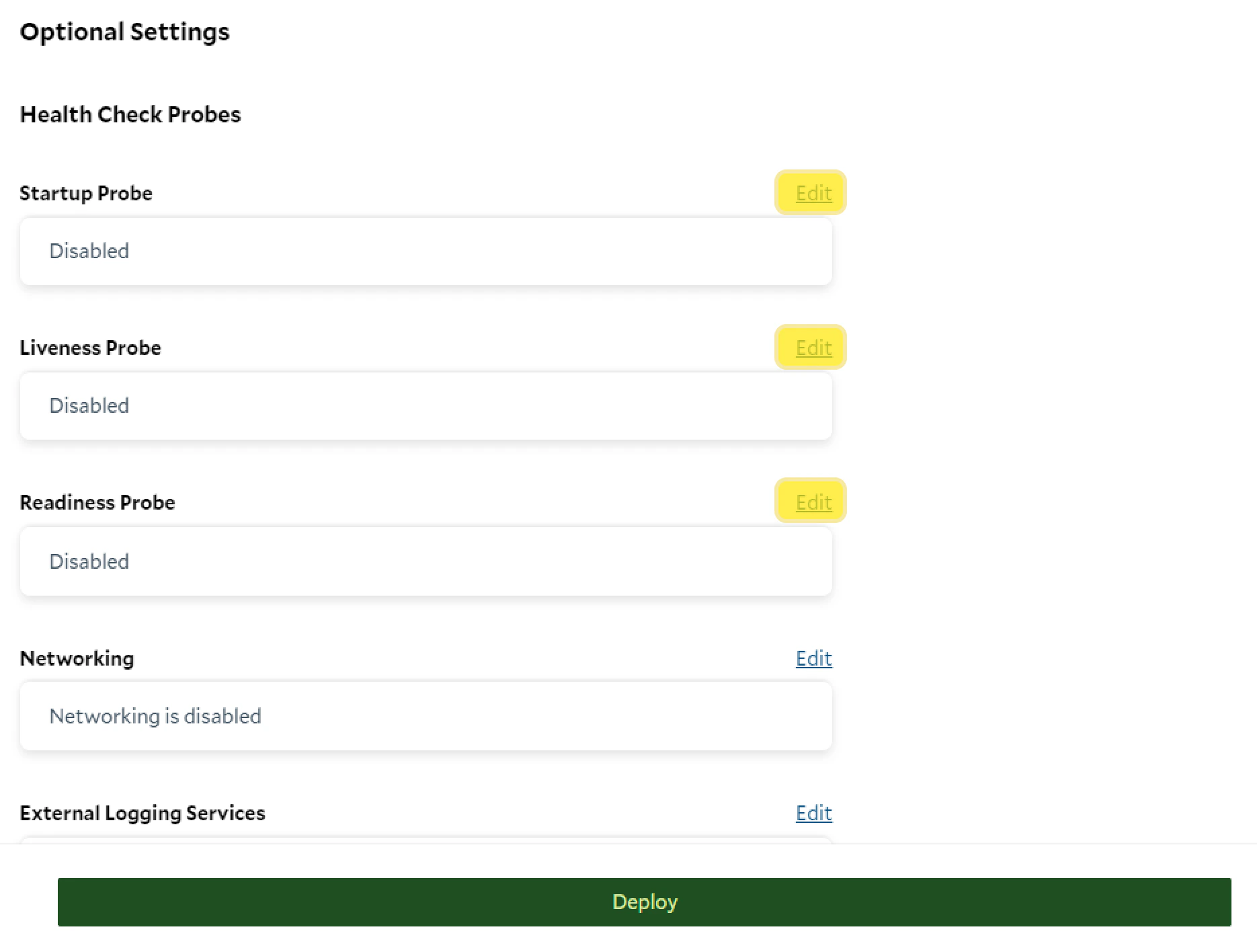
Each of these probes can be configured from the container group configuration page by clicking the edit button beside
each probe section.
 # Probe Configuration
SaladCloud provides comprehensive protocol support, including `exec`, `gRPC`, `TCP`, and `HTTP`.
To perform a probe, SaladCloud executes the command you specify in the target container. To configure a command, press
the Edit link as shown below.
# Probe Configuration
SaladCloud provides comprehensive protocol support, including `exec`, `gRPC`, `TCP`, and `HTTP`.
To perform a probe, SaladCloud executes the command you specify in the target container. To configure a command, press
the Edit link as shown below.
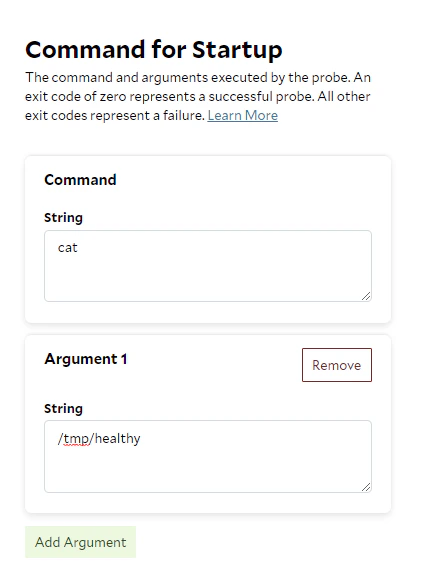
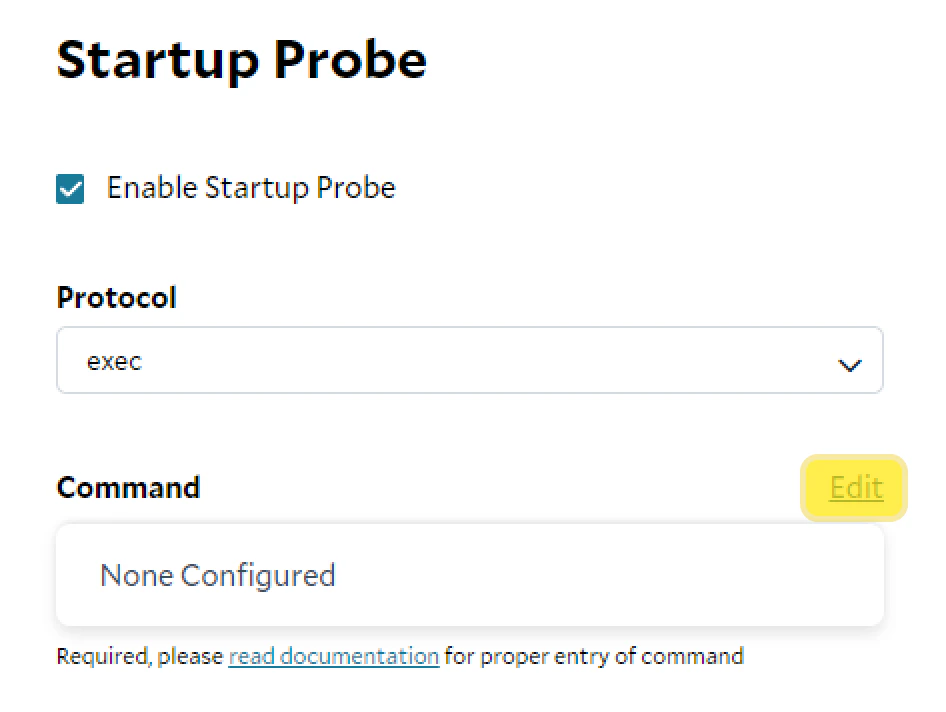 Configure the command and any additional arguments. In this example, the container will attempt to read a file located
at `/tmp/healthy` exactly `Initial Delay Seconds` after startup. If it successfully executes the command within
`Timeout Seconds`, the probe returns an exit code 0. Once this has happened `Success Threshold` times, the Startup probe
is 'done' and the Liveness and Readiness probes (if configured) are initiated.
Configure the command and any additional arguments. In this example, the container will attempt to read a file located
at `/tmp/healthy` exactly `Initial Delay Seconds` after startup. If it successfully executes the command within
`Timeout Seconds`, the probe returns an exit code 0. Once this has happened `Success Threshold` times, the Startup probe
is 'done' and the Liveness and Readiness probes (if configured) are initiated.
 ## Standard Probe Properties
All probes (Startup, Liveness, and Readiness) share the following properties.
| Property | Type (Min, Max) | Details |
| :------------------------ | :------------------- | :--------------------------------------------------------------------------------------------------------------------------------------------------------------------------------------------------------------------------------------------------- |
| **Initial Delay Seconds** | Integer (0 - 10,000) | The number of seconds after the container has started before the probe is initiated. If a Startup probe is configured, the initial delay for Liveness and Readiness probes begins counting when the Startup probe has reached the success threshold. |
| **Period Seconds** | Integer (1 - 10,000) | How often, in seconds, to perform the probe. |
| **Timeout Seconds** | Integer (1 - 10,000) | After a probe initiates, the number of seconds to wait for a successful response before timing out (failing). |
| **Success Threshold** | Integer (1 - 10,000) | The minimum consecutive successes for the probe to return a 0 (success) for the probe to be considered successful. |
| **Failure Threshold** | Integer (1 - 10,000) | The number of consecutive failures of the probe before the container is reallocated (in the case of Startup and Liveness probes) or Container Gateway (networking) is disabled (in the case of Readiness probes). |
# Further Reading
In SCE, the Startup, Liveness, and Readiness probes were designed based on the Kubernetes specifications. For additional
information on how probes work under the hood, as well as excellent examples of configured probes and common pitfalls,
check out the Kubernetes documentation on
[configuring probes ](https://kubernetes.io/docs/tasks/configure-pod-container/configure-liveness-readiness-startup-probes/)and
[when to use each one](https://kubernetes.io/docs/tasks/configure-pod-container/configure-liveness-readiness-startup-probes/).
[Health Probe Deep Dive](https://cloud.redhat.com/blog/liveness-and-readiness-probes)
## Standard Probe Properties
All probes (Startup, Liveness, and Readiness) share the following properties.
| Property | Type (Min, Max) | Details |
| :------------------------ | :------------------- | :--------------------------------------------------------------------------------------------------------------------------------------------------------------------------------------------------------------------------------------------------- |
| **Initial Delay Seconds** | Integer (0 - 10,000) | The number of seconds after the container has started before the probe is initiated. If a Startup probe is configured, the initial delay for Liveness and Readiness probes begins counting when the Startup probe has reached the success threshold. |
| **Period Seconds** | Integer (1 - 10,000) | How often, in seconds, to perform the probe. |
| **Timeout Seconds** | Integer (1 - 10,000) | After a probe initiates, the number of seconds to wait for a successful response before timing out (failing). |
| **Success Threshold** | Integer (1 - 10,000) | The minimum consecutive successes for the probe to return a 0 (success) for the probe to be considered successful. |
| **Failure Threshold** | Integer (1 - 10,000) | The number of consecutive failures of the probe before the container is reallocated (in the case of Startup and Liveness probes) or Container Gateway (networking) is disabled (in the case of Readiness probes). |
# Further Reading
In SCE, the Startup, Liveness, and Readiness probes were designed based on the Kubernetes specifications. For additional
information on how probes work under the hood, as well as excellent examples of configured probes and common pitfalls,
check out the Kubernetes documentation on
[configuring probes ](https://kubernetes.io/docs/tasks/configure-pod-container/configure-liveness-readiness-startup-probes/)and
[when to use each one](https://kubernetes.io/docs/tasks/configure-pod-container/configure-liveness-readiness-startup-probes/).
[Health Probe Deep Dive](https://cloud.redhat.com/blog/liveness-and-readiness-probes)