> ## Documentation Index
> Fetch the complete documentation index at: https://docs.salad.com/llms.txt
> Use this file to discover all available pages before exploring further.
# Salad Container Engine FAQs
*Last Updated: April 24, 2025*
This document is a must-read before getting started with SaladCloud. Here, we detail what SaladCloud is, the nature of
our network, how SaladCloud works, unique traits of our distributed network, the choice of consumer GPUs over data
center GPUs and other frequently asked questions.
## General Info
### What is SaladCloud?
SaladCloud is the world’s largest distributed cloud network with 1000s of consumer GPUs at the lowest cost. Our cloud is
powered by unused latent compute shared by individuals & businesses around the world.
### What is Salad Container Engine (SCE)?
Workloads are deployed to SaladCloud via docker containers. SCE is a massively scalable orchestration engine,
purpose-built to simplify this container development.
Containerize your model and inference server, choose the hardware and we take care of the rest.
### How big is the SaladCloud Compute Network?
Over 2 Million+ GPU owners in 190+ countries are part of the SaladCloud ecosystem. 450,000+ GPUs having contributed
significant compute and everyday, 11,000+ GPUs are active on the network.
### What kind of GPUs does SaladCloud have?
All GPUs on SaladCloud belong to the RTX/GTX class of GPUs from Nvidia. Our GPU selection policy is strict and we only
onboard AI-enabled, high performance compute capable GPUs to the network.
### How does SaladCloud work?
GPUs on SaladCloud are similar to spot instances. On one side, we have GPU owners who contribute their resources to
SaladCloud when not in use. Some providers share GPUs for 20-22 hours a day. Others share GPUs for 1-2 hours per day.
Users running workloads on SaladCloud select the GPU types and quantity they need. SaladCloud handles all the
orchestration in the backend and ensures you will have uninterrupted GPU time as per requirements.
### Why do owners share GPUs with Salad?
Owners earn rewards (in the form of Salad balance) for sharing their compute. Many compute providers earn $100 - $200
per month on SaladCloud as a reward that they exchange for games, gift cards and more.
### What are some unique traits of SaladCloud compared to other clouds?
* Since SaladCloud is a compute-share network, our GPUs have longer cold start times than usual, and are subject to
interruption.
* We only have RTX/GTX class of GPUs from Nvidia. Our thesis is that most AI/ML production workloads get better
cost-performance on consumer-grade GPUs. See our [benchmarks](https://blog.salad.com/) for more information.
* The highest vRAM on the network is 32 GB.
* Workloads requiring extremely low latency times are not a fit for our network.
### What are SaladCloud Endpoints/APIs?
SaladCloud has one API offering today - a full-featured [Transcription API](/transcription/explanation/overview). We
will be adding more APIs to our suite in the coming months.
### What is the right SaladCloud product for my workload?
SaladCloud has three product lines:
* [Salad Container Engine (SCE)](/container-engine/tutorials/quickstart): a managed container engine built for deploying
GPU-intensive containers at a massive scale.
* [Salad Gateway Service (SGS)](/gateway-service/explanation/overview): a proxy service that routes requests from VPN
operators or other customers who need distributed residential IP infrastructure to SaladCloud nodes.
* [Salad Transcription API](/transcription/explanation/overview): the lowest-priced transcription service in the market
with unparalleled accuracy.
### Is SaladCloud a good fit for GPU reselling platforms?
If your platform depends on reselling dedicated bare-metal GPUs or VPC-style hardware, SaladCloud is usually not the
right fit. Salad Container Engine is a managed, container-based service rather than raw hardware access.
If your platform supports a similar container-based integration model and you want to resell SaladCloud compute to your
customers, contact us at [cloud@salad.com](mailto:cloud@salad.com).
### How does the billing work?
* SaladCloud operates on a prepaid credits billing model and charges for resource usage at the org level. You can view
your current bill and configure recharge settings within your org on the Billing & Usage page.
* You are billed per second only for container instances in the “running” state. Instances in other states, such as
“downloading” and “allocating” are not billed.
* Bandwidth is not metered, and there are no "stale charges" related to storage for containers that are not running.
* [Learn More About Billing](/container-engine/explanation/billing-pricing/billing)
### RTX 5090 GPUs on SaladCloud?
We have RTX 5090 GPUs on SaladCloud! There are some things you should know before deploying:
* **MINIMUM CUDA VERSION: 12.8** - If your application does not use CUDA 12.8 or later, it will not run on the RTX 5090.
* **CUDA 12.8 is not currently compatible with older GPUs** (Apr 24, 2025)- If you are using a docker image that is
compatible with the RTX 5090, it will not work on older GPUs. You will need to maintain separate docker images for the
RTX 5090 and older GPUs.
* [More Info](/container-engine/tutorials/machine-learning/pytorch-rtx5090)
## Security and Compliance
### How does security work on Salad?
Every day, 100s of businesses run production workloads on SaladCloud securely. We have several layers of security to
keep your containers safe, encrypting them in transit, and at rest. Containers run in an isolated environment on our
nodes - keeping your data isolated and also ensuring you have the same compute environment regardless of the machine
you’re running on.
Learn more about [Security](https://salad.com/security)
### What if a host tries to access my container?
Our constant host intrusion detection tests look for operations like folder access, opening a shell, etc. If a host
machine tries to access the linux environment, we automatically implode the environment and blacklist the machine. We’re
also bringing Falco into our runtime for a more robust set of checks.
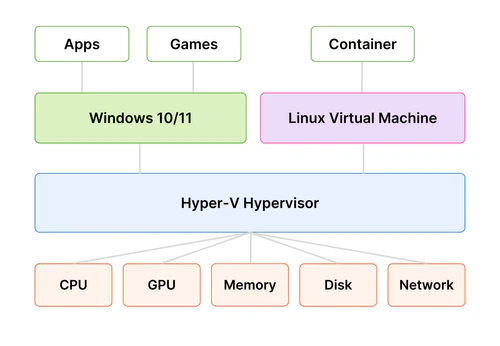
This diagram explains the SaladCloud architecture to protect workloads from malicious software and suppliers from
malicious workloads.
 ### What about compliance on Salad?
We are SOC 2 Type 1 compliant. You can read more about our compliance
[here](https://blog.salad.com/salad-soc-2-certification/).
## Performance
### How does latency work on Salad?
Since our GPUs are globally distributed, and often accessed via residential internet connections, latency can be higher
on SaladCloud than on datacenter-based clouds. The best use cases for SaladCloud's network are ones that DO NOT have
extremely low latency requirements.
Many companies run production workloads on SaladCloud with acceptable latency times. One of SaladCloud's largest users
is an AI image generation tool that serves millions of users. Our team can work with you on the right architecture to
ensure your latency requirements are met.
### How can I be sure a GPU is performant?
We use a proprietary trust rating system to index node performance, forecast availability, and select the optimal
hardware configuration for deployment. We also run proprietary tests on every GPU to determine their fit for our
network. For more on performant GPU infrastructure configuration, view our
[Build High-Performance Applications](/container-engine/tutorials/performance/high-performance-apps) tutorial and our
[Performance Monitoring](/container-engine/tutorials/performance/performance-monitoring) tutorial.
### Are consumer-grade GPUs good for AI workloads?
Yes. Many consumer GPUs on our network offer comparable or even better performance for AI workloads. You can read all
our [benchmarks here](https://blog.salad.com/).
## Deployment Info
### How do I troubleshoot issues on Salad?
We have a detailed troubleshooting guide [here](/container-engine/how-to-guides/troubleshooting). If you have any issues
not covered in the guide, please contact support.
### What should I be aware of before deploying a workload to Salad?
* Cold start time is high on SaladCloud. Give it a few minutes to let your containers up and running.
* Instances will be interrupted with no warning. Architect your application accordingly, such as retrying failed
requests, and running multiple replicas to provide coverage during automatic fail-overs.
* Network performance will
[vary from node to node](/container-engine/explanation/core-concepts/overview#performance-variability), due the
distributed, residential nature of the network.
* For Mac developers, be sure to build your containers for amd64, not arm64.
If you're looking to implement networking on your instances within a container group by leveraging
[SaladCloud's container gateway](/container-engine/explanation/infrastructure-platform/networking), you'll need to
[configure IPv6](/container-engine/how-to-guides/gateway/enabling-ipv6) within your container image.
### What happens if a GPU goes offline?
Salad Container Engine automatically reallocates your workload to another GPU (same type and class) when a resource goes
offline.
### Do you have a checklist to track before deploying a workload to Salad?
This checklist is for SCE. For checklists for APIs and SGS, check the relevant docs page.
* Test your docker container in a local environment
* Make sure you select enough vCPU, RAM, and vRAM for your application
* Setup container gateway or a job queue
* If you are using the container gateway,
[make sure your container is setup for IPv6](/container-engine/how-to-guides/gateway/enabling-ipv6).
* Make sure you’re not running an empty container (i.e. Ubuntu) without setting the command to “sleep infinity”.
* Run your workload with at least 3 replicas to account for latency.
### What is the expected uptime on SaladCloud?
* SaladCloud nodes operate similarly to "spot" instances on other clouds. While individual nodes on SaladCloud have a
reliability of 90%-95% (meaning, in a container group of 100 nodes, you will usually have 90+ running nodes at any
given time), the combined reliability of the system is higher, thanks to redundancy and higher no. of nodes.
* Similar to "spot" instances, SaladCloud using a
[Priority Pricing](/container-engine/explanation/billing-pricing/priority-pricing) model, where you can choose the
priority of your container group based on your workload requirements. Higher priority workloads may interrupt lower
priority workloads.
* Here is a real example over 24 hours for a production AI image generation workload with 100 requested nodes. As we
would expect, it’s fairly uncommon for all 100 to be running at the same time, but 100% of the time, we have at least
82 live nodes. For this customer, 82 simultaneous nodes offered plenty of throughput to keep up with their own
internal SLOs, and provided a 0-downtime experience.
### What about compliance on Salad?
We are SOC 2 Type 1 compliant. You can read more about our compliance
[here](https://blog.salad.com/salad-soc-2-certification/).
## Performance
### How does latency work on Salad?
Since our GPUs are globally distributed, and often accessed via residential internet connections, latency can be higher
on SaladCloud than on datacenter-based clouds. The best use cases for SaladCloud's network are ones that DO NOT have
extremely low latency requirements.
Many companies run production workloads on SaladCloud with acceptable latency times. One of SaladCloud's largest users
is an AI image generation tool that serves millions of users. Our team can work with you on the right architecture to
ensure your latency requirements are met.
### How can I be sure a GPU is performant?
We use a proprietary trust rating system to index node performance, forecast availability, and select the optimal
hardware configuration for deployment. We also run proprietary tests on every GPU to determine their fit for our
network. For more on performant GPU infrastructure configuration, view our
[Build High-Performance Applications](/container-engine/tutorials/performance/high-performance-apps) tutorial and our
[Performance Monitoring](/container-engine/tutorials/performance/performance-monitoring) tutorial.
### Are consumer-grade GPUs good for AI workloads?
Yes. Many consumer GPUs on our network offer comparable or even better performance for AI workloads. You can read all
our [benchmarks here](https://blog.salad.com/).
## Deployment Info
### How do I troubleshoot issues on Salad?
We have a detailed troubleshooting guide [here](/container-engine/how-to-guides/troubleshooting). If you have any issues
not covered in the guide, please contact support.
### What should I be aware of before deploying a workload to Salad?
* Cold start time is high on SaladCloud. Give it a few minutes to let your containers up and running.
* Instances will be interrupted with no warning. Architect your application accordingly, such as retrying failed
requests, and running multiple replicas to provide coverage during automatic fail-overs.
* Network performance will
[vary from node to node](/container-engine/explanation/core-concepts/overview#performance-variability), due the
distributed, residential nature of the network.
* For Mac developers, be sure to build your containers for amd64, not arm64.
If you're looking to implement networking on your instances within a container group by leveraging
[SaladCloud's container gateway](/container-engine/explanation/infrastructure-platform/networking), you'll need to
[configure IPv6](/container-engine/how-to-guides/gateway/enabling-ipv6) within your container image.
### What happens if a GPU goes offline?
Salad Container Engine automatically reallocates your workload to another GPU (same type and class) when a resource goes
offline.
### Do you have a checklist to track before deploying a workload to Salad?
This checklist is for SCE. For checklists for APIs and SGS, check the relevant docs page.
* Test your docker container in a local environment
* Make sure you select enough vCPU, RAM, and vRAM for your application
* Setup container gateway or a job queue
* If you are using the container gateway,
[make sure your container is setup for IPv6](/container-engine/how-to-guides/gateway/enabling-ipv6).
* Make sure you’re not running an empty container (i.e. Ubuntu) without setting the command to “sleep infinity”.
* Run your workload with at least 3 replicas to account for latency.
### What is the expected uptime on SaladCloud?
* SaladCloud nodes operate similarly to "spot" instances on other clouds. While individual nodes on SaladCloud have a
reliability of 90%-95% (meaning, in a container group of 100 nodes, you will usually have 90+ running nodes at any
given time), the combined reliability of the system is higher, thanks to redundancy and higher no. of nodes.
* Similar to "spot" instances, SaladCloud using a
[Priority Pricing](/container-engine/explanation/billing-pricing/priority-pricing) model, where you can choose the
priority of your container group based on your workload requirements. Higher priority workloads may interrupt lower
priority workloads.
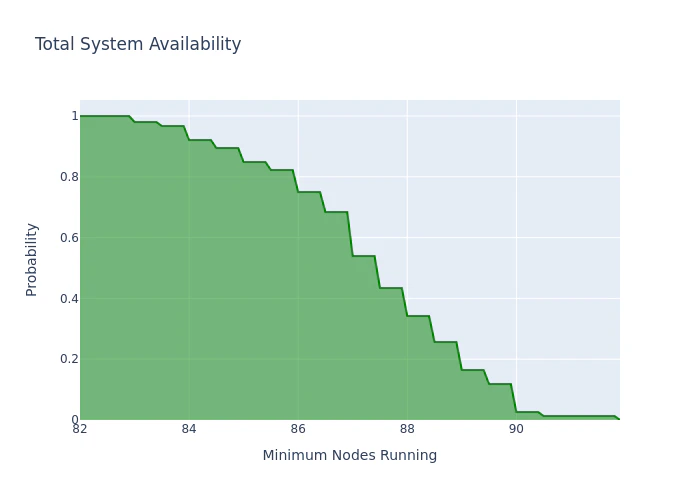
* Here is a real example over 24 hours for a production AI image generation workload with 100 requested nodes. As we
would expect, it’s fairly uncommon for all 100 to be running at the same time, but 100% of the time, we have at least
82 live nodes. For this customer, 82 simultaneous nodes offered plenty of throughput to keep up with their own
internal SLOs, and provided a 0-downtime experience.
 ### How do I use SSH with Salad?
SaladCloud supports both SSH access and a web-based terminal for connecting to running containers. To use SSH, add your
public key in the Portal under **SSH Keys**, then click on a running instance to get the SSH command. See
[SSH & Terminal Access](/container-engine/explanation/container-groups/ssh-and-terminal) for detailed instructions.
### I need a unique URL for each node. How do I do that?
The best way to accomplish this is to create container groups with the Container Gateway enabled and with 1 replica
each, because each container group with the Container Gateway enabled receives a static, unique URL. For large numbers
of container groups, we recommend managing these container groups programmatically through the API.
### How do I use SSH with Salad?
SaladCloud supports both SSH access and a web-based terminal for connecting to running containers. To use SSH, add your
public key in the Portal under **SSH Keys**, then click on a running instance to get the SSH command. See
[SSH & Terminal Access](/container-engine/explanation/container-groups/ssh-and-terminal) for detailed instructions.
### I need a unique URL for each node. How do I do that?
The best way to accomplish this is to create container groups with the Container Gateway enabled and with 1 replica
each, because each container group with the Container Gateway enabled receives a static, unique URL. For large numbers
of container groups, we recommend managing these container groups programmatically through the API.