> ## Documentation Index
> Fetch the complete documentation index at: https://docs.salad.com/llms.txt
> Use this file to discover all available pages before exploring further.
# SCE Architectural Overview
> The world's largest distributed GPU cloud at the most competitive prices
*Last Updated: May 29, 2025*
## What is SaladCloud Container Engine (SCE)?
SaladCloud Container Engine (SCE) is a decentralized global GPU cloud that operates as a two-sided marketplace
connecting PC owners (called "chefs") to businesses with compute-intensive workloads. Our chefs sell time on their
gaming PCs when they aren't in use—an average of 22 hours per day—while businesses deploy containerized workloads to
access affordable GPU compute power.
### Global Distribution at Scale
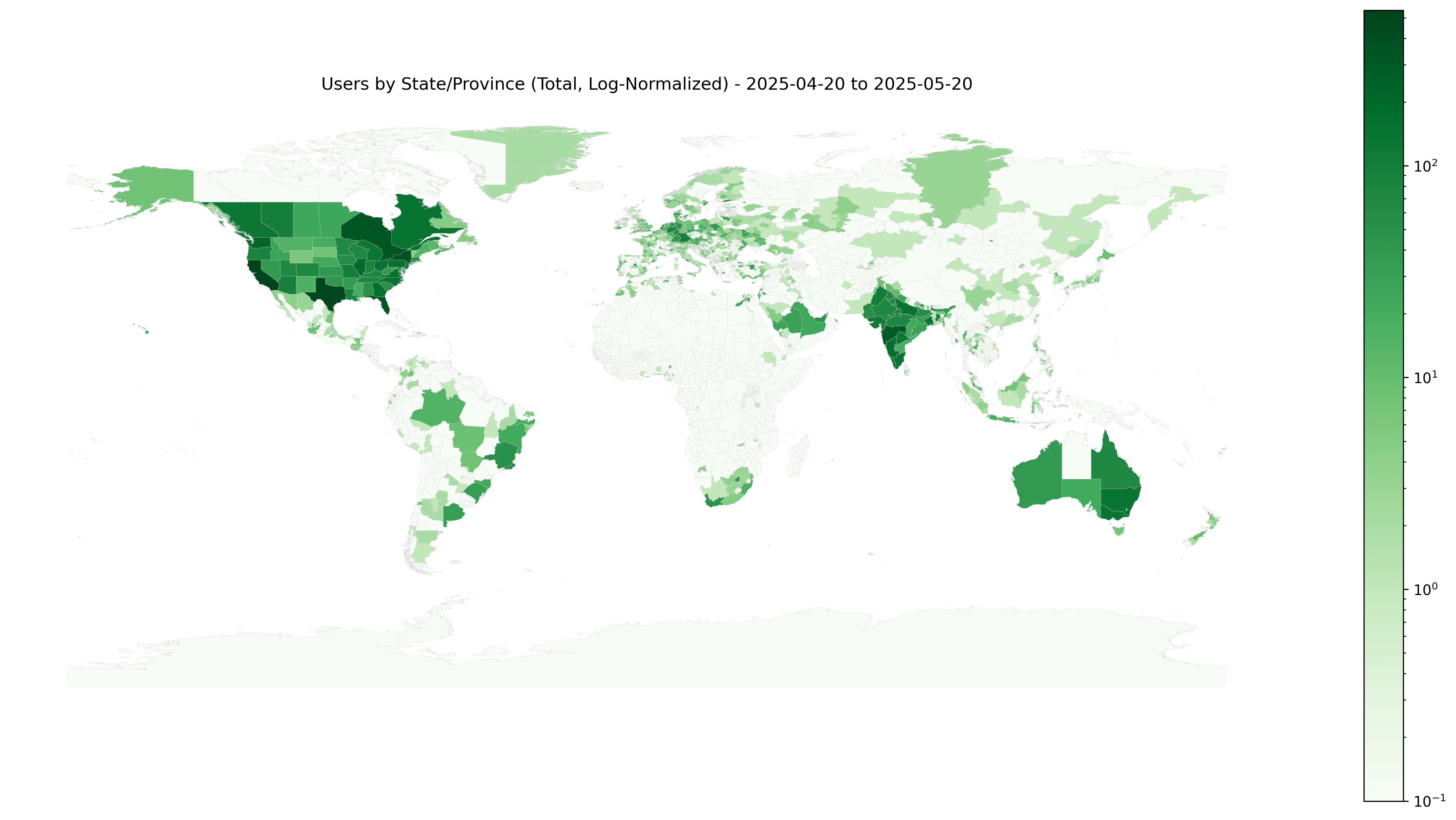 SCE comprises tens of thousands of Salad nodes distributed across the global Internet, with chefs operating from 156
countries in a sampled 30 day period. These machines are spread across more than 1,300 states and provinces worldwide,
with distribution roughly following population density patterns.
**Hardware Diversity:**
* GPU types range from older GTX series GPUs to mid-range RTX 3060s (available in 98 countries) to high-end RTX 4090s
(concentrated in 63 countries, primarily US, Canada, and UK)
* Each node is equipped with consumer GPUs and varying CPU and memory configurations
* Maximum node configuration: 16 vCPUs, 60 GB RAM, RTX 5090 with 32 GB VRAM
* Up to 250 GB of ephemeral storage available while instances are running
**Network Characteristics:**
* Many nodes are located in residential networks with asymmetric bandwidth
* Upload speeds are typically lower than download speeds
* Connections are predominantly over residential internet, often shared with other household devices
## How SCE Works Under the Hood
### Chef Infrastructure
Chefs download and install a Windows desktop application that allows them to configure their sharing preferences,
including:
* Whether to share GPU or CPU resources
* Bandwidth sharing preferences
* Types of workloads they're willing to accept
The application installs Salad Enterprise Linux (SEL) in Windows Subsystem for Linux 2 (WSL2), which:
* Manages container workload lifecycles
* Coordinates with the SaladCloud backend
* Provides security features including intrusion detection
* Automatically requests work when the chef is away and the machine is idle
### Workload Deployment Process
SCE comprises tens of thousands of Salad nodes distributed across the global Internet, with chefs operating from 156
countries in a sampled 30 day period. These machines are spread across more than 1,300 states and provinces worldwide,
with distribution roughly following population density patterns.
**Hardware Diversity:**
* GPU types range from older GTX series GPUs to mid-range RTX 3060s (available in 98 countries) to high-end RTX 4090s
(concentrated in 63 countries, primarily US, Canada, and UK)
* Each node is equipped with consumer GPUs and varying CPU and memory configurations
* Maximum node configuration: 16 vCPUs, 60 GB RAM, RTX 5090 with 32 GB VRAM
* Up to 250 GB of ephemeral storage available while instances are running
**Network Characteristics:**
* Many nodes are located in residential networks with asymmetric bandwidth
* Upload speeds are typically lower than download speeds
* Connections are predominantly over residential internet, often shared with other household devices
## How SCE Works Under the Hood
### Chef Infrastructure
Chefs download and install a Windows desktop application that allows them to configure their sharing preferences,
including:
* Whether to share GPU or CPU resources
* Bandwidth sharing preferences
* Types of workloads they're willing to accept
The application installs Salad Enterprise Linux (SEL) in Windows Subsystem for Linux 2 (WSL2), which:
* Manages container workload lifecycles
* Coordinates with the SaladCloud backend
* Provides security features including intrusion detection
* Automatically requests work when the chef is away and the machine is idle
### Workload Deployment Process
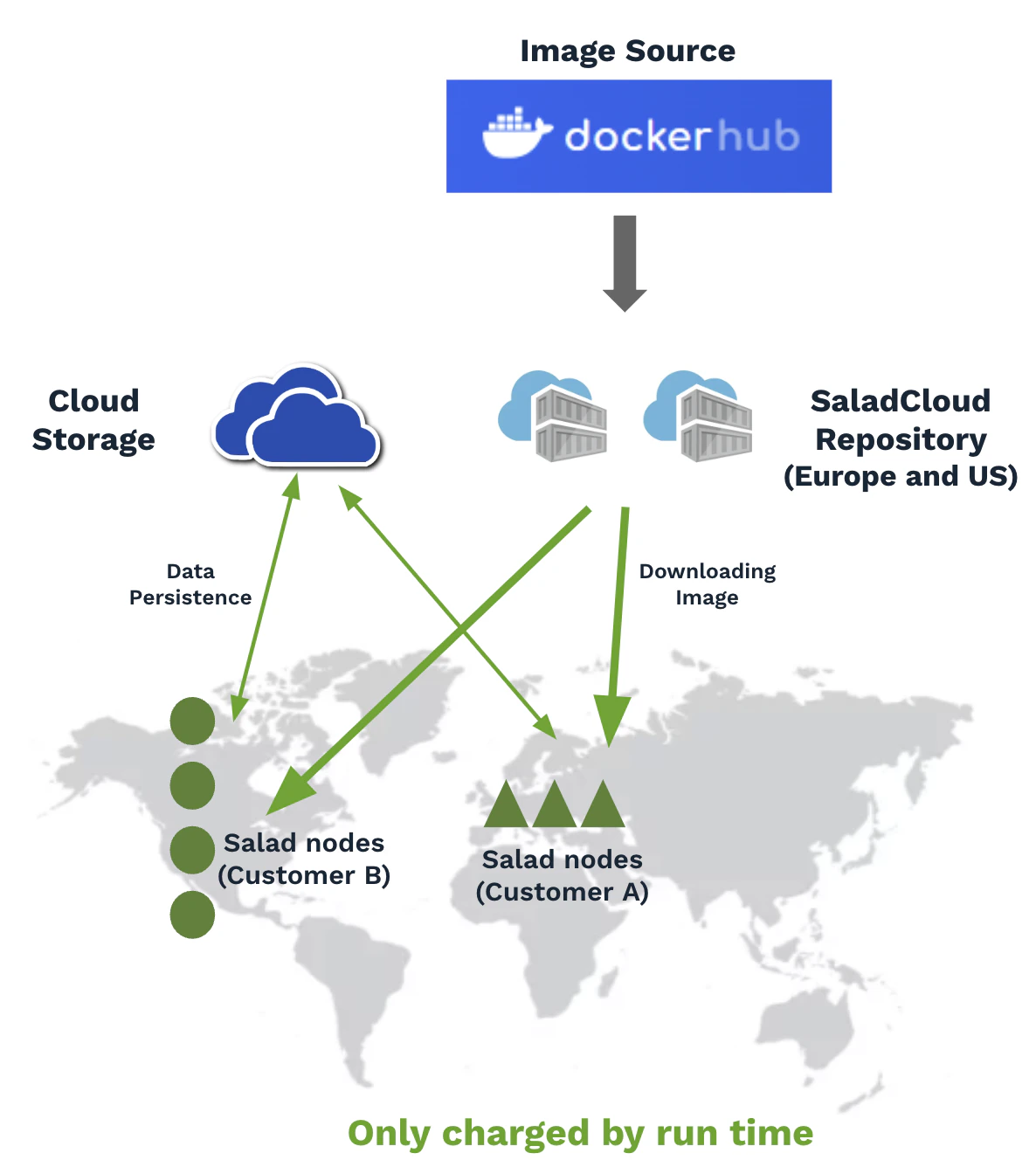 When you deploy a container group, the following process occurs:
1. **Image Distribution:** Your container image is pulled from your registry to our internal cache (only once to
minimize egress fees)
2. **Node Allocation:** Compatible machines are selected based on your hardware requirements
3. **Image Deployment:** The cached image is distributed to allocated nodes
4. **Startup:** Containers start running your application
Startup times vary from minutes to longer periods depending on image size and network conditions, with some nodes
starting earlier than others.
## Container Group Architecture
A SCE application (container group) consists of multiple replicas (instances) running the same container image, with
each instance deployed on a separate Salad node.
**Important Distinctions:**
* SCE instances are **not virtual machines or physical machines** with attached volumes
* Both the image and runtime data are removed when applications stop
* **Docker-in-Docker is not permitted**
* Instances must have continuously running processes (web servers, job queue workers, etc.)
## Preparing Container Images
### Dockerfile Best Practices
When you deploy a container group, the following process occurs:
1. **Image Distribution:** Your container image is pulled from your registry to our internal cache (only once to
minimize egress fees)
2. **Node Allocation:** Compatible machines are selected based on your hardware requirements
3. **Image Deployment:** The cached image is distributed to allocated nodes
4. **Startup:** Containers start running your application
Startup times vary from minutes to longer periods depending on image size and network conditions, with some nodes
starting earlier than others.
## Container Group Architecture
A SCE application (container group) consists of multiple replicas (instances) running the same container image, with
each instance deployed on a separate Salad node.
**Important Distinctions:**
* SCE instances are **not virtual machines or physical machines** with attached volumes
* Both the image and runtime data are removed when applications stop
* **Docker-in-Docker is not permitted**
* Instances must have continuously running processes (web servers, job queue workers, etc.)
## Preparing Container Images
### Dockerfile Best Practices
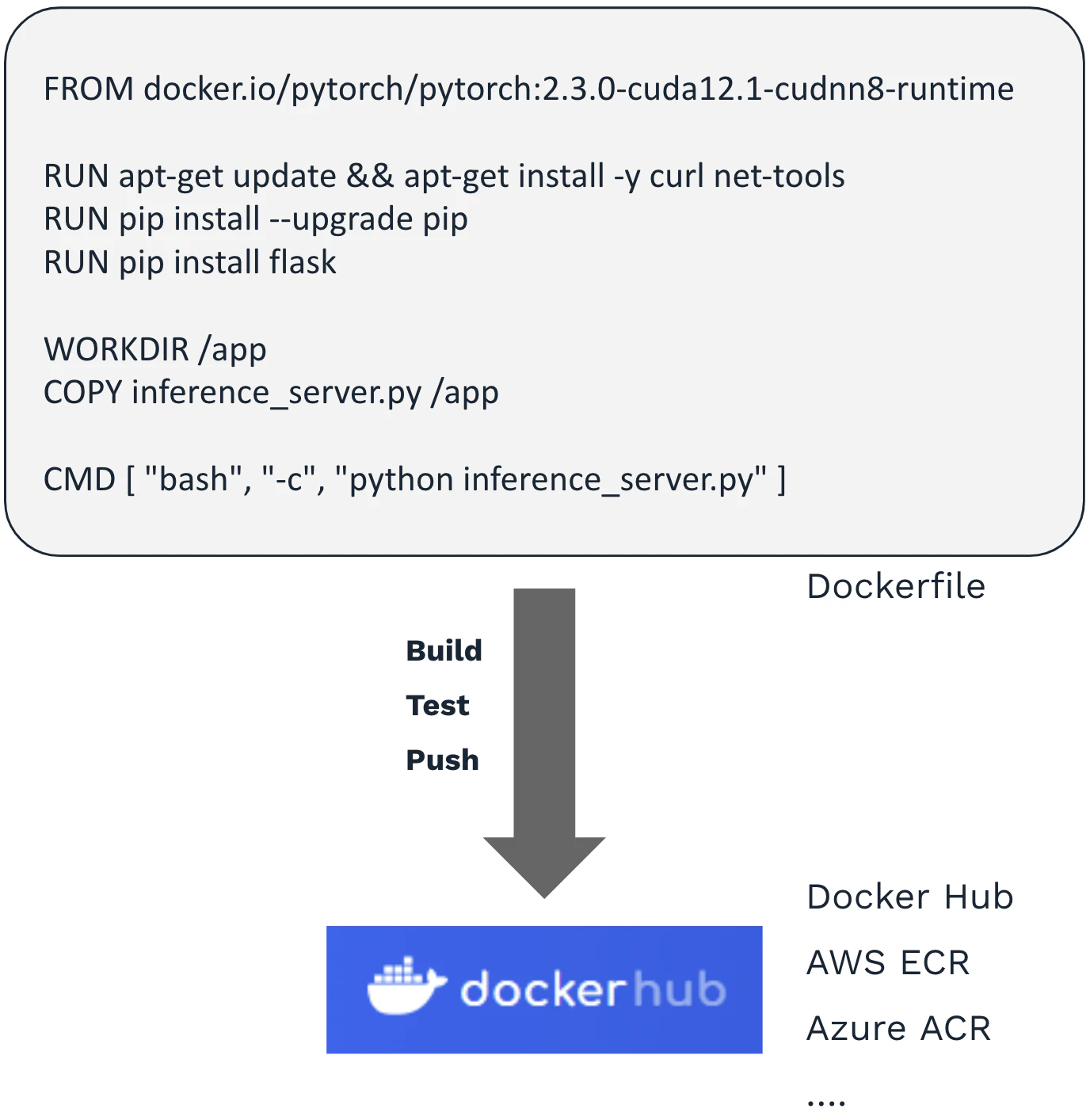 Create a Dockerfile that:
* Selects a base image with GPU support
* Adds necessary dependencies
* Copies your code and data
* Defines the default command to run
* Uses environment variables for configuration
**Example workflow:**
```Code theme={null}
# Build and test locally
docker image build -t docker.io/saladtechnologies/misc:test -f Dockerfile .
docker run --rm -it --gpus all docker.io/saladtechnologies/misc:test
# Push to registry
docker push docker.io/saladtechnologies/misc:test
```
**Supported container image size:** Up to 35 GB (compressed)
### Environment Variables
Use environment variables to pass information to your applications:
* Customization settings (listening ports, request limits)
* External service access (cloud storage, databases, APIs)
* Configuration parameters
## Deployment Options
Create a Dockerfile that:
* Selects a base image with GPU support
* Adds necessary dependencies
* Copies your code and data
* Defines the default command to run
* Uses environment variables for configuration
**Example workflow:**
```Code theme={null}
# Build and test locally
docker image build -t docker.io/saladtechnologies/misc:test -f Dockerfile .
docker run --rm -it --gpus all docker.io/saladtechnologies/misc:test
# Push to registry
docker push docker.io/saladtechnologies/misc:test
```
**Supported container image size:** Up to 35 GB (compressed)
### Environment Variables
Use environment variables to pass information to your applications:
* Customization settings (listening ports, request limits)
* External service access (cloud storage, databases, APIs)
* Configuration parameters
## Deployment Options
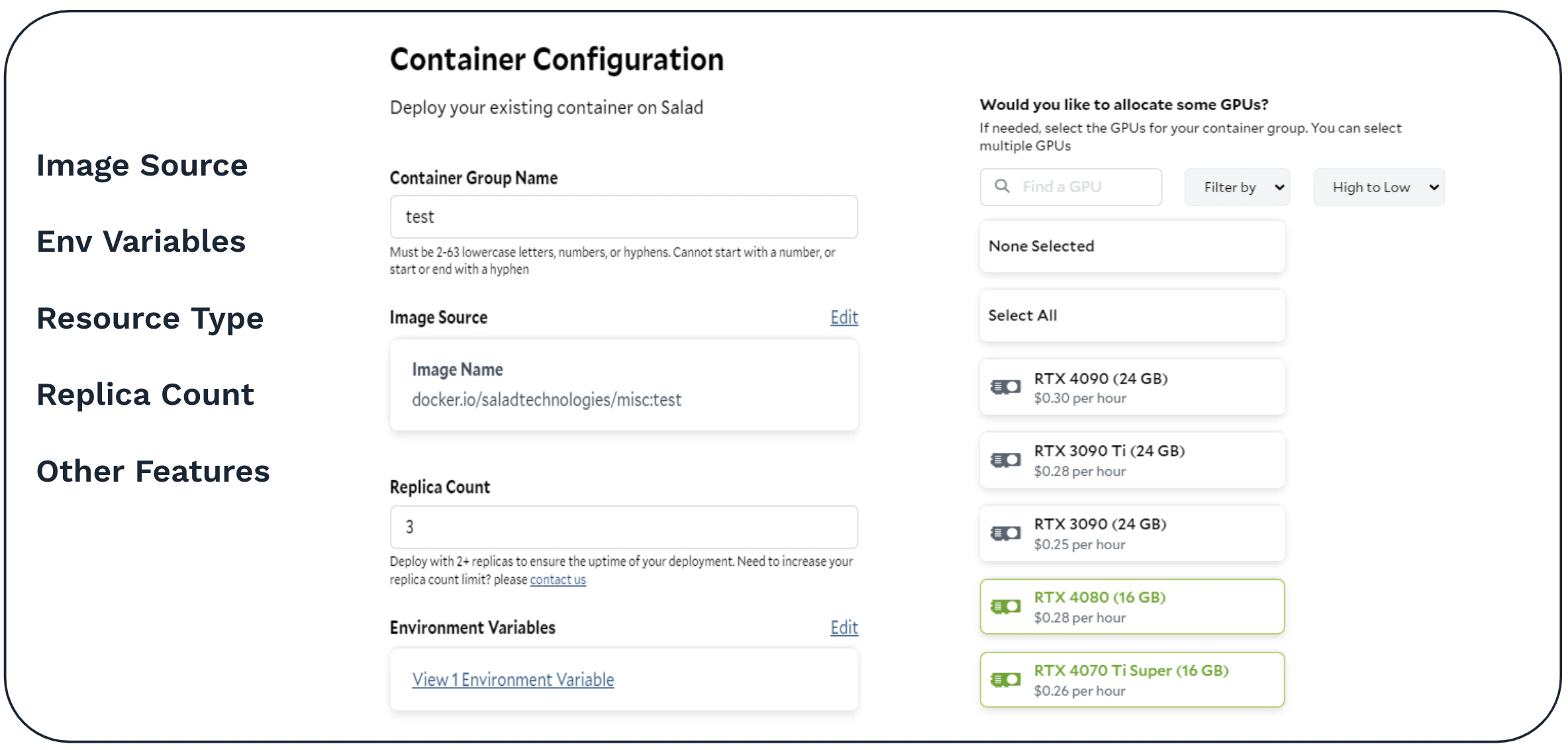 ### Portal vs API Deployment
Two deployment methods are available:
* **SaladCloud Portal:** Web-based interface for easy deployment
* **API:** Programmatic deployment with advanced features
**Advanced API Features:**
* Deploy in specific countries
* Deploy and use Job Queues
* More flexible configuration options
## Accessing Your Applications
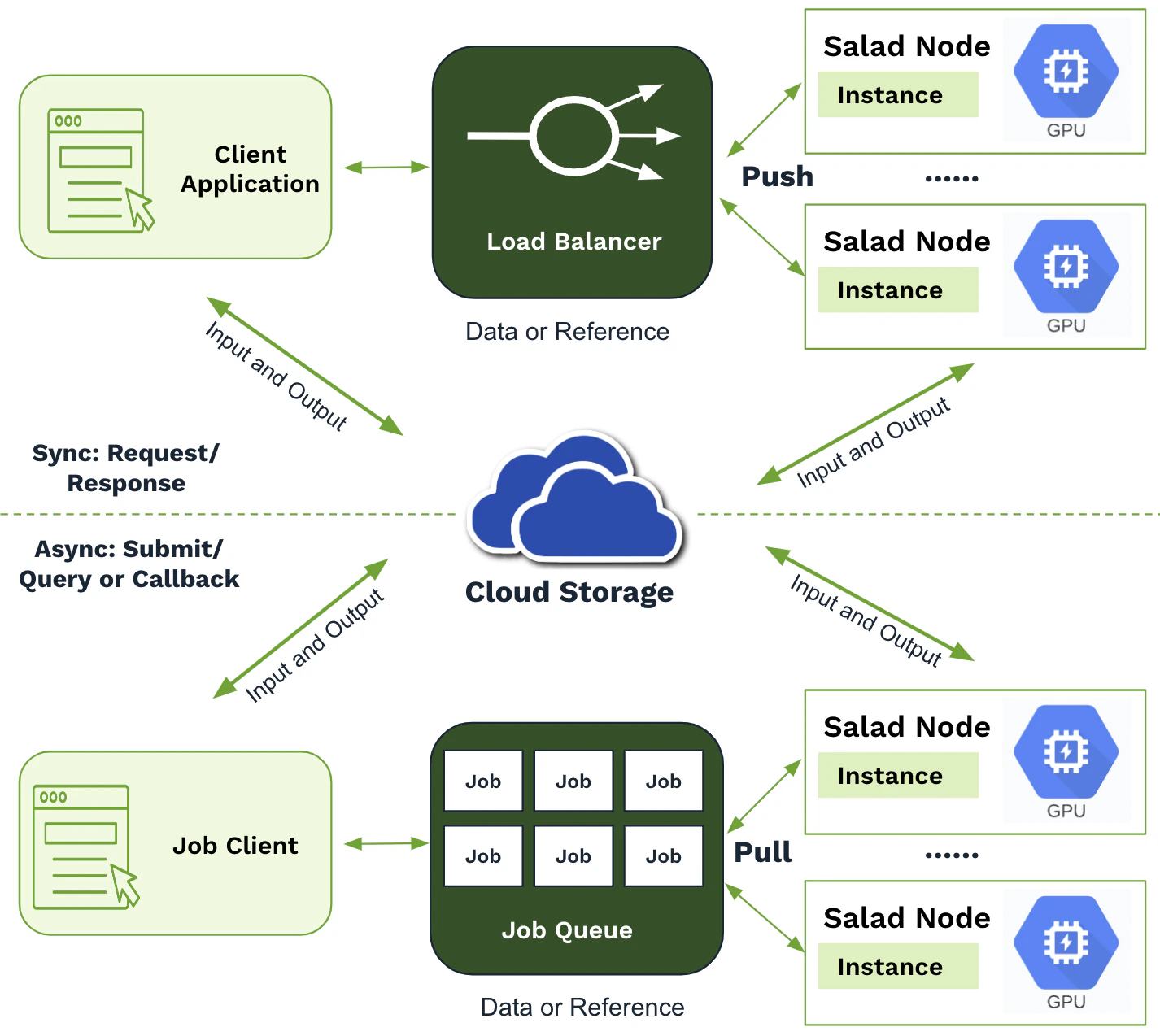
### Real-Time Access Patterns
**Container Gateway (HTTP Load Balancer):**
* Best for tasks of approximately equal size
* Ideal for processing times under 100 seconds
* Free and extremely easy to set up
* Perfect for stable, predictable, relatively quick workloads
**When Container Gateway Works Well:**
* Tasks complete in well under 100 seconds
* Fairly predictable and stable demand
* Consistent task sizes (e.g., always 512x512 pixel images)
### Portal vs API Deployment
Two deployment methods are available:
* **SaladCloud Portal:** Web-based interface for easy deployment
* **API:** Programmatic deployment with advanced features
**Advanced API Features:**
* Deploy in specific countries
* Deploy and use Job Queues
* More flexible configuration options
## Accessing Your Applications
### Real-Time Access Patterns
**Container Gateway (HTTP Load Balancer):**
* Best for tasks of approximately equal size
* Ideal for processing times under 100 seconds
* Free and extremely easy to set up
* Perfect for stable, predictable, relatively quick workloads
**When Container Gateway Works Well:**
* Tasks complete in well under 100 seconds
* Fairly predictable and stable demand
* Consistent task sizes (e.g., always 512x512 pixel images)
 ### Job Queue Patterns
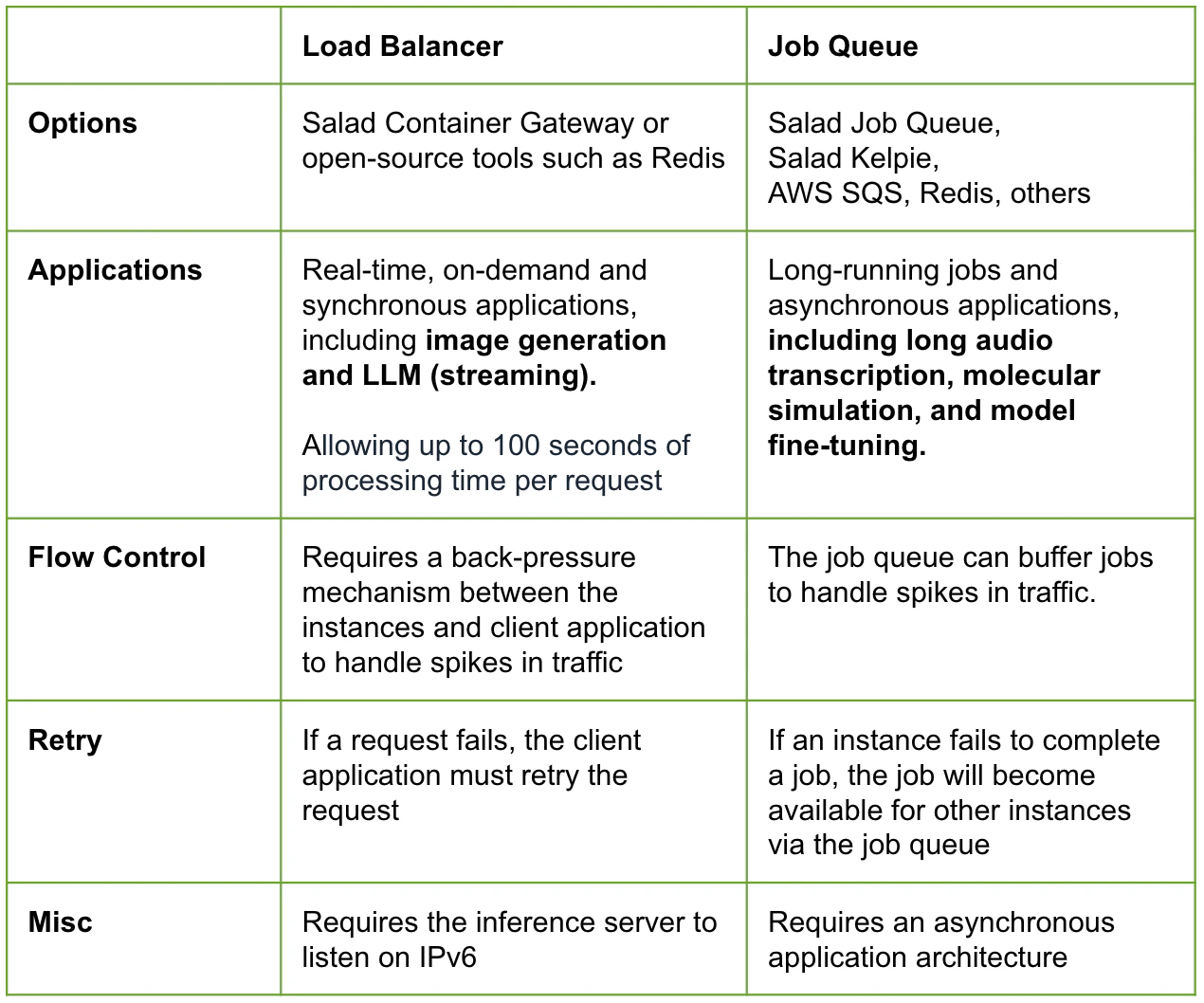
**When to Use Job Queues:**
* Variable request sizes (1024x1024 images take 4x longer than 512x512)
* Tasks exceeding 100-second limit
* Long-running workloads (AI video generation, molecular simulations, model fine-tuning)
* Multi-model pipelines with different architectures
**Available Options:**
* **Salad Job Queue:** On-platform solution (API-only currently)
* **External Job Queues:** AWS SQS, Redis, and other popular solutions
* **Salad Kelpie:** Specialized for very long-running tasks and data synchronization with AWS S3-compatible storage
**Trade-offs:**
* Job queues introduce asynchronous patterns
* Require polling, webhooks, or other completion mechanisms
* More complex than direct HTTP responses
### Job Queue Patterns
**When to Use Job Queues:**
* Variable request sizes (1024x1024 images take 4x longer than 512x512)
* Tasks exceeding 100-second limit
* Long-running workloads (AI video generation, molecular simulations, model fine-tuning)
* Multi-model pipelines with different architectures
**Available Options:**
* **Salad Job Queue:** On-platform solution (API-only currently)
* **External Job Queues:** AWS SQS, Redis, and other popular solutions
* **Salad Kelpie:** Specialized for very long-running tasks and data synchronization with AWS S3-compatible storage
**Trade-offs:**
* Job queues introduce asynchronous patterns
* Require polling, webhooks, or other completion mechanisms
* More complex than direct HTTP responses
 ## Handling Distributed Cloud Challenges
### Hardware Heterogeneity
## Handling Distributed Cloud Challenges
### Hardware Heterogeneity
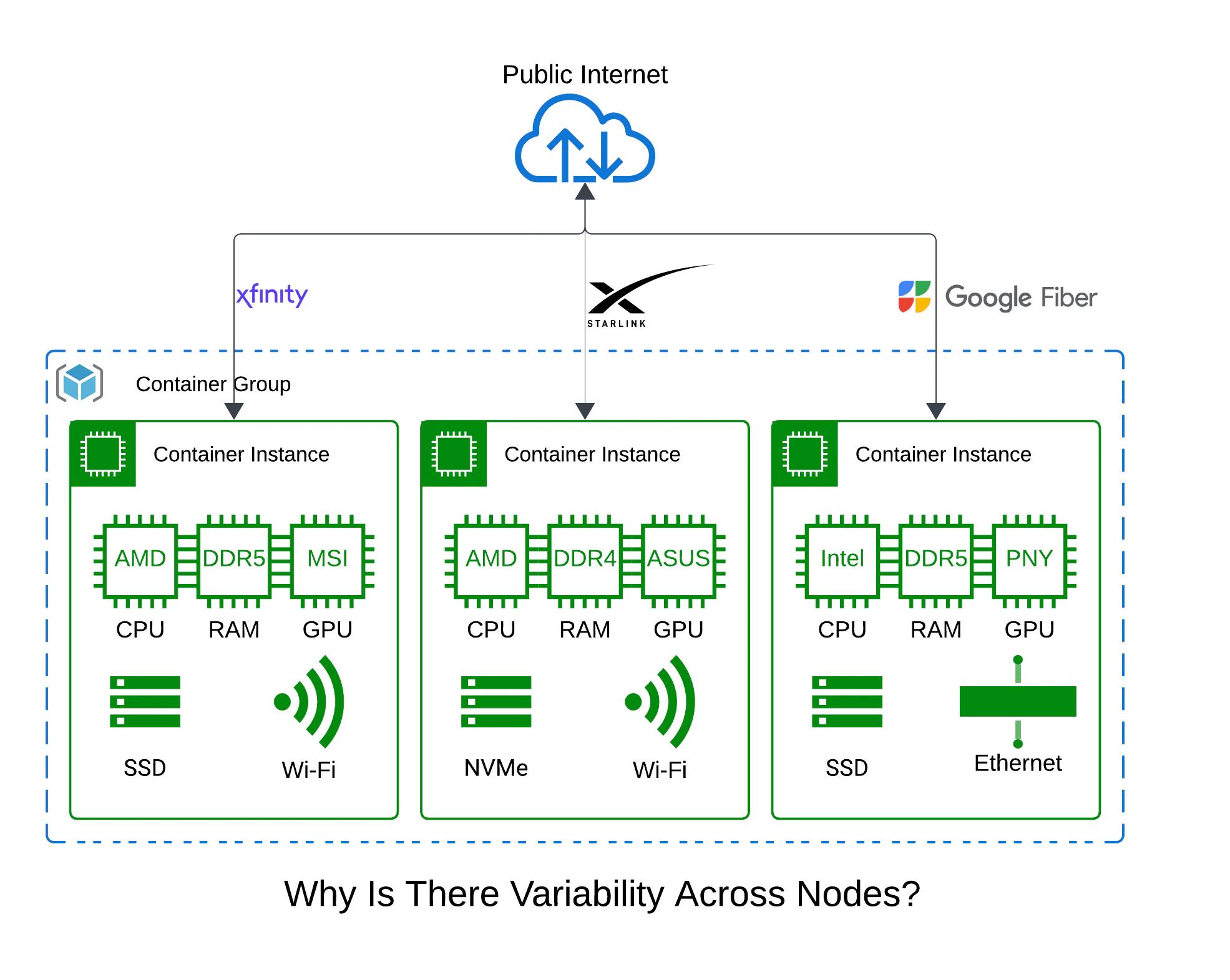 **Challenge:** Significant variability in hardware configurations
* Custom-built PCs, gaming rigs, former crypto miners
* Different CPUs, RAM speeds, storage types
* Network connections from WiFi to 10 Gigabit Ethernet
**Solutions:**
* Understand your performance bottlenecks
* Handle error cases unlikely in data centers
* Monitor system metrics (e.g., GPU temperature over time)
* Implement graceful degradation strategies
### Network Variability
**Challenge:** Heterogeneous networking conditions
* Point-in-time bandwidth measurements
* Residential internet with shared connections
* Variable latency and throughput
**Solutions:**
* Monitor bandwidth availability over time within your application
* Respond to network conditions in real-time
* Set appropriate minimum requirements for your workloads
### Data Transfer Optimization
**Challenge:** All nodes are out-of-region for major cloud providers
**Solutions:**
* Use egress-free storage (CloudFlare R2, etc.)
* Minimize data transfer costs
* Cache container images automatically (handled by SCE)
## Managing Interruptions
### Understanding Interruptions
**Key Characteristics:**
* Machines can be interrupted without warning at unpredictable times
* Similar to spot instances but no minimum uptime guarantees
* No advance notification events (unlike AWS spot instances)
* Various causes: power issues, network problems, users wanting to game
**Recent Performance Metrics:**
* Greater than 99% success rate on requests within one attempt
* Even higher success rates with single retry
* Particularly reliable for shorter tasks like image generation
### Automatic Recovery
**SCE Handles:**
* Automatic reprovisioning of interrupted nodes
* Maintaining desired replica counts
* No charges during container image download periods
* Background replacement of failed instances
**Your Application Handles:**
* Implementing retry logic for failed requests
* Graceful handling of 500-series errors
* Client-side request management
## Long-Running Tasks
### Data Persistence Strategy
**Challenge:** Local storage is ephemeral—completely erased when containers exit or nodes are interrupted
**Solutions for Short Tasks:**
* Model outputs returned promptly to users
* Minimal local storage requirements
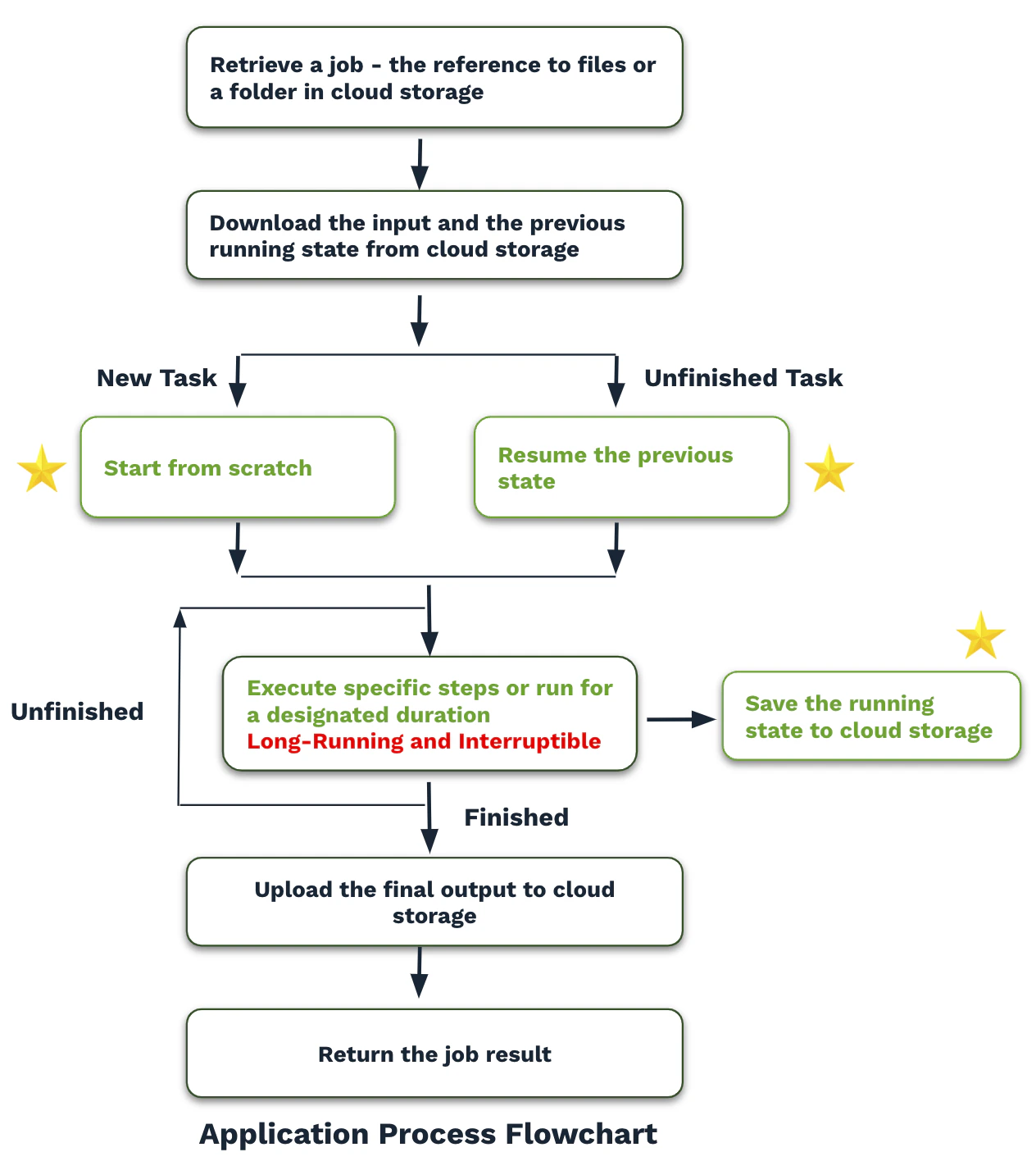
**Solutions for Long Tasks:**
* Regular checkpoint saving to cloud storage
* Resume from checkpoints after interruptions
* Use tools with built-in checkpoint support (molecular simulation, model fine-tuning frameworks)
* Handle data transfer asynchronously to avoid blocking GPU tasks
**Challenge:** Significant variability in hardware configurations
* Custom-built PCs, gaming rigs, former crypto miners
* Different CPUs, RAM speeds, storage types
* Network connections from WiFi to 10 Gigabit Ethernet
**Solutions:**
* Understand your performance bottlenecks
* Handle error cases unlikely in data centers
* Monitor system metrics (e.g., GPU temperature over time)
* Implement graceful degradation strategies
### Network Variability
**Challenge:** Heterogeneous networking conditions
* Point-in-time bandwidth measurements
* Residential internet with shared connections
* Variable latency and throughput
**Solutions:**
* Monitor bandwidth availability over time within your application
* Respond to network conditions in real-time
* Set appropriate minimum requirements for your workloads
### Data Transfer Optimization
**Challenge:** All nodes are out-of-region for major cloud providers
**Solutions:**
* Use egress-free storage (CloudFlare R2, etc.)
* Minimize data transfer costs
* Cache container images automatically (handled by SCE)
## Managing Interruptions
### Understanding Interruptions
**Key Characteristics:**
* Machines can be interrupted without warning at unpredictable times
* Similar to spot instances but no minimum uptime guarantees
* No advance notification events (unlike AWS spot instances)
* Various causes: power issues, network problems, users wanting to game
**Recent Performance Metrics:**
* Greater than 99% success rate on requests within one attempt
* Even higher success rates with single retry
* Particularly reliable for shorter tasks like image generation
### Automatic Recovery
**SCE Handles:**
* Automatic reprovisioning of interrupted nodes
* Maintaining desired replica counts
* No charges during container image download periods
* Background replacement of failed instances
**Your Application Handles:**
* Implementing retry logic for failed requests
* Graceful handling of 500-series errors
* Client-side request management
## Long-Running Tasks
### Data Persistence Strategy
**Challenge:** Local storage is ephemeral—completely erased when containers exit or nodes are interrupted
**Solutions for Short Tasks:**
* Model outputs returned promptly to users
* Minimal local storage requirements
**Solutions for Long Tasks:**
* Regular checkpoint saving to cloud storage
* Resume from checkpoints after interruptions
* Use tools with built-in checkpoint support (molecular simulation, model fine-tuning frameworks)
* Handle data transfer asynchronously to avoid blocking GPU tasks
 ### Optimization Techniques
**Bandwidth Optimization:**
* Select nodes with better upload bandwidth by performing a bandwidth test on start
* Use multithreaded downloading/uploading tools (s3parcp)
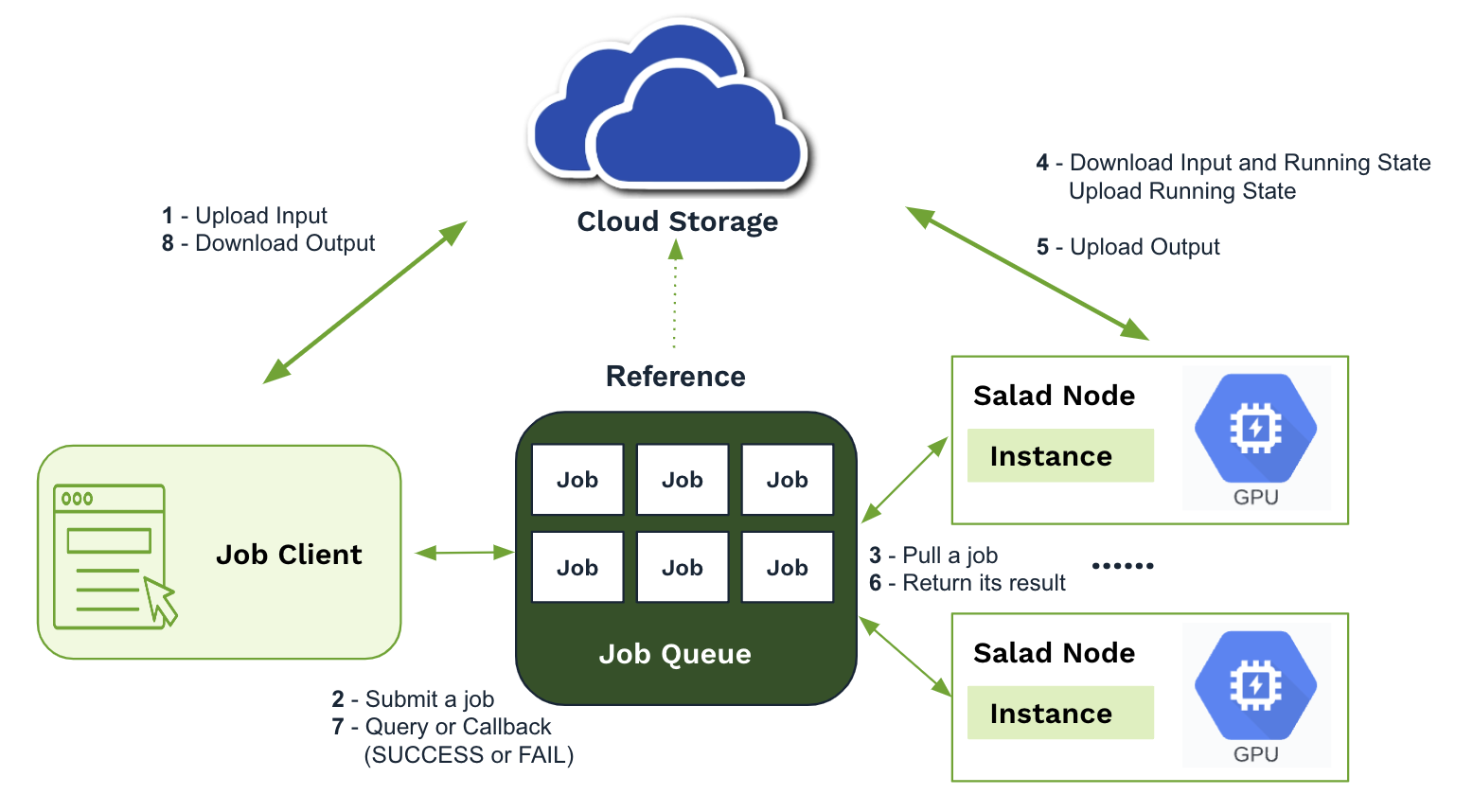
**Data Management:**
* Separate cloud storage folders for each job
* Include input files, state files, and output files
* Jobs contain only data references, not actual data
### Optimization Techniques
**Bandwidth Optimization:**
* Select nodes with better upload bandwidth by performing a bandwidth test on start
* Use multithreaded downloading/uploading tools (s3parcp)
**Data Management:**
* Separate cloud storage folders for each job
* Include input files, state files, and output files
* Jobs contain only data references, not actual data
 ## Security and Compliance
### Security Measures
**Data Protection:**
* Container images and configurations encrypted at rest and in transit
* Images only decrypted at runtime
* Environment variables decrypted and passed at runtime (not stored locally)
* Private registry credentials discarded immediately after image caching
**Network Security:**
* Inbound connections disabled by default
* Secure connections via WireGuard when enabled
* Runtime security monitoring with Falco intrusion detection
* Immediate workload shutdown and chef banning for security violations
**Platform Security:**
* SOC 2 compliant
* No known leaks or compromised workloads to date
* Demonstrated adherence to security, availability, processing integrity, confidentiality, and privacy standards
### Compliance Considerations
**Appropriate Workloads:**
* Most AI inference and GPU-intensive computations
* Molecular dynamics simulations
* Model fine-tuning and training
* Batch processing tasks
**Inappropriate Workloads:**
* HIPAA-regulated workloads
* Single-instance applications requiring high availability guarantees
* UI-based applications requiring consistent user sessions
* Database applications requiring persistent storage
## Use Cases and Optimization
### Ideal Scenarios
**Large-Scale Operations:**
* AI inference involving tens to thousands of GPUs
* GPU-intensive computations requiring massive parallelization
* Cost-sensitive workloads where price performance is critical
**Model Support:**
* SDXL/Flux image generation models
* Whisper Large speech recognition
* LLM 7B/8B/9B and quantized 13B/34B models
* Molecular dynamics simulations
* Text to Speech (TTS) models
### Performance Optimization
**Replica Strategy:**
* Increase replica counts to enhance reliability and throughput
* Additional replicas may reduce waiting times without extra costs, as only running replicas incur charges
* Balance system capacity and reliability requirements
**Hardware Selection:**
* Older GPUs may offer better price-performance ratios
* Consider trade-offs between speed and cost
* Evaluate user experience requirements vs. cost controls
**Autoscaling:**
There are two simple autoscaling strategies to match your compute capacity to workload demand:
1. Queue-based autoscaling: Automatically scale up/down based on the number of jobs in the queue. This can be handled
automatically by the Salad Job Queue or Kelpie.
2. Custom Autoscaling: Implement your own autoscaling logic using the
[SCE API](/reference/saladcloud-api/container-groups/update-container-group#body-replicas) to update the number of
replicas based on real-time metrics you collect from your application.
### Cost Optimization
**Storage Strategy:**
* Use egress-free cloud storage
* Implement efficient data transfer patterns
* Leverage SCE's image caching to minimize registry costs
## Getting Started
### Documentation and Resources
**Essential Resources:**
* [SaladCloud Documentation](/)
* [Interactive API reference](/reference)
* [Detailed how-to guides for popular use cases](/container-engine/explanation/core-concepts/overview)
* [SaladCloud Blog](https://blog.salad.com):
* Performance benchmarks across different GPU types
* Optimal hardware configuration guides
* Price-performance analysis
* Real-world case studies and best practices
### Best Practices Summary
**Architecture Patterns:**
* Design for distributed, dynamic environments
* Implement robust error handling and retry logic
* Use external storage for data persistence
* Plan for variable startup times and node reallocations
**Development Workflow:**
1. Build and test containers locally with GPU support
2. Optimize for heterogeneous hardware environments
3. Implement appropriate access patterns (gateway vs. queue)
4. Design for interruptions and automatic recovery
5. Test at scale with multiple replicas
**Monitoring and Observability:**
* Implement application-level performance monitoring
* Track success rates and retry patterns
* Monitor resource utilization across nodes
* Set up alerts for critical application metrics
* While SaladCloud offers basic log and terminal access, consider integrating with external logging and monitoring
solutions for advanced observability. We like Axiom.
SCE provides unprecedented scale and cost-effectiveness for GPU-intensive workloads while requiring thoughtful
architecture to handle the unique characteristics of a decentralized, consumer-hardware-based cloud platform.
## Security and Compliance
### Security Measures
**Data Protection:**
* Container images and configurations encrypted at rest and in transit
* Images only decrypted at runtime
* Environment variables decrypted and passed at runtime (not stored locally)
* Private registry credentials discarded immediately after image caching
**Network Security:**
* Inbound connections disabled by default
* Secure connections via WireGuard when enabled
* Runtime security monitoring with Falco intrusion detection
* Immediate workload shutdown and chef banning for security violations
**Platform Security:**
* SOC 2 compliant
* No known leaks or compromised workloads to date
* Demonstrated adherence to security, availability, processing integrity, confidentiality, and privacy standards
### Compliance Considerations
**Appropriate Workloads:**
* Most AI inference and GPU-intensive computations
* Molecular dynamics simulations
* Model fine-tuning and training
* Batch processing tasks
**Inappropriate Workloads:**
* HIPAA-regulated workloads
* Single-instance applications requiring high availability guarantees
* UI-based applications requiring consistent user sessions
* Database applications requiring persistent storage
## Use Cases and Optimization
### Ideal Scenarios
**Large-Scale Operations:**
* AI inference involving tens to thousands of GPUs
* GPU-intensive computations requiring massive parallelization
* Cost-sensitive workloads where price performance is critical
**Model Support:**
* SDXL/Flux image generation models
* Whisper Large speech recognition
* LLM 7B/8B/9B and quantized 13B/34B models
* Molecular dynamics simulations
* Text to Speech (TTS) models
### Performance Optimization
**Replica Strategy:**
* Increase replica counts to enhance reliability and throughput
* Additional replicas may reduce waiting times without extra costs, as only running replicas incur charges
* Balance system capacity and reliability requirements
**Hardware Selection:**
* Older GPUs may offer better price-performance ratios
* Consider trade-offs between speed and cost
* Evaluate user experience requirements vs. cost controls
**Autoscaling:**
There are two simple autoscaling strategies to match your compute capacity to workload demand:
1. Queue-based autoscaling: Automatically scale up/down based on the number of jobs in the queue. This can be handled
automatically by the Salad Job Queue or Kelpie.
2. Custom Autoscaling: Implement your own autoscaling logic using the
[SCE API](/reference/saladcloud-api/container-groups/update-container-group#body-replicas) to update the number of
replicas based on real-time metrics you collect from your application.
### Cost Optimization
**Storage Strategy:**
* Use egress-free cloud storage
* Implement efficient data transfer patterns
* Leverage SCE's image caching to minimize registry costs
## Getting Started
### Documentation and Resources
**Essential Resources:**
* [SaladCloud Documentation](/)
* [Interactive API reference](/reference)
* [Detailed how-to guides for popular use cases](/container-engine/explanation/core-concepts/overview)
* [SaladCloud Blog](https://blog.salad.com):
* Performance benchmarks across different GPU types
* Optimal hardware configuration guides
* Price-performance analysis
* Real-world case studies and best practices
### Best Practices Summary
**Architecture Patterns:**
* Design for distributed, dynamic environments
* Implement robust error handling and retry logic
* Use external storage for data persistence
* Plan for variable startup times and node reallocations
**Development Workflow:**
1. Build and test containers locally with GPU support
2. Optimize for heterogeneous hardware environments
3. Implement appropriate access patterns (gateway vs. queue)
4. Design for interruptions and automatic recovery
5. Test at scale with multiple replicas
**Monitoring and Observability:**
* Implement application-level performance monitoring
* Track success rates and retry patterns
* Monitor resource utilization across nodes
* Set up alerts for critical application metrics
* While SaladCloud offers basic log and terminal access, consider integrating with external logging and monitoring
solutions for advanced observability. We like Axiom.
SCE provides unprecedented scale and cost-effectiveness for GPU-intensive workloads while requiring thoughtful
architecture to handle the unique characteristics of a decentralized, consumer-hardware-based cloud platform.